AEM 6.5 RTE custom style not working in Dialog not even enabled | Community
Skip to main content
January 29, 2021
Solved

AEM 6.5 RTE custom style not working in Dialog not even enabled

  • January 29, 2021
  • 2 replies
  • 2287 views

Hi Team,


I tried to apply the style in RTE , and style icon is not enabled in Dialog fullscreen mode.

In Inplace editor style applied to total RTE content. 

This post is no longer active and is closed to new replies. Need help? Start a new post to ask your question.
Best answer by Kiran_Vedantam

Hi, @santoshkammar,


To enable the style system at the component level,


1. Add the below node in cq:design_dialog: cq:design_dialog/content/items/tabs/items/styletab

Properties:

path                          String   /mnt/overlay/cq/gui/components/authoring/dialog/style/tab_design/styletab

sling:resourceType   String   granite/ui/components/coral/foundation/include

2. Once that is done, add your css classes in BEM notation in css files of that particular component.

3. Later, add the classes in the component policies.
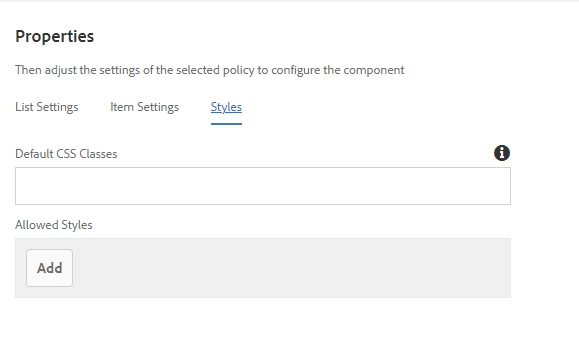
 

As per your query, the classes in css file might be written in such a way that the change in style impacts the whole div. So please check it accordingly.


Hope this helps.


Thanks,

Kiran Vedantam.

2 replies

Kiran_Vedantam
Community Advisor
Kiran_VedantamCommunity AdvisorAccepted solution
Community Advisor
January 29, 2021

Hi, @santoshkammar,


To enable the style system at the component level,


1. Add the below node in cq:design_dialog: cq:design_dialog/content/items/tabs/items/styletab

Properties:

path                          String   /mnt/overlay/cq/gui/components/authoring/dialog/style/tab_design/styletab

sling:resourceType   String   granite/ui/components/coral/foundation/include

2. Once that is done, add your css classes in BEM notation in css files of that particular component.

3. Later, add the classes in the component policies.


As per your query, the classes in css file might be written in such a way that the change in style impacts the whole div. So please check it accordingly.


Hope this helps.


Thanks,

Kiran Vedantam.

ChitraMadan
Community Advisor
Community Advisor
February 1, 2021

Hi @santoshkammar ,


Please see below an example to use styles in full screen mode:


<text jcr:primaryType="nt:unstructured" sling:resourceType="cq/gui/components/authoring/dialog/richtext" externalStyleSheets="/etc/clientlibs/projectname/css/styles.css" fieldDescription="Please use full screen mode to edit styles" name="./text" removeSingleParagraphContainer="{Boolean}true" useFixedInlineToolbar="true"> <rtePlugins jcr:primaryType="nt:unstructured"> <edit jcr:primaryType="nt:unstructured" features="*"/> <findreplace jcr:primaryType="nt:unstructured" features="*"/> <format jcr:primaryType="nt:unstructured" features="*"/> <image jcr:primaryType="nt:unstructured" features="*"/> <keys jcr:primaryType="nt:unstructured" features="*"/> <justify jcr:primaryType="nt:unstructured" features="*"/> <links jcr:primaryType="nt:unstructured" features="*"/> <lists jcr:primaryType="nt:unstructured" features="*"/> <misctools jcr:primaryType="nt:unstructured" features="*"> <specialCharsConfig jcr:primaryType="nt:unstructured"> <chars jcr:primaryType="nt:unstructured"> <copyright jcr:primaryType="nt:unstructured" entity="&amp;#169;"/> <trademark jcr:primaryType="nt:unstructured" entity="&amp;#8482;"/> <registered jcr:primaryType="nt:unstructured" entity="&amp;#174;"/> <emDash jcr:primaryType="nt:unstructured" entity="&amp;#8212;"/> <pound jcr:primaryType="nt:unstructured" entity="&amp;#163;"/> <nbsp jcr:primaryType="nt:unstructured" entity="&amp;#160;"/> </chars> </specialCharsConfig> </misctools> <paraformat jcr:primaryType="nt:unstructured" features="*"> <formats jcr:primaryType="cq:WidgetCollection"> <h1 jcr:primaryType="nt:unstructured" description="Heading 1" tag="h1"/> <h3 jcr:primaryType="nt:unstructured" description="Heading 3" tag="h3"/> <h4 jcr:primaryType="nt:unstructured" description="Heading 4" tag="h4"/> <h5 jcr:primaryType="nt:unstructured" description="Heading 5" tag="h5"/> <h6 jcr:primaryType="nt:unstructured" description="Heading 6" tag="h6"/> <paragraph jcr:primaryType="nt:unstructured" description="Paragraph" tag="p"/> </formats> </paraformat> <spellcheck jcr:primaryType="nt:unstructured" features="*"/> <styles jcr:primaryType="nt:unstructured" features="*"> <styles jcr:primaryType="cq:WidgetCollection"> <giga jcr:primaryType="nt:unstructured" cssName="giga" text="Massive type"/> <mega jcr:primaryType="nt:unstructured" cssName="mega" text="Pretty big type"/> <kilo jcr:primaryType="nt:unstructured" cssName="kilo" text="Large type"/> <alpha jcr:primaryType="nt:unstructured" cssName="alpha" text="H1 sized type"/> <beta jcr:primaryType="nt:unstructured" cssName="beta" text="H2 sized type"/> <gamma jcr:primaryType="nt:unstructured" cssName="gamma" text="H3 sized type"/> <delta jcr:primaryType="nt:unstructured" cssName="delta" text="H4 sized type"/> <epsilon jcr:primaryType="nt:unstructured" cssName="epsilon" text="H5 sized type"/> <milli jcr:primaryType="nt:unstructured" cssName="milli" text="Small type"/> <micro jcr:primaryType="nt:unstructured" cssName="micro" text="Pretty small type"/> <baseFontColor jcr:primaryType="nt:unstructured" cssName="base-font-color" text="Base font color"/> <brandFontColor jcr:primaryType="nt:unstructured" cssName="brand-font-colour" text="Brand font color"/> <primaryFontColor jcr:primaryType="nt:unstructured" cssName="primary-font-color" text="Primary font color"/> <basebrand jcr:primaryType="nt:unstructured" cssName="brand-font-color" text="Base Brand"/> <baselight jcr:primaryType="nt:unstructured" cssName="base-light-font-color" text="Base-Light"/> <footnote jcr:primaryType="nt:unstructured" cssName="footnote-text" text="Foot Note"/> </styles> </styles> <subsuperscript jcr:primaryType="nt:unstructured" features="*"/> <undo jcr:primaryType="nt:unstructured" features="*"/> </rtePlugins> <uiSettings jcr:primaryType="nt:unstructured"> <cui jcr:primaryType="nt:unstructured"> <inline jcr:primaryType="nt:unstructured" toolbar="[format#bold,format#italic,format#underline,justify#justifyleft,justify#justifycenter,justify#justifyright,links#modifylink,links#unlink,links#anchor,lists#ordered,lists#unordered,lists#indent,lists#outdent]"> <popovers jcr:primaryType="nt:unstructured"> <justify jcr:primaryType="nt:unstructured" items="[justify#justifyleft,justify#justifycenter,justify#justifyright]" ref="justify"/> <lists jcr:primaryType="nt:unstructured" items="[lists#unordered,lists#ordered,lists#outdent,lists#indent]" ref="lists"/> </popovers> </inline> <dialogFullScreen jcr:primaryType="nt:unstructured" toolbar="[#styles,edit#cut,edit#copy,edit#paste-default,edit#paste-plaintext,edit#paste-wordhtml,findreplace#find,findreplace#replace,format#bold,format#italic,format#underline,image#image,justify#justifyleft,justify#justifycenter,justify#justifyright,links#modifylink,links#unlink,links#anchor,lists#ordered,lists#unordered,lists#indent,lists#outdent,misctools#specialchars,misctools#sourceedit,#paraformat,spellcheck#checktext,subsuperscript#subscript,subsuperscript#superscript,undo#undo,undo#redo]"> <popovers jcr:primaryType="nt:unstructured"> <justify jcr:primaryType="nt:unstructured" items="[justify#justifyleft,justify#justifycenter,justify#justifyright]" ref="justify"/> <lists jcr:primaryType="nt:unstructured" items="[lists#unordered,lists#ordered,lists#outdent,lists#indent]" ref="lists"/> <paraformat jcr:primaryType="nt:unstructured" items="paraformat:getFormats:paraformat-pulldown" ref="paraformat"/> <styles jcr:primaryType="nt:unstructured" items="styles:getStyles:styles-pulldown" ref="styles"/> </popovers> </dialogFullScreen> </cui> </uiSettings> </text>