How can I get my variable value into quote " "? | Community
Skip to main content
Level 2
December 11, 2023
Question

How can I get my variable value into quote " "?

  • December 11, 2023
  • 3 replies
  • 1927 views

Hi everyone!


I have the following js script to pass the value gridversion to delivery.  

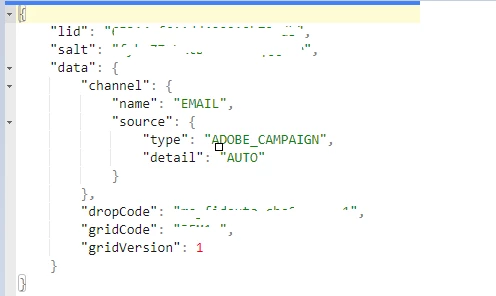
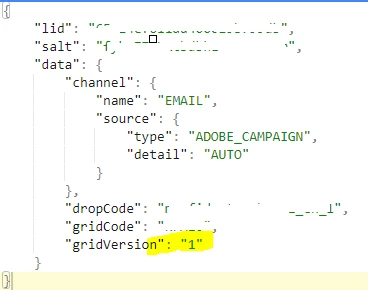
The result is OK but the value is not passed to the delivery with double quote " "

---

var query = xtk.queryDef.create(
<queryDef schema={vars.targetSchema} operation="select">
<select>
<node expr="@mongoId"/>
<node expr="@email"/>
<node expr="@scoring"/>
<node expr="@profil"/>
<node expr="@gridVersion"/>
</select>
</queryDef>
);

result = query.ExecuteQuery();

for each (var e in result) {
logInfo(e.@scoring +";"+ e.@profil +";"+ e.@mongoId);

var recipientScoring = e.@scoring;
var mongoId = e.@mongoId;
var recipientProfil = e.@profil;
var gridVersion = e.@gridVersion;

//for statement

if (recipientScoring == "RFM10" && recipientProfil == 1111) {
gridVersion = 1
logInfo("gridVersion:" + gridVersion)}

if (recipientScoring == 'RFM10' && recipientProfil == 1000) {
gridVersion = 2
logInfo("gridVersion:" + gridVersion)}

else {
logInfo("gridVersion:" + 'DEFAULT')}

sqlExec("UPDATE " + vars.tableName + " SET iGridVersion="+ gridVersion +" where sMongoId= '" + mongoId + "'");

// Declaration de variable

instance.vars.tableName = "gridVersion"

--


In the delivery tabs/advanced settings, I have: 
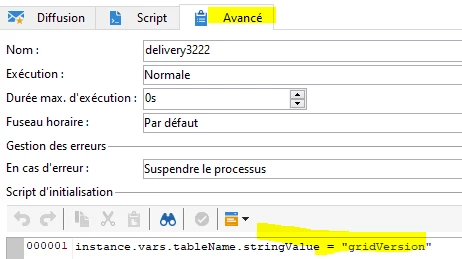


And under Delivery Tabs/variables, I have:
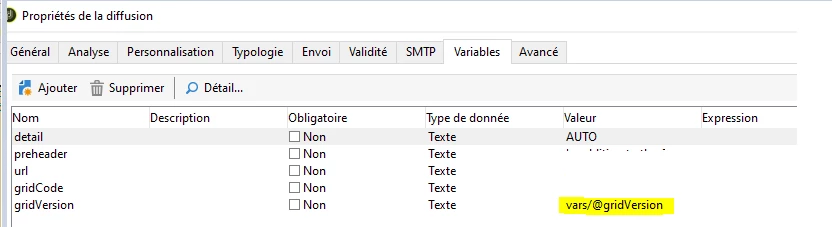


My result is:


Expected result should be:


Anyone knows how I can fix this? Thanks in advance!

This post is no longer active and is closed to new replies. Need help? Start a new post to ask your question.

3 replies

ParthaSarathy
Community Advisor
Community Advisor
December 11, 2023

Hi @assiba_johnson ,

Add below line in top of for loop,

var gridVersion = e.@gridVersion;

var gridVersionString = gridVersion.toString();

And pass gridVersionString variable to your delivery.

~  ParthaSarathy S~  Click here to join ADOBE CAMPAIGN USER GROUP for Quarterly In-person | Hybrid | Virtual Meetups
December 13, 2023

Hello @_manoj_kumar_  & @parthasarathy ,


I have the js script working like this now:


Result OK:


However, even that the gridVersion variable is updated for each Lead under the delivery, they all picked up the value 1. NOK.


How can I make it work so?


    Lead A will get the value A via the Delivery variable

     Lead B ----> Value B

     Lead C ----> Value C


Thanks in advance for your help!


Manoj_Kumar
Community Advisor
Community Advisor
December 13, 2023

Hello @assibaj68720939 


The value of the instance variable is static and will be the same for all records.


Here is what you can do.

Add an enrichment activity before this javascript code and add a blank field gridVersion in it.


Then in your JS code do this:

if(recipeintScoring=='RFM10' && recipientProfile ==1111){ var gridVersion=2; }else if(recipeintScoring=='RFM10' && recipientProfile ==1010){ var gridVersion=1; else{ var gridVersion=0; } var mySQL="UPDATE "+vars.tableName+" set sGridVersion="+gridVersion+" WHERE sEmail="+w.@email+"; sqlExec(mySQL);


I am have used the email address as Primary key to update field you can use mongoId or whatever is the unique valure


Then in your delivery, you can just use targetData.gridVersion to personalize content.

Manoj     Find me on LinkedIn
Manoj_Kumar
Community Advisor
Community Advisor
December 12, 2023

@assiba_johnson 


Replace this

instance.vars.tableName = "gridVersion"

with this

instance.vars.tableName = '"'+gridVersion+'"';
Manoj     Find me on LinkedIn
December 12, 2023

Hi @parthasarathy , many thanks for your suggestion. It didn't work out for me. I will try @_manoj_kumar_ approach and provide a feedback here. Thank you all!!!

Sukrity_Wadhwa
Community Manager
Community Manager
January 10, 2024

Hi @assiba_johnson,

Were you able to resolve this query on your own or do you still need help here? Do let us know.

Thanks!

Sukrity Wadhwa
Level 2
January 10, 2024

Hi @sukrity_wadhwa I am still stuck with this. Will really appreciate it if someone has the solution for this. Seeing product limitation here maybe. Thanks.

Sukrity_Wadhwa
Community Manager
Community Manager
January 10, 2024

Thanks for sharing that @assiba_johnson! I will escalate this among our internal SMEs and see if they can help you with this issue.


Sukrity Wadhwa