コミュニティアチーブメントバーを展開する。

Mark Solution

この会話は、活動がないためロックされています。新しい投稿を作成してください。

解決済み

Get the Actual Subject of the Email Delivery in Broadlog

Avatar

Level 5

Hi All,


I tried to follow this thread - specially the points mentioned by Jonathon_wodnicki

https://experienceleaguecommunities.adobe.com/t5/adobe-campaign-classic-questions/how-to-change-a-su...


Point No - 1, I completed.

I need help on Point 2 and Point 3, specially Point 3, as I am unable to understand the place where I need to do that activity and what needs to be done


We have over 100 emails send everyday by different campaign managers. Can we have a generic solution where subject of every email send is automatically captured without any specific coding to be done by Campaign Managers  .


Request if somebody can help me on this.


@Jonathon_wodnicki , @Darren_Bowers 


Regards,

DG

1 受け入れられたソリューション

Avatar

正解者
Community Advisor

There might be use cases, where you will be storing subject line in variable.

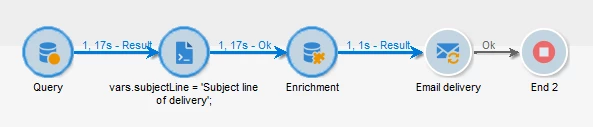
example, defining variable in JS activity before delivery

like, vars.subjectLine = 'Subject line of delivery';

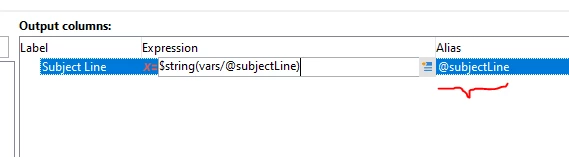
So, followed by this JS activity,  add enrichment, and to call the previously created Vars, you need to use the syntax $string([vars/@subjectLine])

ParthaSarathy_1-1683282208067.png


Enrichment: Use same Alias.

ParthaSarathy_2-1683282252396.png

And delivery subject line configuration is same as above method.

元の投稿で解決策を見る

3 返信

Avatar

Community Advisor

Hi @dipendu_g ,

If you try to get subject line from [delivery/mailParameters/subject], then you will be getting what you had configured in Delivery, but can't get personalized subject line content.

If Subject line in delivery is, Hi <%= recipient.firstName %>

Then it will be stored as 'Hi <%= recipient.firstName %>' in [delivery/mailParameters/subject], instead of 'Hi Dipendu'


So as per above mention thread, Jonathon solution was,

1) create a new attribute in broadLogRcp schema

(Label: Subject Line, internalName: @subjectLine, data type: string)

2) In Target mapping, (for recipient, mapRecipient), go to mapping tab > storage > Additional fields > Add

Source Expression: [targetData/@subjectLine]

Destination: select @subjectLine

ParthaSarathy_0-1683276115917.png

3) When creating a campaign, create additional data in query/enrichment and add subject line as additional data and giving Alias to it as @subjectLine

ParthaSarathy_1-1683276295835.png


4) In delivery, give subject line as <%= targetData.subjectLine %>

ParthaSarathy_2-1683276385103.png


So, now in broadLogRcp schema,

[delivery/mailParameters/subject] will be <%= targetData.subjectLine %>

@subjectLine will be 'Hi Partha, This is the Subject Line'

ParthaSarathy_3-1683276589188.png


Avatar

Level 5

Hi @ParthaSarathy, Thanks for such a detailed reply. Really awesome.


Just one question - In that article there was another option with $string([vars/@subjectLine]) -> @subjectLine.

How can this be achieved. Where can we set this value ?


Regards,

DG

Avatar

正解者
Community Advisor

There might be use cases, where you will be storing subject line in variable.

example, defining variable in JS activity before delivery

like, vars.subjectLine = 'Subject line of delivery';

So, followed by this JS activity,  add enrichment, and to call the previously created Vars, you need to use the syntax $string([vars/@subjectLine])

ParthaSarathy_1-1683282208067.png


Enrichment: Use same Alias.

ParthaSarathy_2-1683282252396.png

And delivery subject line configuration is same as above method.