What populates post_mvvar1 | Community
Skip to main content
Adobe Employee
September 29, 2022
Solved

What populates post_mvvar1

  • September 29, 2022
  • 1 reply
  • 1016 views

We are repurposing listVar1. We have not used the old implementation in 5 months. But, we notice extra data in the post_mvvar1 values when comparing it to the mvvar1 values, and we can't figure out where it comes from. What populates the post_mvvar1/values?

We disproved that vista rules and processing rules are contributing.

Because it states "post" in the var name, we assume some processing is happening after the fact, but we're not sure about that either.

We are now considering the expiration of the var but don't know how it relates to the post_mvvar1 variable.

Also, wondering if the Allocation affects the post_mvvar1 values.
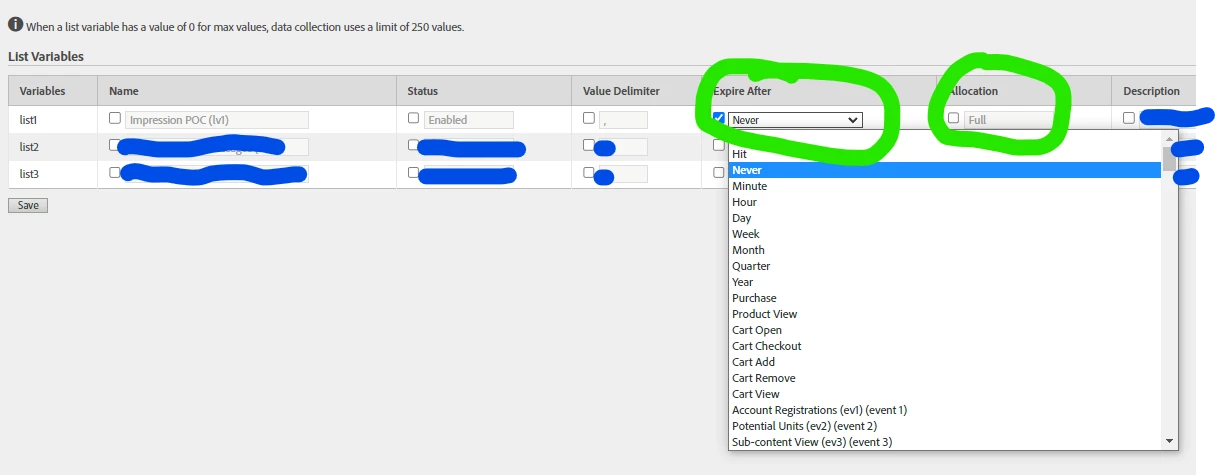
Can anyone shed light on if the expiration and allocation have an effect on the post_mvvar1 variable in the click stream?


This post is no longer active and is closed to new replies. Need help? Start a new post to ask your question.
Best answer by Jennifer_Dungan

Yeah, it's likely that "never" expiry.


So in the raw data feed, the base dimensions (like prop1, evar1, mvvar1, etc) represent the instance - basically when the value is actually set. The post_ dimensions represent the processed data, which includes post processing rules, vista rules, and yes the values that are retained due to the expiry.


So let's say you have a visit level expiry. On Page A, the value of an evar or list is set, then a different value is set on Page C


Page A > Page B > Page C


Page A:

  • evar is set (will be sent in data feed as the base value)
  • post_evar is also set (will be sent in data feed as the post_value)

Page B:

  • evar is not set (it will be empty in the data feed)
  • post_evar retains the value set on Page A (will be sent in data feed as the post_value)

Page C

  • A new value is set in the evar (will be sent in data feed as the base value)
  • post_evar is also set with the new value (will be sent in data feed as the post_value)


So I don't know if switching the expiry now will allow the previous values to clear, but it's worth a shot.


In your new list var usage, if it's being set all the time, it should overwrite those old values naturally... but if the list isn't always being set (and changing the expiry doesn't fix the issue before you start using this); depending on the old values; you may need to create a classification to help remove the old values until such time as the new value has applied to all your users.... 

1 reply

Jennifer_Dungan
Community Advisor and Adobe Champion
Jennifer_DunganCommunity Advisor and Adobe ChampionAccepted solution
Community Advisor and Adobe Champion
September 30, 2022

Yeah, it's likely that "never" expiry.


So in the raw data feed, the base dimensions (like prop1, evar1, mvvar1, etc) represent the instance - basically when the value is actually set. The post_ dimensions represent the processed data, which includes post processing rules, vista rules, and yes the values that are retained due to the expiry.


So let's say you have a visit level expiry. On Page A, the value of an evar or list is set, then a different value is set on Page C


Page A > Page B > Page C


Page A:

  • evar is set (will be sent in data feed as the base value)
  • post_evar is also set (will be sent in data feed as the post_value)

Page B:

  • evar is not set (it will be empty in the data feed)
  • post_evar retains the value set on Page A (will be sent in data feed as the post_value)

Page C

  • A new value is set in the evar (will be sent in data feed as the base value)
  • post_evar is also set with the new value (will be sent in data feed as the post_value)


So I don't know if switching the expiry now will allow the previous values to clear, but it's worth a shot.


In your new list var usage, if it's being set all the time, it should overwrite those old values naturally... but if the list isn't always being set (and changing the expiry doesn't fix the issue before you start using this); depending on the old values; you may need to create a classification to help remove the old values until such time as the new value has applied to all your users....