How to set dynamic values in Classification | Community
Skip to main content
October 26, 2020
Solved

How to set dynamic values in Classification

  • October 26, 2020
  • 1 reply
  • 1145 views

Hello,


I have a variable I want to apply Classification to.


The format will be something like : %CountryCode%-Homepage-%LanguageCode% (just an example)


Where %CountryCode% and %LanguageCode% are dynamically sent by the developers. (ex : FR-Homepage-FR)


I want to use the classification to KEEP the dynamic values and change the value in the middle only - to have something like this : 


%CountryCode%-HP-%LanguageCode%


Is this possible in Classification Rule Builder ? 

I want it to be a classification because I want it to be retroactive to old values.


Thank you

This post is no longer active and is closed to new replies. Need help? Start a new post to ask your question.
Best answer by Brian_Johnson_

@prahme  -

It certainly is possible. You'll just have to use a regex match in the rule, then reassemble the parts to build the string you want to see in reports. Your regex may vary, but the simplest approach would be something like the following:
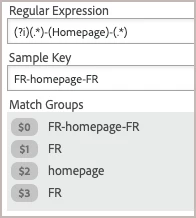
 

This assumes we're looking for the "Homepage" value, you always have three (3) parts to the value coming in, and there are only two (2) dashes/hyphens in the string. The leading "(?i)" ensures this is a case-insensitive search (so both "Homepage" and "homepage" would match). The result should be four (4) total match groups, with $0 always representing the original value as shown in the sample image above. 

To stitch it back together, you can reference the match groups to keep the dynamic values. In the example, this would be $1 for the leading "FR" and $3 for the trailing "FR". In the middle, you can use a literal string, such as "HP" to complete the updated/classification value:

With this approach, you'll have to build a rule for every variation you expect to find in the middle ($2) position of the original string. However, the leading (CountryCode) and trailing (LanguageCode) values do not have to be anticipated because we're using a wildcard to match the strings.


1 reply

Brian_Johnson_
Brian_Johnson_Accepted solution
October 26, 2020

@prahme  -

It certainly is possible. You'll just have to use a regex match in the rule, then reassemble the parts to build the string you want to see in reports. Your regex may vary, but the simplest approach would be something like the following:


This assumes we're looking for the "Homepage" value, you always have three (3) parts to the value coming in, and there are only two (2) dashes/hyphens in the string. The leading "(?i)" ensures this is a case-insensitive search (so both "Homepage" and "homepage" would match). The result should be four (4) total match groups, with $0 always representing the original value as shown in the sample image above. 

To stitch it back together, you can reference the match groups to keep the dynamic values. In the example, this would be $1 for the leading "FR" and $3 for the trailing "FR". In the middle, you can use a literal string, such as "HP" to complete the updated/classification value:

With this approach, you'll have to build a rule for every variation you expect to find in the middle ($2) position of the original string. However, the leading (CountryCode) and trailing (LanguageCode) values do not have to be anticipated because we're using a wildcard to match the strings.


prahmeAuthor
October 26, 2020
Very useful, thank you!