Google Chrome phasing out cookies by Q2024 | Community
Skip to main content
February 5, 2024
Solved

Google Chrome phasing out cookies by Q2024

  • February 5, 2024
  • 1 reply
  • 2048 views

Hi everyone,

We're currently conducting a project to assess the impact of Google Chrome blocking third-party cookies on our analytics capabilities.

While we anticipate a minimal impact on basic tracking within individual domains, a specific challenge we face is cross-domain tracking.


Both the Visitor ID service's demdex.net cookie and the legacy Analytics ID service's s_vi cookie rely on third-party contexts to provide persistent identifiers for users across different customer domains. When blocked, these cookies make cross-domain tracking impossible.


Could someone share their insights on the specific implications of losing cross-domain tracking? In what scenarios is this feature particularly valuable for analytics?


We've read that Adobe WebSDK potentially mitigates these limitations, but it also requires significant technical expertise and implementation effort. In the meantime, are there any other ways we can handle this challenge?


Thank you for your insights! We appreciate any advice on navigating this transition.


This post is no longer active and is closed to new replies. Need help? Start a new post to ask your question.
Best answer by Jennifer_Dungan

Hi @jennifer_dungan 

Can you please share any documentation or resource for us to better understand this statement. 


"WebSDK uses server side cookies, which should mitigate the risks (as you said), but learning the XDM Stream format is daunting".


I can see this one from a FAQ section. 

https://experienceleague.adobe.com/docs/experience-platform/edge/web-sdk-faq.html?lang=en
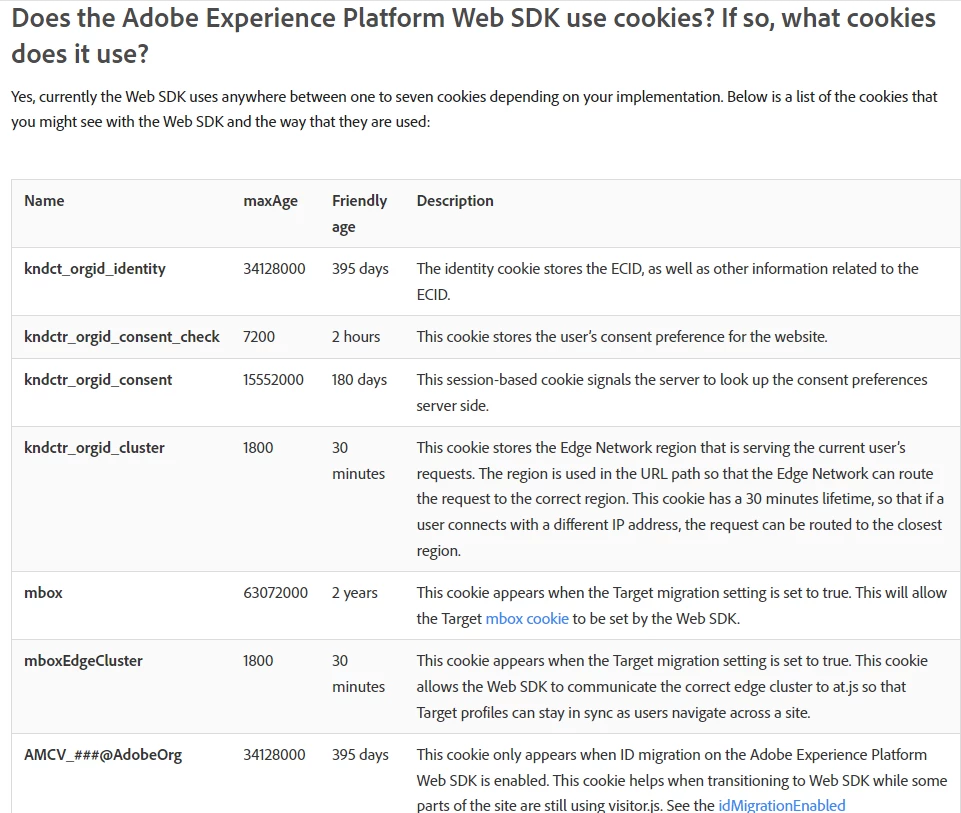


Are all these cookies set in server-side?


Hi, first off, I haven't used WebSDK yet myself, so I am by no means an expert on this yet...


But I believe that the cookies you have a screenshot for above are all First Party Cookies (not server-side).


But I've heard that WebSDK sets server side cookies as well... which may or may not be accurate... but I believe that at the very least it cuts out the "third-party" demdex cookie... 


I don't have the documentation to support this... a lot of this info was based on webinars and information being presented in learning sessions, as opposed to written down.


However, first party cookies are still going to be much more reliable than third-party.. but still may fall victim to Safari's ITP... but securely set cookies (via server and not JS) have more authority than a cookie set with JS, and I believe that Safari ITP and Chrome have different rules around those types of cookies... so they are not "server-side cookies, but are cookies set by an authenticated server":


When using the Web SDK, the Edge Network sets one or more of the cookies above. The Edge Network sets all the cookies with the secure and sameSite="none" attributes.

The Edge network is the server, and it should be configured to a CNAME record of your website to ensure that cookies are coming from your domain authority. (i.e. if your domain is https://www.mydomain.com, the edge server should be a CNAME to something like https://edge.mydomain.com and not just a generic https://edge.adobe.com server)


But I am sure I heard that Adobe would also use server side cookies in conjunction with those first-party cookies to identify users, but I am not seeing this here.... maybe they just meant the cookies would be set from the server, rather than stored on the server... 

1 reply

Jennifer_Dungan
Community Advisor and Adobe Champion
February 5, 2024

Hi, I am also concerned about this.. 


WebSDK uses server side cookies, which should mitigate the risks (as you said), but learning the XDM Stream format is daunting. 


I haven't started my WebSDK migration yet, but depending on the complexity of your implementation, you might want to look into the "AA via AEP Web SDK" extension, which uses a similar interface to the the current AA Extension (where you can set your dimensions and events in the familiar style), and it will map to the XDM structures for you automatically.


Here is a User Group session I hosted last year that might help you:

https://www.youtube.com/watch?v=k7re4vxZBVk


It looks like "Search Discovery" has changed names to "Further" but, the extension should be the same.


However, if your implementation is complex like mine, this may be a lot harder to achieve 😛


Good luck!

VishiCDNAuthor
February 5, 2024

Thank you, @jennifer_dungan!!


As we await the implementation of our WebSDK, I'm interested in exploring short-term solutions to minimize the impact of Google Chrome's third-party cookie phase-out, particularly for cookies like demdex.net (Visitor ID) and s_vi (legacy Analytics ID). These cookies rely on third-party contexts for cross-domain user tracking.


Is there anything we can do to minimize the impact?


Thanks for your insights!

V_Sirish_Kaushik1
Level 4
February 6, 2024

Hi, first off, I haven't used WebSDK yet myself, so I am by no means an expert on this yet...


But I believe that the cookies you have a screenshot for above are all First Party Cookies (not server-side).


But I've heard that WebSDK sets server side cookies as well... which may or may not be accurate... but I believe that at the very least it cuts out the "third-party" demdex cookie... 


I don't have the documentation to support this... a lot of this info was based on webinars and information being presented in learning sessions, as opposed to written down.


However, first party cookies are still going to be much more reliable than third-party.. but still may fall victim to Safari's ITP... but securely set cookies (via server and not JS) have more authority than a cookie set with JS, and I believe that Safari ITP and Chrome have different rules around those types of cookies... so they are not "server-side cookies, but are cookies set by an authenticated server":


When using the Web SDK, the Edge Network sets one or more of the cookies above. The Edge Network sets all the cookies with the secure and sameSite="none" attributes.

The Edge network is the server, and it should be configured to a CNAME record of your website to ensure that cookies are coming from your domain authority. (i.e. if your domain is https://www.mydomain.com, the edge server should be a CNAME to something like https://edge.mydomain.com and not just a generic https://edge.adobe.com server)


But I am sure I heard that Adobe would also use server side cookies in conjunction with those first-party cookies to identify users, but I am not seeing this here.... maybe they just meant the cookies would be set from the server, rather than stored on the server... 


Hmm, got the idea. 
Thank you!