Percent Change Calculation | Community
Skip to main content
November 19, 2018
New

Percent Change Calculation

  • November 19, 2018
  • 5 replies
  • 5683 views

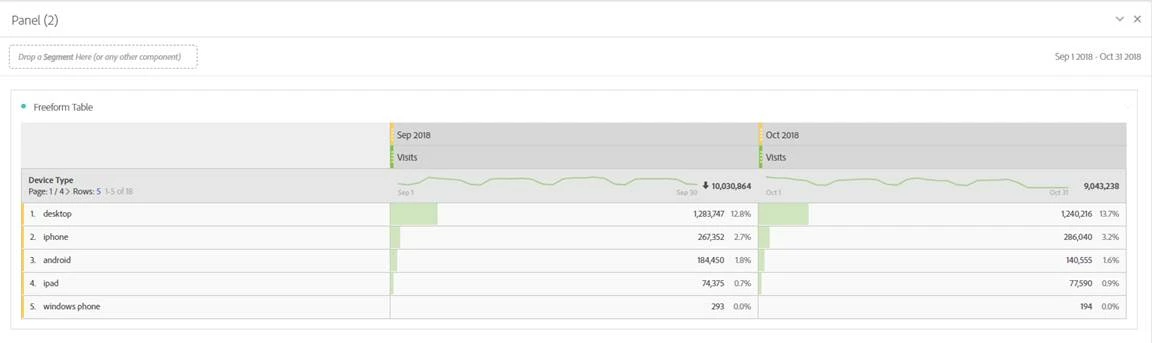
I would like to see a % change calculation - or summary change calculation - across multiple metrics. Right now, we can do this across a single metric, but I'd like to be

able to do this MoM for example. In the screenshot included below, I'd love to include a % change column that runs down the right-hand side to show the change MoM across each device type I've pulled into the table.
5 replies

Urs_Boller
Community Advisor
Community Advisor
December 7, 2019

just right-click in the header column and select "show change to previous month". if that doesn't work you can create a calculated metric on your own.

jantzen_b
Adobe Employee
Adobe Employee
October 27, 2020
No text available
Community Manager
October 5, 2022
No text available
January 4, 2023

Hi I am also encountering the same issue, cant seem to find the percentage change option?


January 4, 2023

I believe the option 'Compare Time Periods' (the one that creates a % comparison) is only available if you create a precise Date Rage (like the one in the pic e.g .Oct 1, 2021 - Oct 31, 2021), and it has to be on top of a Metric (as it shows in the pic, it is on top of 'Visits'). 

If you are using generic data ranges like 'Last Month', 'This Month' or even 'Oct 2021', I don't think it works..