Build better products with our product team
Would you please add a Search to the Mentions Home page Widget. There is a search in the Updates so why can’t Search also exist in the Mentions Home page Widget too?
This could be me coming from Drift before Dynamic Chat, but the one item that I really miss and would love to have is their path that shows where people are dropping off in conversations. We would review this quarterly, at least, to see where our content needs to be adjusted to help push more people through the chat. It also helped us to see how many people would click on each option throughout the chat as well so we could get a rough idea of how many said support, billing or sales to go through those paths.
Sometimes, a collaborative dashboard can benefit from the Comments feature, but most of the time this is unnecessary and instead causes annoyance by opening frequently by accident as users try to scroll down through the workspace.While I can turn off comments individually on each dashboard, it would be much more convenient to default this to Off in Preferences and only toggle Comments section on when needed..
Idea SummaryUpdate Workfront email notification subject line formatting so the ticket subject appears first, followed by the notification type or status.ProblemUsers rely on email subject lines to scan, filter, and sort notifications. Currently, Workfront places notification actions first, which creates inconsistent subject lines and makes sorting ineffective.Current examples: Request Submitted: Subject Comment on Subject Subject is Ready to Start Because the ticket subject is not consistently positioned, users cannot easily group or prioritize notifications related to the same work item.Proposed SolutionStandardize all Workfront email notification subject lines using a consistent structure:[Ticket Subject] – [Notification Type/Status]Examples: Subject – Request Submitted Subject – New Comment Subject – Ready to Start Benefits Improves email sorting, filtering, and scanning Creates consistent notification patterns Reduces user friction managing high email volumes Aligns with common ticketing and project management notification standards Impact Increased productivity for users managing multiple requests Faster identification of related work items Better usability without changing core workflows
Hi!It would be great if Workfront would show all people assigned to tasks on reports instead of just the primary person.
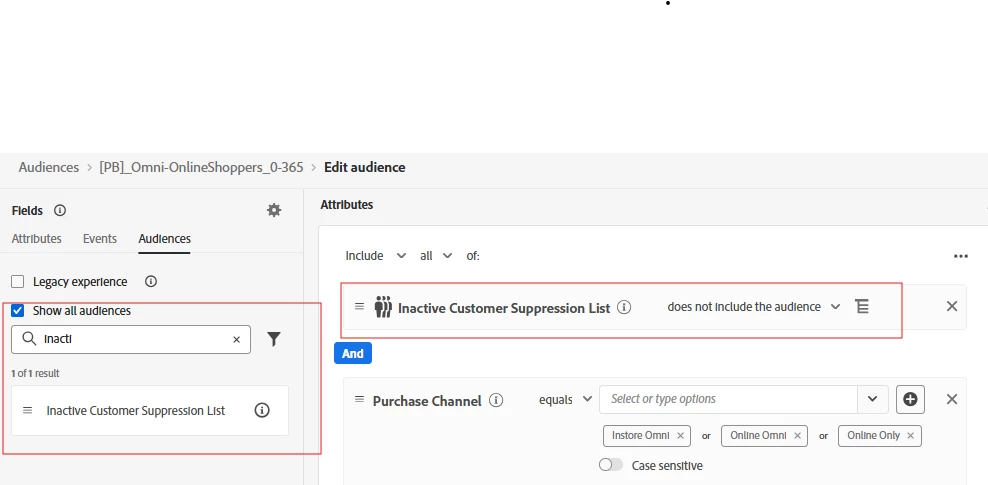
Description:We use a specific naming structure for our Journeys and our message names. We want to be able to Query this Name when creating an audience, instead of having to use Journey ID or Message ID. Why is this feature important to you:As I empower more teams to work on campaigns as standalone teams, including test variations with split tests, I need to have overarching criteria that will allow me to all audiences who have received a type/class of mailing without having to create a manual list of Journey ID or message IDs How would you like the feature to work:For instance, if all emails with an Offer use "-OFFER-" in the message name, then I want to be able to create and audience with anyone who has received a message with "-OFFER-" in last X months and not have to recall all the journey IDs. Similarly, if a customer has been in any journey that begins with "XYZ-" in last X day I want may want to exclude them. I don't want to have to search all possible Journey IDs. This becomes impractical to scale up. Alternative option: Let me tag every journey or message and use those tags for audience segmentation. (Preference would be for Journey or message names over tags) Current Behaviour:Can only use MessageID or JourneyID. Have to ask all teams to remember and add these to a centralized audience - this will have issues based on human error.
Enable system admin to unshare with a specific user multiple projects, tasks, etc. Today if 100 projects were shared with a user, you can not unshare the 100 projects at once, you have to unshare one by one by one by one by one by one by one.. .until done for a specific user.
My idea is to offer the ability to pull Workfront Schedule Exceptions into Calendar reports in a manner similar to how user PTO can be displayed in a Calendar report. My company operates globally and uses multiple Workfront Schedules on user profiles with Exceptions to reflect regional office holidays. These Exceptions appear as holidays in the Workload Balancer and appropriately block resourcing, which works well for our resourcing needs. However, we would also like the ability to surface Workfront Schedule Exceptions in Calendar reports when reviewing task and project dates. Currently, this functionality is not supported by the API. Would love to see this added to the product roadmap.
My idea is to offer a date range filter in reports that ignores weekends. We use date ranges in many of our reports. When using a date range filter, including relative date ranges such as between $$TODAY-2D and $$TODAY, weekends are included in the calculation. As a result, when a report with the above relative date range is run on a Monday, tasks due on Thursday and Friday may not appear because the weekend days are counted in the range. We have used a Report Prompt, allowing users to manually enter the appropriate dates based on the day they are running the report. But we would like the ability to tell the system to ignore weekends when setting a date range filter in reports. Currently, Workfront offers the ability to ignore weekends in Schedules, Repeating Deliveries of reports, and creating Recurring Tasks.I would love to see a similar functionality built into report filters to tell the system to ignore weekends for date ranges. Thanks!
No task duration type, constraint type, or predecessor dependency type allows Project Managers to create tasks with variable durations. We have several instances where task A and C are set dates and task B falls between them. This duration can be 50+ business days and changes as task A and C move based on external factors. This also happens so frequently and in different workflows that a Fusion scenario isn’t feasible.Ideally Workfront would have a new predessor type that drives both the start and end date independently instead of depending on a planned duration. Task B planned start date starts when Task A’s end date finishes and Task B’s planned completion date finishes when Task C’s start date starts. The current work around is to set fixed dates for the task and manually update them as the other tasks recalculate but that takes a lot of diligence and effort on the project manager.
We have received confirmation from Adobe Support that when importing customer attribute data from non-Adobe CDP sources using the Adobe Target Bulk Profile Update API (v2), although the data is transferred in array format, Adobe Target can only process it as ‘single-value strings’.If array format can be received, should it not then be possible to handle it as an array within Target?This would be significantly more convenient when creating audiences, so we would very much appreciate your consideration of this matter.
In Adobe Experience Manager (AEM), performing a rollout from a blueprint currently requires the initiating user to have at least read access to all live copies associated with that blueprint. If the user lacks access to even one unrelated or newly created live copy, the rollout operation fails—even when the user has full permissions on the blueprint and the intended target live copy.This behavior creates significant operational challenges in large, multi-site or multi-tenant environments where: Editors are intentionally restricted from accessing unrelated live copies New sites are frequently added under the same blueprint Permission models are designed to enforce strict content isolation As a result, editors are blocked from performing legitimate rollouts, while administrators can perform the same action successfully. This forces teams to either over-provision permissions, rely on admin intervention, or introduce service-account-based workarounds, all of which increase operational risk and complexity. Requested Enhancement:Allow blueprint rollouts to: Succeed based solely on permissions for the blueprint and the target live copy(s), or Gracefully ignore live copies to which the user does not have access, or Provide a configuration option to control this behavior at the blueprint or system level This enhancement would greatly improve scalability, security, and usability for enterprise AEM implementations, while aligning rollout behavior with least-privilege access principles
In Queries > Templates, there is currently no way to organise query templates beyond a flat list with a search bar. As the number of templates grows, this creates several usability challenges: No ability to create folders or group queries by use case, brand, or purpose Users must remember the exact query name to find it The search is case-sensitive, so queries cannot be found unless the name is typed exactly This often results in duplicate or sample queries being recreated multiple times, leading to clutter and inefficiency For teams working extensively with queries (especially in enterprise environments), this significantly impacts productivity and governance.
We have a requirement to apply different capping thresholds to different placements,For a given customer A show offer B, X times in Placement C or Y times in Placement Dwhere X <> YFor example,For customer Andrew, show LOAN offer, 3 times over 7 days in Header placement or 2 times over 14 days Footer placement My idea would be to include an optional placement qualifier (“Placement name”) when selecting “Apply capping to each placement” as shown above. Capping would then apply to “Placement name” only and not all placements. Note that placement capping is “Offer Decisioning” functionality, which would need to be re-introduced into experience decisioning.
Summary of Request The current Adobe Marketo Engage REST API is severely limited regarding the programmatic construction of marketing assets. While we can "Clone" or "Trigger" assets, we completely lack the ability to Create, Read, Update, and Delete (CRUD) the internal logic of Smart Campaigns (Flow Steps & Triggers) and Smart Lists (Filters & Rules) via API.As marketing operations move toward hyper-automation and dynamic campaign generation, the inability to define campaign logic via code is rendering the Marketo API obsolete compared to modern, developer-friendly platforms. We urgently request new endpoints to manipulate these assets' definitions directly.Current Limitations & Pain Points Smart Campaigns are "Black Boxes" to the API: The Problem: We can create a shell campaign or clone an existing one, but we cannot add, edit, or order Flow Steps (e.g., "Send Email," "Change Data Value," "Wait") or Smart List Triggers via API. The Impact: We cannot dynamically generate campaigns based on external data signals. If we have 100 micro-segments requiring slightly different flow logic, a human must manually build 100 campaigns in the UI. This prevents true scale and automated campaign execution. Smart Lists cannot be defined programmatically: The Problem: The Asset API allows us to clone a Smart List, but not to inject or modify its Filters (e.g., "Industry is X" AND "Score > 50"). The Impact: We cannot automate audience segmentation. External systems (like a custom CDP or data warehouse) cannot push segmentation logic into Marketo. We are forced to use static lists (which don't update in real-time) or manual UI work. Inefficient Workarounds: Current workarounds involve cloning "Template Programs" and using token variables. This is brittle, creates technical debt (thousands of unused clones), and does not solve the need for structural changes to campaign flows (e.g., adding an extra "Wait" step dynamically). Proposed Solution / Feature Request We request the addition of the following capabilities to the Asset API: POST /rest/asset/v1/smartCampaign/{id}/flow: Ability to pass a JSON array defining flow steps (Action, Choice Steps, Constraints, Parameters). POST /rest/asset/v1/smartCampaign/{id}/smartList: Ability to define triggers and filters for the campaign's audience. POST /rest/asset/v1/smartList/{id}/rules: Ability to add/update filter rules for standalone Smart Lists. GET endpoints for the above to retrieve the current logic structure (JSON representation of the Flow/Rules). Business Justification Modern marketing requires agility. We are building internal tools to orchestrate customer journeys across multiple channels. Without these endpoints, Marketo acts as a bottleneck rather than an engine. Opening these endpoints will allow developers to build powerful automations on top of Marketo, significantly increasing platform stickiness and utilization.Priority: Critical (Blocking scalable automation initiatives)
In Adobe Workfront Goals, the current UI offers very limited view customization compared to Projects or Tasks.At the Goals and Progress Indicators levels, users cannot:- Add or remove columns- Display additional fields- Group or sort data- Customize or save viewsIn particular, at the Progress Indicators level, there is no ability to group, filter, or customize the view in a similar way to task lists.These limitations make it difficult to review goals at scale and reduce usability for leadership and program-level reviews.
For improved clarity and productivity, could Adobe provide an option to associate a project with a default or preferred view that automatically loads when the project is opened?(If I understand Workfront correctly, it always uses the most recently selected view when opening a project. This requires users to manually search for and select the appropriate view each time, even if a view was created specifically for that project.)
Before Adobe combined the Requestor and Reviewer Access Levels, reviewer had the ability to view project, portfolio, reports, etc.. if the share setting 'Everyone in the system can view' was selected. Since we now only have one Access Level called Contributor, this setting is non-functional and explicit shared users must be selected otherwise Contributors cannot view these resources.This is clearly and oversight when merging the previous access levels and needs to be reversed. The 'Everyone in the system can view' is false and should not be an exception with a hidden meaning that is not reflected in any documentation.
I would love to see the Comment stream in the Update sections change. Most users complain that the threads are hard to follow and expect to be able to read from top to bottom with the latest at the bottom similar to how Slack, Teams, Reddit, WhatsApp and other messaging/social media platforms function. Below is a quote from one of my Super Users“Today, it is difficult to find the latest message in the Updates section. It may be at the top in the latest thread, or it may be somewhere below in response to an older thread, because older threads are lower on the page. Instead, Updates could be arranged oldest to newest - top to bottom. When you open the Updates, you could see the latest message at the bottom. The UI could have a message that tells you when there are unread messages above that you should scroll back to see. But overall, this would prevent the hunt for the latest as the latest will always be at the bottom. This is similar to the flow of iMessage threads where the further up you go, the further back in history you go, or how Slack handles messages.”
Looking to populate city, state, country, geolocation values to Adobe Analytics’ default Cities, Region, Countries dimensions. In this case, I would like to prevent Adobe’s IP lookup from populating these values, and populate the default geo dimensions to use geolocation information derived from my own application. Reasons for taking this approach -1 Adobe does not appear to handle IPv6 addresses correctly. Adobe Support confirmed this is the case.2 Better accuracy of geolocation Request - Add a method to overwrite the default geolocation dimensions in Analytics.
It would be nice to be able to programmatically access the QA URLs for a current running AB test. We run a small subset of front end tests in our CI pipeline and we need the tests to be deterministic. The way we do that now is manually retrieve the QA URL from the adobe target GUI. We'd like to have the test determine the experience without having to retrieve the QA URL manually. I have two suggestions:First: Add it to the existing `Get AB Activity by ID` Second: Create a new API to `Get AB Activity QA URLs by ID` Suggested response: "experiences": [ { "experienceLocalId": 0, "name": "Experience A", "visitorPercentage": 34, "qaUrl": "at_preview_token=g5xKOs9QjAl3KN%2BwvyAAmnWEFq%2Br1NJA9GWwjZnLpb4%3D&at_preview_index=1_1&at_preview_listed_activities_only=true&at_preview_evaluate_as_true_audience_ids=1100025", "offerLocations": [ { "locationLocalId": 0, "offerId": 395818 } ] }, { "experienceLocalId": 1, "name": "Experience B", "visitorPercentage": 33, "qaUrl": "at_preview_token=g5xKOs9QjAl3KN%2BwvyAAmnWEFq%2Br1NJA9GWwjZnLpb4%3D&at_preview_index=1_2&at_preview_listed_activities_only=true&at_preview_evaluate_as_true_audience_ids=1100025", "offerLocations": [ { "locationLocalId": 0, "offerId": 395819 } ] } ] If the qaUrl property is too verbose it can be broken up into its separate properties:at_preview_token, at_preview_index,at_preview_listed_activities_only,at_preview_evaluate_as_true_audience_ids
In the Microsoft Store version of Adobe Report Builder, the upload limit for scheduled reports was reduced:Current limit: 4 MB Previous limit: 5 MBAs a result, existing automated reports fail, especially more complex reports with multiple dimensions and metrics.Requested improvement:Increase the scheduled report upload limit back to at least 5 MBThis small change would significantly improve day‑to‑day usability, as many of our existing reports are between 4 MB and 5 MB.
Allow announcement banners Adobe creates to be limited to administrators only or the ability to adjust who sees these types of banner announcements. Recently all users had an announcement introducing a trial for the planning module and it is confusing for end users who have limited decision making on additional modules.
It would be extremely useful to be able to utilize $TriggerObject in Email Script Tokens for the "<Custom Object Name> is Updated" trigger, in addition to the "Added to Opportunity", "Opportunity is Updated", and "Added to <Custom Object Name>" triggers. This would provide the following benefits: Increased flexibility in Email sends using VTL tokens Increased efficiency in API use Increased scope of Custom Object use
“Subject” is automatically a required field for all requests: But it is not possible to change the label for this field. As admins, we should be able to adjust the verbiage. Reason is because my users are very acclimated to the terminology around Projects. The reality is this line is not a subject, its “Project Name”. So my users don’t know what this subject will populate or what they need to put here without being explicitly told what it means.
Already have an account? Login
No account yet? Create an account
Enter your E-mail address. We'll send you an e-mail with instructions to reset your password.