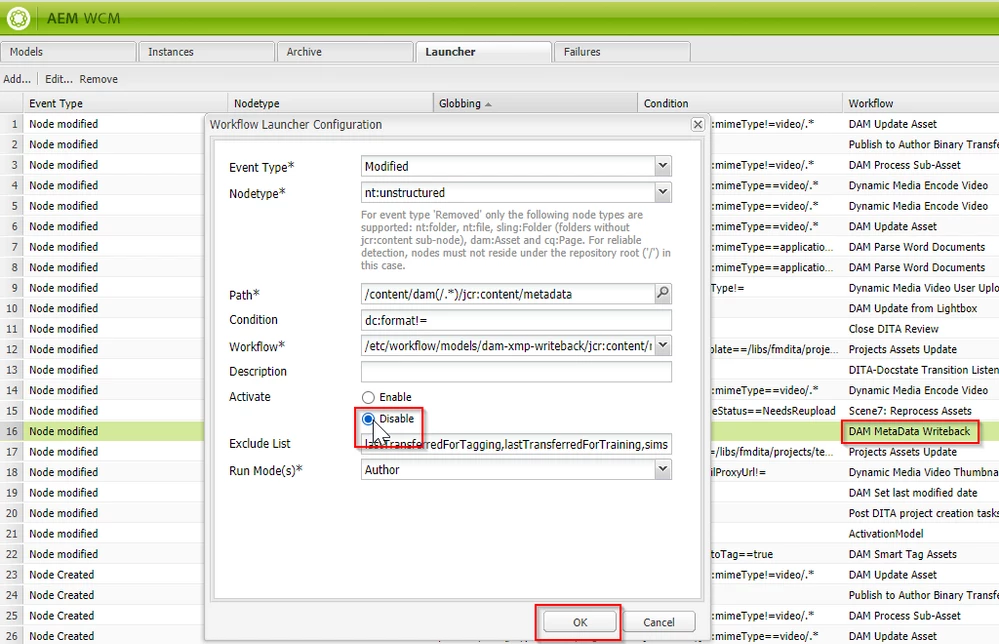


Version History | Reverting between asset versions, creates a unwanted branched version
AEM creates additional version of a media assets when you revert between different versions of the asset. This is functionality as design, as the system:
- expects that the image version that is currently active may have some work in progress changes and may require saving those before moving to another version
- so it creates a branch version before moving to the selected version
In case this behavior is not desired, you have following options:
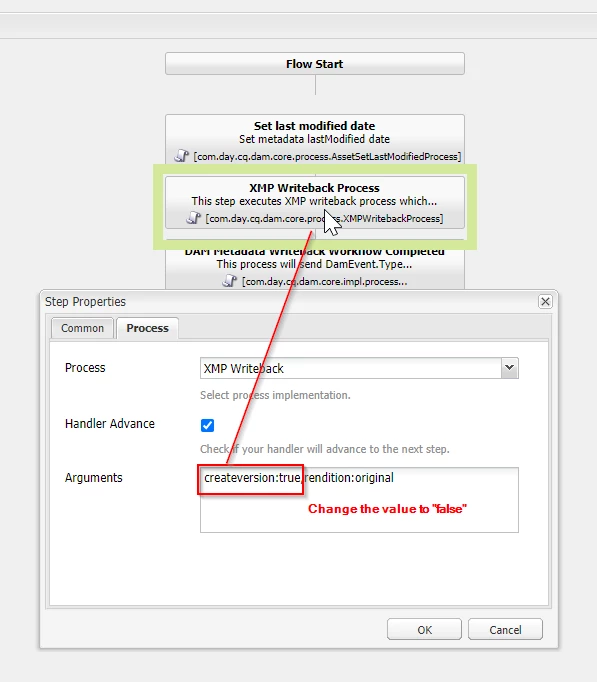
- Option 1: update the “XML Writeback Process” step of “DAM Metadata Writeback” workflow to turn off version creation – refer [1].
-
Use this option if you don't need the version creation only, but do need other metadata writeback features
-
- Option 2: Disable the launcher for workflow “DAM Metadata Writeback”, refer [2].
-
With this option the metadata writeback is turned off, use this option in case none of the features of writeback are required
- to know more on why this workflow is required refer this link and to learn more about this workflow refer this documentation
-
[1]:

[2]: