Unable to access audio file via publish url | Community
Skip to main content
Level 3
June 22, 2023

Unable to access audio file via publish url

  • June 22, 2023
  • 2 replies
  • 1017 views

I have a content fragment which has references to audio files from dam. I'm exposing a graphQL endpoint which pulls contents from this content fragment and exposes publish url of contents. In the response, I'm getting the url of the audio like :


https://publish-pXXXX-XXX.adobeaemcloud.com/content/dam/my-project/folder/audio/file.mp3


In graphql query, I'm referring to audio like:
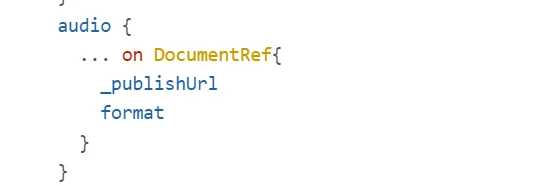
format I'm getting in response is : 'audio/mpeg'

When I hit this url in browser, I get a 'Not found' error. For images, when I hit the publish url in browser, it gets downloaded. Doesn't work the same way for audio.

Please help.

 

This post is no longer active and is closed to new replies. Need help? Start a new post to ask your question.

2 replies

rawvarun
Community Advisor
Community Advisor
June 22, 2023

Can you check if the file exists here:

/content/dam/my-project/folder/audio/file.mp3


Also, see if the below URL is blocked in AEM as Cloud Publish: 

https://publish-pXXXX-XXX.adobeaemcloud.com/content/dam/my-project/folder/audio/file.mp3


rakesh_h2Author
Level 3
June 23, 2023

File exists in the above location in author instance and it has been published too. But unable to access via publish url.

EstebanBustamante
Community Advisor and Adobe Champion
June 23, 2023

Additionally, check if you don't have ACL issues, perhaps the folder is not allowed by an anonymous user, did you try once logged in to the publish instance?

Esteban Bustamante
rakesh_h2Author
Level 3
June 23, 2023

No ACL applied.