Integrate AEM with adobe commerce & core-cif connector build issue | Community
Skip to main content
Level 2
May 29, 2025
Solved

Integrate AEM with adobe commerce & core-cif connector build issue

  • May 29, 2025
  • 3 replies
  • 746 views

Hi, We have existing AEM application. We would like to build connectivity to adobe commerce(magento). I prefer solution without create new project using arche type.

Do I need venia project?

I installed commerce add-on & configured graphql URL. Now I need components to retrieve it. adobe core cif components is not building and getting error(attached).
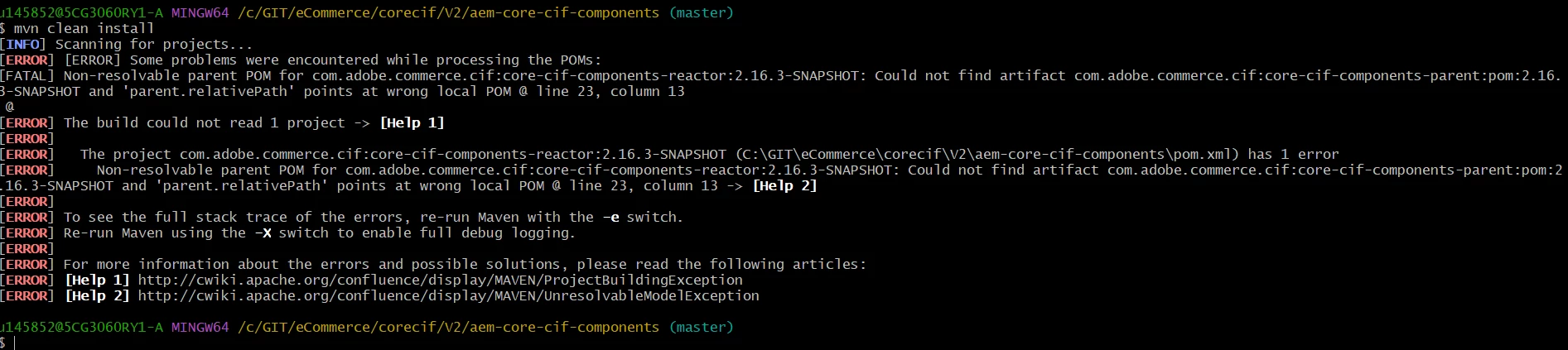
 

Please let us know the steps if my approach is incorrect. Happy to start from scratch.

Steps followed

1. install commerce add-on

2. configure graphql URL in configMgr

3. synch data in AEM commerce


your help is appreciated.


Thanks

Venkat

This post is no longer active and is closed to new replies. Need help? Start a new post to ask your question.
Best answer by Venkat_-_Privileged_AccouJa

I am able to fix it with following versions:

<core.cif.components.version>2.16.2</core.cif.components.version>

<graphql.client.version>1.8.1</graphql.client.version>

<magento.graphql.version>9.1.0-magento242ee</magento.graphql.version>


Thanks for the help!

3 replies

giuseppebaglio
Level 10
May 29, 2025

hi @venkat3062258106jv

SNAPSHOT versions cannot be used because they are not stored in the Maven remote archive. Available versions for the package can be found here (latest is 2.27.0):

https://mvnrepository.com/artifact/com.adobe.commerce.cif/core-cif-components-core 


Update your pom from

<dependency> <groupId>com.adobe.commerce.cif</groupId> <artifactId>core-cif-components-core</artifactId> <version>2.16.3-SNAPSHOT</version> <scope>provided</scope> </dependency>

to

<dependency> <groupId>com.adobe.commerce.cif</groupId> <artifactId>core-cif-components-core</artifactId> <version>2.16.2</version> <scope>provided</scope> </dependency>


Level 2
May 29, 2025

after adding above, I don't see cif components in my crx/de. Do I need to add core-cif-components-core-all?


I want to be able to use components directly on the page.

narendiran_ravi
Level 6
May 30, 2025

Hi @venkat3062258106jv ,


You need to embed the CIF packages in your all pom.xml files. I recommend generating an AEM with CIF project using the latest archetype. Compare your pom.xml with this new project to identify any missing dependencies.

<embedded> <groupId>com.adobe.commerce.cif</groupId> <artifactId>core-cif-components-apps</artifactId> <type>zip</type> <target>/apps/vendor-packages/application/install</target> </embedded> <embedded> <groupId>com.adobe.commerce.cif</groupId> <artifactId>core-cif-components-config</artifactId> <type>zip</type> <target>/apps/vendor-packages/application/install</target> </embedded> <embedded> <groupId>com.adobe.commerce.cif</groupId> <artifactId>core-cif-components-core</artifactId> <target>/apps/vendor-packages/application/install</target> </embedded> <embedded> <groupId>com.adobe.commerce.cif</groupId> <artifactId>magento-graphql</artifactId> <target>/apps/vendor-packages/application/install</target> </embedded>


AmitVishwakarma
Community Advisor
Community Advisor
May 30, 2025

Hi @venkat3062258106jv ,

The error in your image shows:

Could not find artifact com.adobe.commerce.cif:core-cif-components-parent:pom:2.16.3-SNAPSHOT

This is because SNAPSHOT versions are not available in public Maven repositories.

Try below solution:


1. Update to a Stable CIF Version

Avoid SNAPSHOT versions.

Update your pom.xml dependency:

<dependency> <groupId>com.adobe.commerce.cif</groupId> <artifactId>core-cif-components-core</artifactId> <version>2.27.0</version> </dependency>

Check here for latest versions:
https://mvnrepository.com/artifact/com.adobe.commerce.cif/core-cif-components-core


2. Embed the Required CIF Packages

In your all/pom.xml, add the following <embedded> artifacts under the content-package-maven-plugin section:

<embeddeds> <embedded> <groupId>com.adobe.commerce.cif</groupId> <artifactId>core-cif-components-apps</artifactId> <type>zip</type> <target>/apps/vendor-packages/application/install</target> </embedded> <embedded> <groupId>com.adobe.commerce.cif</groupId> <artifactId>core-cif-components-config</artifactId> <type>zip</type> <target>/apps/vendor-packages/application/install</target> </embedded> <embedded> <groupId>com.adobe.commerce.cif</groupId> <artifactId>core-cif-components-core</artifactId> <target>/apps/vendor-packages/application/install</target> </embedded> <embedded> <groupId>com.adobe.commerce.cif</groupId> <artifactId>magento-graphql</artifactId> <target>/apps/vendor-packages/application/install</target> </embedded> </embeddeds>

This ensures the CIF components, GraphQL layer, and config are installed into AEM at runtime.


3. Install CIF Components into AEM

After updating the pom.xml, do:

mvn clean install -PautoInstallPackage

This installs everything into AEM (/apps/vendor-packages/...), including CIF components.

4. Verify GraphQL Configuration

Go to AEM:
/system/console/configMgr/com.adobe.cq.commerce.graphql.client.impl.GraphqlClientImpl

Ensure:

  - Magento GraphQL endpoint is correct (e.g., https://your-magento-site.com/graphql)

  - Identifier matches what’s used in CIF components (e.g., default)


5. Use CIF Components in Your Project

Once the CIF packages are installed:

  - Go to CRXDE: /apps/core/cif/components/...

  - Copy the components you want (e.g., product teaser, category list) into your project's component folder.

  - Or directly reference them in your page components/templates.


6. Recommended AEM Configuration

If using AEMaaCS or 6.5+:

  - Ensure AEM Commerce Add-on is installed and enabled.

  - GraphQL client config is active.

  - CIF core components version matches the add-on compatibility matrix.


Regards,

Amit


kautuk_sahni
Community Manager
Community Manager
June 27, 2025

@venkat3062258106jv Just checking in — were you able to resolve your issue?
We’d love to hear how things worked out. If the suggestions above helped, marking a response as correct can guide others with similar questions. And if you found another solution, feel free to share it — your insights could really benefit the community. Thanks again for being part of the conversation!

Kautuk Sahni
June 27, 2025

I am able to fix it with following versions:

<core.cif.components.version>2.16.2</core.cif.components.version>

<graphql.client.version>1.8.1</graphql.client.version>

<magento.graphql.version>9.1.0-magento242ee</magento.graphql.version>


Thanks for the help!