Implementing image resource delegate similar to teaser core component in custom component, but giving broken image with warning in error logs. What am I missing here?
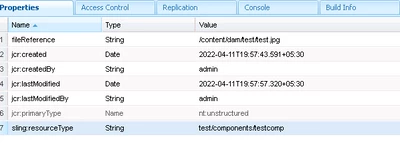
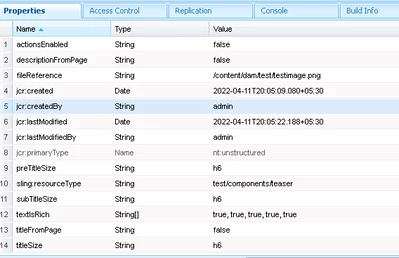
I am trying to implement image resource delegate concept (from teaser core component) in one of our custom component. So that we can adapt to image core component as use its description and other properties. I tried to achieve by placing the fileupload in dialog of custom component similar to teaser. Backend logic works fine. Used similar way of creating properties. But still image was seen broken and below warning in local AEM instance. What am I missing here? Can you help?
Warning:
11.04.2022 20:11:54.408 *WARN* [[0:0:0:0:0:0:0:1] [xxxxxxxxxxxxxxx] GET /content//Testpage/_jcr_content/root/container/container/testcomp.coreimg.jpeg/xxxxxxxxxxxxx/testimage.jpeg HTTP/1.1] io.wcm.caconfig.extensions.persistence.impl.ToolsConfigPagePersistenceStrategy Ignoring reference to /conf/test/settings from /conf/test/settings - Probably misconfigured as it ends with '/settings'
Html view source of custom component: (broken image)
<div>
<div data-cmp-lazythreshold="0" data-cmp-src="/content/test/Testpage/_jcr_content/root/container/container/testcomp.coreimg{.width}.jpeg/xxxxxxxxxx/lava-testimage.jpeg" data-asset="/content/dam/test/test.jpg" data-asset-id="xxxxxxxxxxxxxxxxxxxxxx" data-title="Gray lava rock formation" id="image-7940c95054" class="cmp-image" itemscope="" itemtype="xxxxxxxxxxxxxxxxxx">
<img src="/content/test/Testpage/_jcr_content/root/container/container/testcomp.coreimg.jpeg/xxxxxxxxxxxx/testimage.jpeg" class="cmp-image__image" itemprop="contentUrl" data-cmp-hook-image="image" alt="Gray lava rock formation" title="test formation">
<meta itemprop="caption" content="test formation">
</div>
</div>
Below broken image :

Html view source of teaser core component: (image working)
<div class="cmp-teaser__image-desktop">
<div data-cmp-lazythreshold="0" data-cmp-src="/content/test/Testpage/_jcr_content/root/container/container/teaser.coreimg{.width}.png/xxxxxxxxxxxxx/testimage.png" data-asset="/content/dam/test/testimage.png" data-asset-id="xxxxxxxxxxxxxxxxxxxxxx" data-title="test title" id="image-3b4d0ca2a4" class="cmp-image" itemscope="" itemtype="xxxxxxxxxxxxxxxxxxxxxxxx">
<img src="/content/test/Testpage/_jcr_content/root/container/container/teaser.coreimg.png/xxxxxxxxxxxx/testimage.png" class="cmp-image__image" itemprop="contentUrl" data-cmp-hook-image="image" alt="test title">
</div>
</div>
Model from core teaser for reference of backend logic used similarly for custom component:
AbstractImageDelegatingModel - For ImageResource field
Custom component:
Teaser core component:
Note:
I have manually edited above for organization security reasons. Please ignore any typo, names, extensions errors or any text mismatch in screenshots vs code. I tried to give exact details where ever possible.



