
How to Export Conent Fragment data as a JSON to third party system using an endpoint with servlet in AEM | Community
Skip to main content
Nandheswara
Level 4
July 10, 2023
Solved

How to Export Conent Fragment data as a JSON to third party system using an endpoint with servlet in AEM

  • July 10, 2023
  • 2 replies
  • 1511 views

Hi Everyone,


I want to export my conent fragment data in JSON format using specfic end point with servlet, I want the ouput of the data like below attached screenshot, Kindly Help me if you have any ideas for this issue.
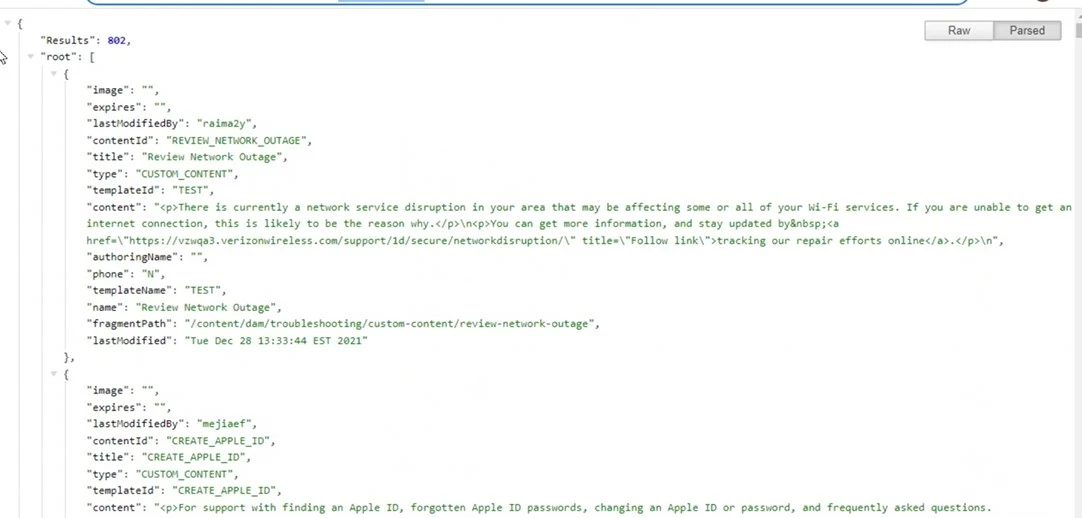
 

Thanks.

This post is no longer active and is closed to new replies. Need help? Start a new post to ask your question.
Best answer by Saravanan_Dharmaraj

@nandheswara Please check this below example for the servlet to return JSON.You need to write the logic to get the content fragment into the json

https://gist.github.com/nateyolles/d4ca683078efd60aa8ac


2 replies

aanchal-sikka
Community Advisor
Community Advisor
July 10, 2023

hello @nandheswara 


There are multiple options to export Content Fragments as json


Option-1:

OOTB Content Services would allow to access Content Fragment data by appending .model.json to the CF. Reference: https://experienceleague.adobe.com/docs/experience-manager-65/developing/components/json-exporter.ht...


It essentially works with Content Fragment component. Example: Add CF to a page via Content Fragment component. Then access its data as http://localhost:4502/content/experience-fragments/wknd/language-masters/en/contributors/stacey-rosw... 


Option-2: You should try exploring GraphQL to get Json output from Content Fragments. They are pretty powerful.

https://experienceleague.adobe.com/docs/experience-manager-learn/getting-started-with-aem-headless/g... 

Aanchal Sikka
Nandheswara
Level 4
July 10, 2023

I want to export data using servlet so if there any blog means give please

Saravanan_Dharmaraj
Community Advisor
Saravanan_DharmarajCommunity AdvisorAccepted solution
Community Advisor
July 10, 2023

@nandheswara Please check this below example for the servlet to return JSON.You need to write the logic to get the content fragment into the json

https://gist.github.com/nateyolles/d4ca683078efd60aa8ac


EstebanBustamante
Community Advisor and Adobe Champion
July 10, 2023

The preferred way to expose the Content Fragment data is through GraphQL, some of the advantages are:


  1. Enhance cache: the GraphQL endpoints can be stored and cached, improving the performance overall.
  2. Efficient Data Fetching: GraphQL allows clients to specify the exact data they need, eliminating over-fetching and under-fetching issues commonly found in traditional RESTful APIs.

  3. Flexible and Customizable Queries: With GraphQL, clients have the flexibility to define their own queries to fetch the required data. They can specify the fields, relationships, and fragments they need, enabling them to fetch multiple content fragments in a single request. 

  4. Strong Typing and Schema Validation: GraphQL has a strongly typed schema, which acts as a contract between the client and server. This schema allows clients to understand the available data and its structure. Additionally, GraphQL provides schema validation, enabling early detection of errors and providing a clear contract for API consumers.

  5. Reduced Overhead for Backend Development: Developers can add or modify fields within the schema without impacting existing clients, making it easier to evolve the API over time.

  6. Frontend Agnostic: GraphQL decouples the backend from the frontend, allowing clients to choose their preferred programming language or framework. 

Why would be the reason to avoid GraphQL and use a servlet instead?

Esteban Bustamante