
How include 2 times the same component?
Hi everyone,
I have few time working with AEM 6.3 and I'm trying to include 2 times the same component into other component.
The next component is a generic redirecction component and this structure is used in a lot of components
<?xml version="1.0" encoding="UTF-8"?>
<jcr:root xmlns:sling="http://sling.apache.org/jcr/sling/1.0"
xmlns:granite="http://www.adobe.com/jcr/granite/1.0"
xmlns:cq="http://www.day.com/jcr/cq/1.0"
xmlns:jcr="http://www.jcp.org/jcr/1.0"
xmlns:nt="http://www.jcp.org/jcr/nt/1.0"
jcr:primaryType="nt:unstructured"
jcr:title="Lista de Enlaces con Icono"
sling:resourceType="cq/gui/components/authoring/dialog"
extraClientlibs="[core.wcm.components.image.v1.editor]"
helpPath="https://www.adobe.com/go/aem_cmp_image_v1">
<content jcr:primaryType="nt:unstructured"
sling:resourceType="granite/ui/components/coral/foundation/container">
<items jcr:primaryType="nt:unstructured">
<linkTypeSelection
jcr:primaryType="nt:unstructured"
granite:class="cq-dialog-dropdown-showhide-multi"
sling:resourceType="granite/ui/components/coral/foundation/form/select"
name="./linkType" fieldLabel="Tipo de Enlace">
<granite:data jcr:primaryType="nt:unstructured"
cq-dialog-dropdown-showhide-target=".cqDialogDropdownShowhideTarget" />
<items jcr:primaryType="nt:unstructured">
<value1 jcr:primaryType="nt:unstructured" text="Interno"
value="internal" />
<value2 jcr:primaryType="nt:unstructured" text="Externo"
value="external" />
</items>
</linkTypeSelection>
<internalLinks jcr:primaryType="nt:unstructured"
granite:class="hide cqDialogDropdownShowhideTarget"
sling:resourceType="granite/ui/components/coral/foundation/container">
<granite:data jcr:primaryType="nt:unstructured"
showhidetargetvalue="internal" />
<items jcr:primaryType="nt:unstructured">
<internalLinks jcr:primaryType="nt:unstructured"
sling:resourceType="granite/ui/components/coral/foundation/form/pathfield"
fieldLabel="Enlace Interno" rootPath="/content/foo"
name="./internallink">
</internalLinks>
</items>
</internalLinks>
<externalLinks jcr:primaryType="nt:unstructured"
granite:class="hide cqDialogDropdownShowhideTarget"
sling:resourceType="granite/ui/components/coral/foundation/container">
<granite:data jcr:primaryType="nt:unstructured"
showhidetargetvalue="external" />
<items jcr:primaryType="nt:unstructured">
<externalLinks jcr:primaryType="nt:unstructured"
sling:resourceType="granite/ui/components/coral/foundation/form/textfield"
fieldLabel="Enlace Externo" name="./externallink">
</externalLinks>
</items>
</externalLinks>
<noFollow jcr:primaryType="nt:unstructured"
sling:resourceType="granite/ui/components/coral/foundation/form/select"
name="./nofollow" fieldLabel="No follow">
<items jcr:primaryType="nt:unstructured">
<value1 jcr:primaryType="nt:unstructured" text="Sí"
value="{Boolean}true" />
<value2 jcr:primaryType="nt:unstructured" text="No"
value="{Boolean}false" />
</items>
</noFollow>
</items>
</content>
</jcr:root>
Then I try to include the previous component two times in another component like next
<?xml version="1.0" encoding="UTF-8"?>
<jcr:root xmlns:sling="http://sling.apache.org/jcr/sling/1.0" xmlns:cq="http://www.day.com/jcr/cq/1.0" xmlns:jcr="http://www.jcp.org/jcr/1.0" xmlns:nt="http://www.jcp.org/jcr/nt/1.0"
jcr:primaryType="nt:unstructured"
jcr:title="Botón genérico"
sling:resourceType="cq/gui/components/authoring/dialog"
extraClientlibs="[core.wcm.components.image.v1.editor]"
helpPath="https://www.adobe.com/go/aem_cmp_image_v1">
<content
jcr:primaryType="nt:unstructured"
sling:resourceType="granite/ui/components/coral/foundation/container">
<items jcr:primaryType="nt:unstructured">
<tabs
jcr:primaryType="nt:unstructured"
sling:resourceType="granite/ui/components/coral/foundation/tabs"
maximized="{Boolean}true">
<items jcr:primaryType="nt:unstructured">
<configuracion
jcr:primaryType="nt:unstructured"
jcr:title="Configuraciòn del Botón"
sling:resourceType="granite/ui/components/coral/foundation/fixedcolumns"
margin="{Boolean}true">
<items jcr:primaryType="nt:unstructured">
<content
jcr:primaryType="nt:unstructured"
sling:resourceType="granite/ui/components/coral/foundation/container"
margin="{Boolean}false">
<items jcr:primaryType="nt:unstructured">
<field jcr:primaryType="nt:unstructured"
sling:resourceType="granite/ui/components/coral/foundation/container"
name="./linkList"
margin="{Boolean}true">
<items jcr:primaryType="nt:unstructured">
<linkType jcr:primaryType="nt:unstructured"
sling:resourceType="granite/ui/components/foundation/include"
name="./linkType"
path="/apps/foocom/components/section/dialogSnippets/linkType/cq:dialog/content" />
</items>
</field>
</items>
</content>
</items>
</configuracion>
<configuracionDos
jcr:primaryType="nt:unstructured"
jcr:title="Configuración del Enlace Secundario"
sling:resourceType="granite/ui/components/coral/foundation/fixedcolumns"
margin="{Boolean}true">
<items jcr:primaryType="nt:unstructured">
<content
jcr:primaryType="nt:unstructured"
sling:resourceType="granite/ui/components/coral/foundation/container"
margin="{Boolean}false">
<items jcr:primaryType="nt:unstructured">
<field jcr:primaryType="nt:unstructured"
sling:resourceType="granite/ui/components/coral/foundation/container"
name="./linkList"
margin="{Boolean}true">
<items jcr:primaryType="nt:unstructured">
<linkType jcr:primaryType="nt:unstructured"
sling:resourceType="granite/ui/components/foundation/include"
name="./linkType"
path="/apps/foocom/components/section/dialogSnippets/linkType/cq:dialog/content" />
</items>
</field>
</items>
</content>
</items>
</configuracionDos>
</items>
</tabs>
</items>
</content>
</jcr:root>
When I configure the dialog its works fine
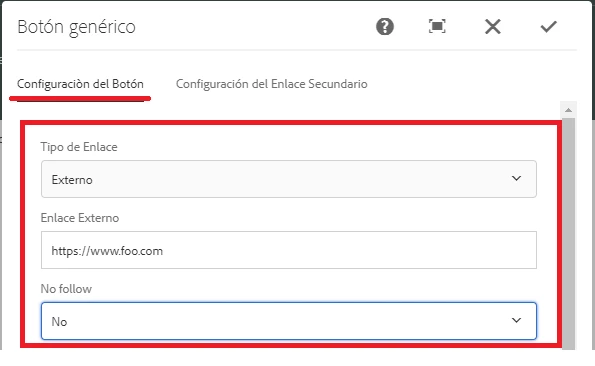
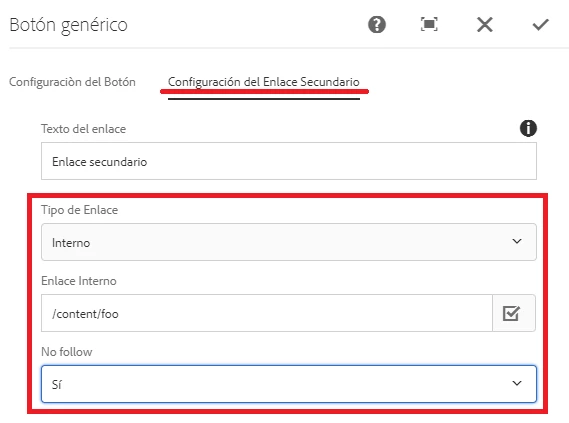
This save the properties like array
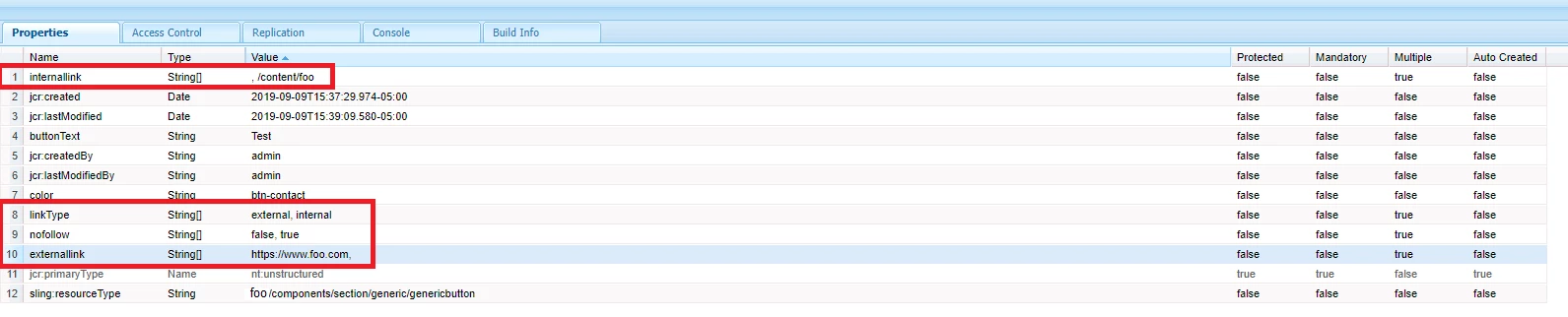
But when I reopen the dialog doesnt work very well, since it just take the first element of the array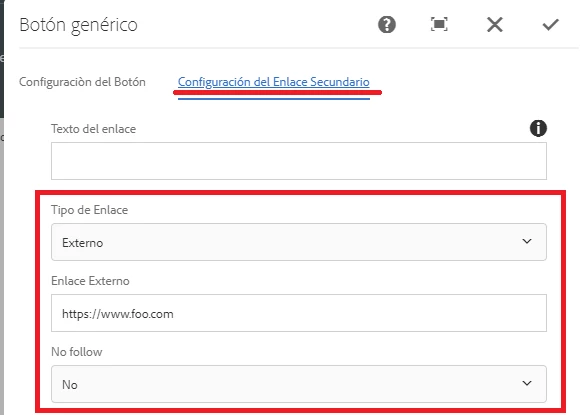
I know that both has the same name, but I don't know how implement it to work fine.