How can I add arbitrary css to editor.html? | Community
Skip to main content
jkpanera
May 21, 2020
Solved

How can I add arbitrary css to editor.html?

  • May 21, 2020
  • 3 replies
  • 8042 views

Hi guys,


We have run into a small problem where some of the css on editor.html is problematic, causing some of content not to display properly.


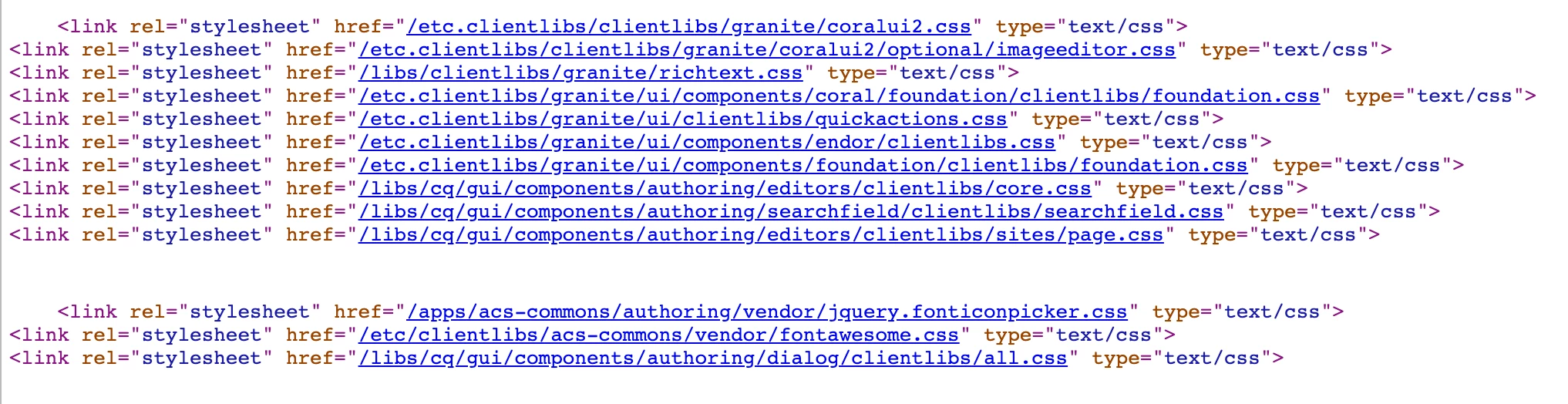
In order to fix that, we'd like to add our own css to that page. When I look at the page source, I see:


How does AEM choose which stylesheets to use here? How do we add our?


Thanks so much!!!

This post is no longer active and is closed to new replies. Need help? Start a new post to ask your question.
Best answer by BrianKasingli

@jkpanera 

For example, if you would like to include the Bootstrap CSS framework, into your website, there are many different ways to achieve these ways. 

I am assuming that you are utilising the WCM Core Component V2 Page to construct your base page. What you need to do is to overlay the customfooterlibs.html to include your client library, CSS or JS configuration. The customfooterlibs.com is designed in the Core Page component for us developers to overlay the script to include our own client library, CSS or JS configuration; these resources will be loaded right before the closing tag of </body>. Similarly, there is a customheaderlibs.html script where you can overlay as well, so that your client library, CSS or JS configuration loads within the <head> of the HTML element. 

customfooterlibs.html: https://github.com/adobe/aem-core-wcm-components/blob/master/content/src/content/jcr_root/apps/core/wcm/components/page/v2/page/customfooterlibs.html

 customheaderlibs.html: https://github.com/adobe/aem-core-wcm-components/blob/master/content/src/content/jcr_root/apps/core/wcm/components/page/v2/page/customheaderlibs.html

Different ways of including external scripts or CSS.

1. External Reference: Overlay customfooterlibs.html or customheaderlibs.html to include: (this method will ensure that your scripts and CSS will be requested via the vendor's CDN)


// Overlay customfooterlibs.html or customheaderlibs.html <link href="https://stackpath.bootstrapcdn.com/bootstrap/4.5.0/css/bootstrap.min.css" rel="stylesheet" integrity="sha384-9aIt2nRpC12Uk9gS9baDl411NQApFmC26EwAOH8WgZl5MYYxFfc+NcPb1dKGj7Sk" crossorigin="anonymous"> <script src="https://stackpath.bootstrapcdn.com/bootstrap/4.5.0/js/bootstrap.min.js" integrity="sha384-OgVRvuATP1z7JjHLkuOU7Xw704+h835Lr+6QL9UvYjZE3Ipu6Tp75j7Bh/kR0JKI" crossorigin="anonymous"></script>


2. Vendor Client Library: Overlay customfooterlibs.html or customheaderlibs.html to include the client library that should be loaded into the page: (this method will ensure that your scripts and CSS will be loaded within your own AEM environment, using your own system resources); Create a new client library with a unique category name (e.g. bootstrap.v2.3.1) with all the vendor scripts and CSS, setup like this https://github.com/Adobe-Marketing-Cloud/aem-sample-we-retail/tree/master/ui.apps/src/main/content/jcr_root/apps/weretail/clientlibs/vendor/bootstrap


//Overlay customfooterlibs.html or customheaderlibs.html <sly data-sly-use.clientlib="/libs/granite/sightly/templates/clientlib.html"/> <sly data-sly-call="${clientlib.all @ categories='bootstrap.v2.3.1'}"/>


Example: https://github.com/Adobe-Marketing-Cloud/aem-sample-we-retail/blob/master/ui.apps/src/main/content/jcr_root/apps/weretail/components/structure/page/customfooterlibs.html
The we-retail project has great examples of how the vendor client libraries are imported into AEM, https://github.com/Adobe-Marketing-Cloud/aem-sample-we-retail


Also:

AEM provides various mechanisms to enable you to customize the page authoring functionality (and the consoles ) of your authoring instance. You can create a new client library that is only active via page editor. From there you can start adding new functionality the page editor.

The new client library must:
  • depend on the authoring clientlib cq.authoring.editor.sites.page
  • is categories cq.authoring.editor.sites.page.hook category

documentation: https://docs.adobe.com/content/help/en/experience-manager-64/developing/extending-aem/customizing-pa...

Is this what you need?



3 replies

BrianKasingli
Community Advisor and Adobe Champion
BrianKasingliCommunity Advisor and Adobe ChampionAccepted solution
Community Advisor and Adobe Champion
May 21, 2020

@jkpanera 

For example, if you would like to include the Bootstrap CSS framework, into your website, there are many different ways to achieve these ways. 

I am assuming that you are utilising the WCM Core Component V2 Page to construct your base page. What you need to do is to overlay the customfooterlibs.html to include your client library, CSS or JS configuration. The customfooterlibs.com is designed in the Core Page component for us developers to overlay the script to include our own client library, CSS or JS configuration; these resources will be loaded right before the closing tag of </body>. Similarly, there is a customheaderlibs.html script where you can overlay as well, so that your client library, CSS or JS configuration loads within the <head> of the HTML element. 

customfooterlibs.html: https://github.com/adobe/aem-core-wcm-components/blob/master/content/src/content/jcr_root/apps/core/wcm/components/page/v2/page/customfooterlibs.html

 customheaderlibs.html: https://github.com/adobe/aem-core-wcm-components/blob/master/content/src/content/jcr_root/apps/core/wcm/components/page/v2/page/customheaderlibs.html

Different ways of including external scripts or CSS.

1. External Reference: Overlay customfooterlibs.html or customheaderlibs.html to include: (this method will ensure that your scripts and CSS will be requested via the vendor's CDN)


// Overlay customfooterlibs.html or customheaderlibs.html <link href="https://stackpath.bootstrapcdn.com/bootstrap/4.5.0/css/bootstrap.min.css" rel="stylesheet" integrity="sha384-9aIt2nRpC12Uk9gS9baDl411NQApFmC26EwAOH8WgZl5MYYxFfc+NcPb1dKGj7Sk" crossorigin="anonymous"> <script src="https://stackpath.bootstrapcdn.com/bootstrap/4.5.0/js/bootstrap.min.js" integrity="sha384-OgVRvuATP1z7JjHLkuOU7Xw704+h835Lr+6QL9UvYjZE3Ipu6Tp75j7Bh/kR0JKI" crossorigin="anonymous"></script>


2. Vendor Client Library: Overlay customfooterlibs.html or customheaderlibs.html to include the client library that should be loaded into the page: (this method will ensure that your scripts and CSS will be loaded within your own AEM environment, using your own system resources); Create a new client library with a unique category name (e.g. bootstrap.v2.3.1) with all the vendor scripts and CSS, setup like this https://github.com/Adobe-Marketing-Cloud/aem-sample-we-retail/tree/master/ui.apps/src/main/content/jcr_root/apps/weretail/clientlibs/vendor/bootstrap


//Overlay customfooterlibs.html or customheaderlibs.html <sly data-sly-use.clientlib="/libs/granite/sightly/templates/clientlib.html"/> <sly data-sly-call="${clientlib.all @ categories='bootstrap.v2.3.1'}"/>


Example: https://github.com/Adobe-Marketing-Cloud/aem-sample-we-retail/blob/master/ui.apps/src/main/content/jcr_root/apps/weretail/components/structure/page/customfooterlibs.html
The we-retail project has great examples of how the vendor client libraries are imported into AEM, https://github.com/Adobe-Marketing-Cloud/aem-sample-we-retail


Also:

AEM provides various mechanisms to enable you to customize the page authoring functionality (and the consoles ) of your authoring instance. You can create a new client library that is only active via page editor. From there you can start adding new functionality the page editor.

The new client library must:
  • depend on the authoring clientlib cq.authoring.editor.sites.page
  • is categories cq.authoring.editor.sites.page.hook category

documentation: https://docs.adobe.com/content/help/en/experience-manager-64/developing/extending-aem/customizing-pa...

Is this what you need?


jkpanera
jkpaneraAuthor
May 21, 2020
Maybe I'm confused, but I don't think that answers my question. We've already overlayed that to include our css but it isn't doesn't solve this problem. The reason is that editor.html includes the page you are editing as an iframe. Specifically this: <iframe id="ContentFrame" frameborder="0" width="100%" height="500" allowfullscreen></iframe> and you can't apply css to outside. elements from inside an iframe. We need to be able to set css on the top level for editor.html.
May 22, 2020

One approach is to create a new CSS clientlib and assign it to the "cq.authoring.editor.hook" clientlib like so:


<?xml version="1.0" encoding="UTF-8"?> <jcr:root xmlns:cq="http://www.day.com/jcr/cq/1.0" xmlns:jcr="http://www.jcp.org/jcr/1.0" jcr:primaryType="cq:ClientLibraryFolder" categories="cq.authoring.editor.hook"/>


Then put your editor.html specific CSS in your new clientlib and it should load when /editor.html is loaded. You can also use this approach if you want to load custom javascript on /editor.html. One advantage to this approach is that this CSS is separate from the rest of your CSS and page code so it isn't present on your published pages. Adobe describes this approach in more detail at: 

https://docs.adobe.com/content/help/en/experience-manager-65/developing/extending-aem/customizing-page-authoring-touch.html

jkpanera
jkpaneraAuthor
May 27, 2020
Hmmm. It looks like that should work in 6.5, but I am using 6.3. How would that change in 6.3?
May 28, 2020
