
GraphQL Variable Type Mismatch in AEM Persistent Queries | Community
Skip to main content
emilux
Level 2
January 28, 2024

GraphQL Variable Type Mismatch in AEM Persistent Queries

  • January 28, 2024
  • 1 reply
  • 2765 views

Hello everyone ! 


I'm facing a problem with AEM persistent queries and the variables used in those. The problem is that i use a variable in a filter that look like this :


filter: { brand: { _logOp: OR, _expressions: $brands } }


The variables brands is declared as "[StringFilterExpression]!".


So now if a want to use my persistent query, i use Postman and i do a POST request on :


publish-[...].adobeaemcloud.com/graphql/execute.json/id/getByBrands


and i send this in the body (in application/json)  : 


{ "variables": { "brands": [{"value": "mybrand"}] } }


But I get this response from AEM : 


"message": "Variable 'brands' has an invalid value: Variable 'brands' has coerced Null value for NonNull type '[StringFilterExpression]!'"


I already tried with other variables types, like a variable for the limit property, where i set a variable $limit as "Int" and when i send (for example) : 


{ "variables": { "limit": 1 } }


There is no problem and the variable is understood.


And if i do a GET request using : 


publish-[...].adobeaemcloud.com/graphql/execute.json/id/getByBrands;brands=[%7B"value":%20"test"%7D]


I get this error


"message": "Variable 'brands' has an invalid value: Expected type 'Map' but was 'String'. Variables for input objects must be an instance of type 'Map'."


And same here with a variable $limit as "Int" i have no problems. 


I don't understand why ? Also when i'm using the GraphiQL Explorer in the AEM Backoffice i have no problem, i can pass my variable brands without error like that : 
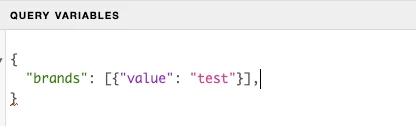
 

Does anyone have a solution to this problem and could share it with me?

Thank you!

This post is no longer active and is closed to new replies. Need help? Start a new post to ask your question.

1 reply

ShaileshBassi
Community Advisor
Community Advisor
January 29, 2024

Hi @emilux 

For POSTMAN below is the way to create the query:


You can even pass the query variable by appending query paramters in the query e.g

/graphql/execute.json/<project-name>/<query>;queryParam1=queraqueryParam1_value;queryParam2=queraqueryParam2_value;


or you can even create the object for the query params similar to the one show in the examples of the react app/nextjs app.

https://github.com/adobe/aem-guides-wknd-graphql/blob/main/react-app/src/api/usePersistedQueries.js


Hope this helps!

Thanks

emilux
emiluxAuthor
Level 2
January 29, 2024

Hello @shaileshbassi and thank you for your reply.


The examples that you share here work very with simple string or number variables. For example with that : 

here my GraphQL query is waiting for $limit to be an ID! and $path to be a String!, with that everything work.


But in my case i have also "$brands" a variable of type : [StringFilterExpression]! and if i send that :

it's working in the GraphiQL Explorer in AEM but not from postman or cURL or anything outside the GraphiQL Explorer. i have this error :


"message": "Variable 'brands' has an invalid value: Variable 'brands' has coerced Null value for NonNull type '[StringFilterExpression]!'"


It's look like the brands variable is empty for the API.