go through node and store data in a json | Community
Skip to main content
kevinl17371805
October 26, 2018
Solved

go through node and store data in a json

  • October 26, 2018
  • 2 replies
  • 1378 views

hello friends I am in the process of learning the servlet sling and I am

trying to read a parent node and bring all the information it contains to

store it in a json and send it to the view I would appreciate a way to do

thank you acontinuacion I leave an example of what I want to achieve
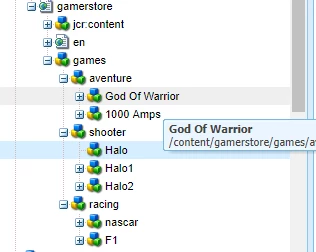
         

In summary, I want to obtain the data of the subnodes of the subnosdo in and store them in an array with a servlet sling. I appreciate all the help you can give me.

This post is no longer active and is closed to new replies. Need help? Start a new post to ask your question.
Best answer by arunpatidar

Hi,

You can use JCR Node API or Resource API to get child resource and adapt to Node API/Value Map

Node (Content Repository for Java Technology API Version 2.0)

Resource (Apache Sling 8 API)

ValueMap and his friends - Experience Delivers

Resource resource = resolver.getResource("/content/testsling/slingmodel");

ValueMap valueMap=resource.adaptTo(ValueMap.class);

response.getWriter().write("Output from ValueMap is First Name: "+valueMap.get("firstName").toString()+" Last Name: "+valueMap.get("lastName").toString()+" Technology: "+valueMap.get("technology").toString()+"");

  UserInfo userInfo = resource.adaptTo(UserInfo.class);

  response.getWriter().write("Output from Sling Model is First Name: "+userInfo.getFirstName()+" Last Name: "+userInfo.getLastName()+" Technology: "+userInfo.getTechnology());

2 replies

arunpatidar
Community Advisor
arunpatidarCommunity AdvisorAccepted solution
Community Advisor
October 27, 2018

Hi,

You can use JCR Node API or Resource API to get child resource and adapt to Node API/Value Map

Node (Content Repository for Java Technology API Version 2.0)

Resource (Apache Sling 8 API)

ValueMap and his friends - Experience Delivers

Resource resource = resolver.getResource("/content/testsling/slingmodel");

ValueMap valueMap=resource.adaptTo(ValueMap.class);

response.getWriter().write("Output from ValueMap is First Name: "+valueMap.get("firstName").toString()+" Last Name: "+valueMap.get("lastName").toString()+" Technology: "+valueMap.get("technology").toString()+"");

  UserInfo userInfo = resource.adaptTo(UserInfo.class);

  response.getWriter().write("Output from Sling Model is First Name: "+userInfo.getFirstName()+" Last Name: "+userInfo.getLastName()+" Technology: "+userInfo.getTechnology());

Arun Patidar
smacdonald2008
October 28, 2018

Nice Response Arun!