
Get Asset version related to image change -color/size | Community
Skip to main content
Nitin_laad
Community Advisor
Community Advisor
April 3, 2020
Solved

Get Asset version related to image change -color/size

  • April 3, 2020
  • 1 reply
  • 3039 views

Hi All, 


We are having a use case to get an asset version related to change in the asset birany (image itself such as image color, size change, not in metadata), not related to metadata change.

AEM creates an asset version for metadata and binary changes and stores into /jcr:system/jcr:versionStorage.

Can you guys please suggest an approach to get asset version related to binary change only, not metadata change?


Thanks in advance. 
 

This post is no longer active and is closed to new replies. Need help? Start a new post to ask your question.
Best answer by Theo_Pendle

Hello,

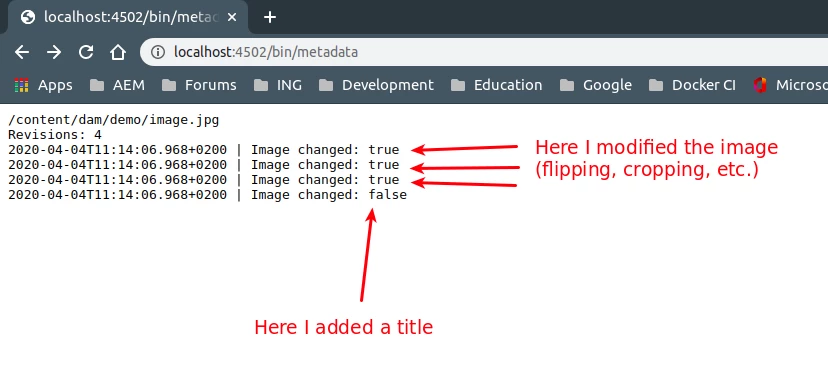
One way you could do this is by looking at the dam:size property of the asset, which is the size of the image in bytes. It does not change if you add or edit metadata (eg: Title), but it will change if authors edit the image. You won't be able to tell what changed specifically (could be flip, rotate or complete image change for example), but you'll be able to tell which revisions include image modifications.

Here is a quick-and-dirty servlet that does this comparison:


And here is the code:

@8220494(service = Servlet.class, property = { "sling.servlet.methods=" + HttpConstants.METHOD_GET, "sling.servlet.paths=" + "/bin/metadata" }) @ServiceDescription("Simple Demo Servlet") @Slf4j public class SimpleServlet extends SlingSafeMethodsServlet { private static final long serialVersionUID = 1L; private SlingHttpServletResponse response; @9944223 protected void doGet(final SlingHttpServletRequest req, final SlingHttpServletResponse resp) throws ServletException, IOException { response = resp; resp.setContentType("text/plain"); final Asset asset = req.getResourceResolver().getResource("/content/dam/demo/image.jpg").adaptTo(Asset.class); output(asset.getPath()); final long currentSize = (long) asset.getMetadata().get(com.day.cq.dam.api.DamConstants.DAM_SIZE); final Collection<Revision> revisions; try { // Get all revisions final AssetManager assetManager = asset.adaptTo(AssetManager.class); revisions = assetManager.getRevisions(asset.getPath(), null); output("Revisions: " + revisions.size()); // Sort by date final ArrayList<Revision> list = new ArrayList<>(revisions); list.sort(this::sortRevisionsByDateDesc); long latestSize = currentSize; for (final Revision revision : revisions) { final ValueMap metadata = revision.getMetadataProperties(); final GregorianCalendar calendar = (GregorianCalendar) metadata.get(com.day.cq.dam.api.DamConstants.DC_MODIFIED); final DateFormat formatter = new SimpleDateFormat("yyyy-MM-dd'T'HH:mm:ss.SSSZ"); // Determine if the image was changed final long revisionSize = (long) revision.getMetadataProperties().get(com.day.cq.dam.api.DamConstants.DAM_SIZE); final boolean imageChanged = revisionSize != latestSize; if (imageChanged) { latestSize = revisionSize; } // Output result output(formatter.format(calendar.getTime()) + " | Image changed: " + imageChanged); } } catch (final Exception e) { log.error("Unexpected error", e); } } private int sortRevisionsByDateDesc(final Revision a, final Revision b) { final GregorianCalendar calendarA = (GregorianCalendar) a.getMetadataProperties().get("dc:modified"); final GregorianCalendar calendarB = (GregorianCalendar) b.getMetadataProperties().get("dc:modified"); return calendarA.compareTo(calendarB) * -1; } private void output(final String string) throws IOException { response.getWriter().println(string); } }


1 reply

Theo_Pendle
Theo_PendleAccepted solution
Level 8
April 4, 2020

Hello,

One way you could do this is by looking at the dam:size property of the asset, which is the size of the image in bytes. It does not change if you add or edit metadata (eg: Title), but it will change if authors edit the image. You won't be able to tell what changed specifically (could be flip, rotate or complete image change for example), but you'll be able to tell which revisions include image modifications.

Here is a quick-and-dirty servlet that does this comparison:


And here is the code:

@8220494(service = Servlet.class, property = { "sling.servlet.methods=" + HttpConstants.METHOD_GET, "sling.servlet.paths=" + "/bin/metadata" }) @ServiceDescription("Simple Demo Servlet") @Slf4j public class SimpleServlet extends SlingSafeMethodsServlet { private static final long serialVersionUID = 1L; private SlingHttpServletResponse response; @9944223 protected void doGet(final SlingHttpServletRequest req, final SlingHttpServletResponse resp) throws ServletException, IOException { response = resp; resp.setContentType("text/plain"); final Asset asset = req.getResourceResolver().getResource("/content/dam/demo/image.jpg").adaptTo(Asset.class); output(asset.getPath()); final long currentSize = (long) asset.getMetadata().get(com.day.cq.dam.api.DamConstants.DAM_SIZE); final Collection<Revision> revisions; try { // Get all revisions final AssetManager assetManager = asset.adaptTo(AssetManager.class); revisions = assetManager.getRevisions(asset.getPath(), null); output("Revisions: " + revisions.size()); // Sort by date final ArrayList<Revision> list = new ArrayList<>(revisions); list.sort(this::sortRevisionsByDateDesc); long latestSize = currentSize; for (final Revision revision : revisions) { final ValueMap metadata = revision.getMetadataProperties(); final GregorianCalendar calendar = (GregorianCalendar) metadata.get(com.day.cq.dam.api.DamConstants.DC_MODIFIED); final DateFormat formatter = new SimpleDateFormat("yyyy-MM-dd'T'HH:mm:ss.SSSZ"); // Determine if the image was changed final long revisionSize = (long) revision.getMetadataProperties().get(com.day.cq.dam.api.DamConstants.DAM_SIZE); final boolean imageChanged = revisionSize != latestSize; if (imageChanged) { latestSize = revisionSize; } // Output result output(formatter.format(calendar.getTime()) + " | Image changed: " + imageChanged); } } catch (final Exception e) { log.error("Unexpected error", e); } } private int sortRevisionsByDateDesc(final Revision a, final Revision b) { final GregorianCalendar calendarA = (GregorianCalendar) a.getMetadataProperties().get("dc:modified"); final GregorianCalendar calendarB = (GregorianCalendar) b.getMetadataProperties().get("dc:modified"); return calendarA.compareTo(calendarB) * -1; } private void output(final String string) throws IOException { response.getWriter().println(string); } }


Nitin_laad
Community Advisor
Community Advisor
April 5, 2020
Thank You theop76211228 for your time and sharing the solution. I was looking into lastModified properties at original asset level and metadata level but no luck.