Create dynamic tabs from textfield input in AEM dialog. | Community
Skip to main content
Level 2
June 28, 2024
Solved

Create dynamic tabs from textfield input in AEM dialog.

  • June 28, 2024
  • 2 replies
  • 1027 views

I am looking for a solution where in 1st tab the author can input a text field name. this textfield name should render a new tab in the same dialog. 
We can have a multifield of text fields in 1st tab so that we can have N number of tabs.

We have a header navigation where data is deeply nested and it becomes difficult and clumsy for the authors to author the data since everything lies in the same tab. Currently, we have three levels of nested data.
Example in the below screenshot - 3 different levels are shown with different colors.
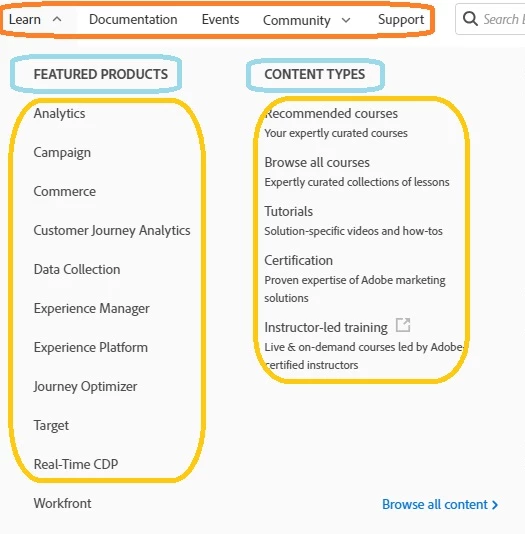
What will be the best way to achieve this? I could think of creating a new tab for each level and doing it with author input dynamically with the help of multifield.

This post is no longer active and is closed to new replies. Need help? Start a new post to ask your question.
Best answer by MukeshYadav_

Hi @arjit_bansal ,


  We  can maintain a parallel similar structure as we create pages(sites) or even use the same structure (just add extra navigation properties if required, also have ootb to include in navigation or not )

Construct corresponding list level as per structure maintained in page properties  (even icon and any other field can be added in page properties in future if required to have along with text on link)

Based on requirement author can create node at that level

Based on root path given navigation can be rendered.

Tree Structure will be easier to comprehend and visualise the rendering.


Thanks,

2 replies

EstebanBustamante
Community Advisor and Adobe Champion
June 28, 2024

Hi, 

In my opinion, the best way to achieve such a complex authoring experience is by attempting to break down the experience into smaller components and allowing the author to manage the configuration through 'smaller' dialogs. This is the approach that core components follow; for instance, in the carousel, you can add a 'slide,' which is another regular component. You can then choose which 'slide' to start authoring, and each 'slide' has its own dialog with its own properties.


This is achievable because of the "panel selector" functionality. Arun has an excellent blog explaining how to use and extend this functionality, you can learn more here: https://aemlab.blogspot.com/2022/09/aemaacs-core-components-children-editor.html 


Hope this helps.


Esteban Bustamante
MukeshYadav_
Community Advisor
MukeshYadav_Community AdvisorAccepted solution
Community Advisor
June 28, 2024

Hi @arjit_bansal ,


  We  can maintain a parallel similar structure as we create pages(sites) or even use the same structure (just add extra navigation properties if required, also have ootb to include in navigation or not )

Construct corresponding list level as per structure maintained in page properties  (even icon and any other field can be added in page properties in future if required to have along with text on link)

Based on requirement author can create node at that level

Based on root path given navigation can be rendered.

Tree Structure will be easier to comprehend and visualise the rendering.


Thanks,