Compare value and transfer on other page | Community
Skip to main content
varuns46785756
Level 5
September 28, 2018
Solved

Compare value and transfer on other page

  • September 28, 2018
  • 4 replies
  • 1609 views

Hi Team,

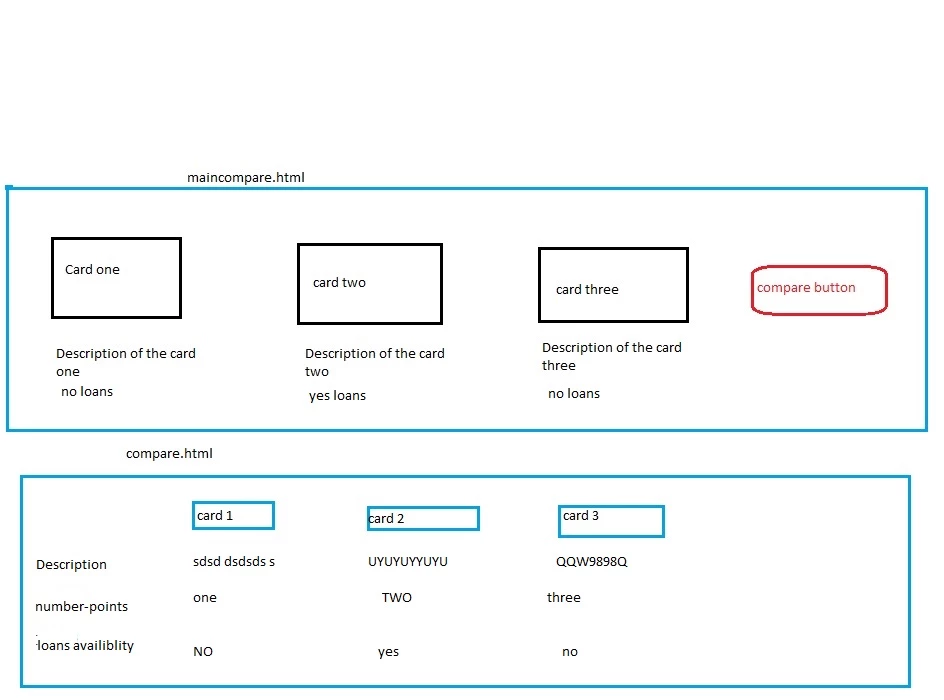
I have one compare functionality on my page, once user will select the card from main page(maincompare.html), it will open a pop up window with all selected card and once user will click on compare button it will redirect all the selected card value on new page( compare.html).After click on compare button I am able to redirect on next page( compare.html) but not able to fetch the values on next page.Please suggest how can i pass the selected values from maincompare.page(compare.html) to compare.html page.Please check the diagram.
This post is no longer active and is closed to new replies. Need help? Start a new post to ask your question.
Best answer by raj_mandalapu

This is more on design question and we can handle this in different ways.

I don't know why are you using different pages. But, when we use different pages. you must follow below things and each approach has it 's own trade offs you need to consider that

On click of the compare button :

Approach 1:

      If you are using simple anchor link to redirect to another page then you must use selectors to pass selected card details. the selectors should form with unique id's, in the compare page read the selectors and dynamically load the respective values in the compare page.

Approach 2 :

If you don't want to pass unique id's through selectors then you need to store all values in HTML5 session storage using JQuery in JSON format or some other format. the sessionStorage is specific to the current session when you close the browser it will automatically expire. in the compare read values from sessionStorage and populate cards.

Approach 3:

Don't know why are we using two pages, but we can handle this in a single page, put two div tags on click of compare button show the compare cards, but it depends on how many cards you have.

4 replies

smacdonald2008
Level 10
September 28, 2018

Hoiw are you reading the values - are you using JS, Java API, etc?

varuns46785756
Level 5
September 28, 2018

I am using JS..

Regards,

Sunil

arunpatidar
Community Advisor
Community Advisor
September 29, 2018

Hi,

If you want to pass value from one page to another, you need to either pass values as parameter or need to store somewhere like session, local storage.

or pass the selected card and fetch again card details via ajax call and display.

https://www.tutorialrepublic.com/jquery-tutorial/jquery-ajax-load.php

Arun Patidar
raj_mandalapu
raj_mandalapuAccepted solution
Level 7
September 29, 2018

This is more on design question and we can handle this in different ways.

I don't know why are you using different pages. But, when we use different pages. you must follow below things and each approach has it 's own trade offs you need to consider that

On click of the compare button :

Approach 1:

      If you are using simple anchor link to redirect to another page then you must use selectors to pass selected card details. the selectors should form with unique id's, in the compare page read the selectors and dynamically load the respective values in the compare page.

Approach 2 :

If you don't want to pass unique id's through selectors then you need to store all values in HTML5 session storage using JQuery in JSON format or some other format. the sessionStorage is specific to the current session when you close the browser it will automatically expire. in the compare read values from sessionStorage and populate cards.

Approach 3:

Don't know why are we using two pages, but we can handle this in a single page, put two div tags on click of compare button show the compare cards, but it depends on how many cards you have.