Best way to implement component with HTML and CSS | Community
Skip to main content
Level 3
September 1, 2022
Solved

Best way to implement component with HTML and CSS

  • September 1, 2022
  • 2 replies
  • 647 views

Hi Team,


Trust you are doing well.


I have HTML and CSS for my whole website, now I want to use that HTML and CSS in to my AEM project.

Can you please suggest a best way to use that HTML and CSS so while upgrade the AEM it will not affect the core AEM component.


Thanks !! 
 

This post is no longer active and is closed to new replies. Need help? Start a new post to ask your question.
Best answer by Sachin_Arora_

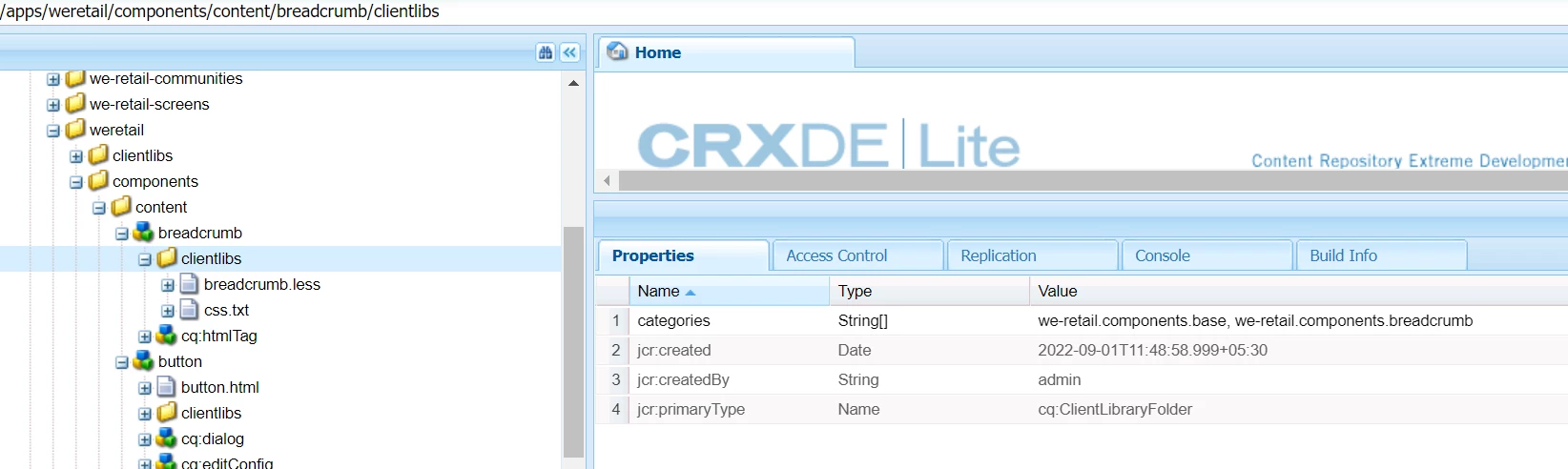
I always prefer referring to we-retail website for following best practices. You can divide CSS based on components which can be later used to add in proxy components like this.

Please refer we-retail website on your local as it also uses core components.


2 replies

Sachin_Arora_
Community Advisor
Sachin_Arora_Community AdvisorAccepted solution
Community Advisor
September 1, 2022

I always prefer referring to we-retail website for following best practices. You can divide CSS based on components which can be later used to add in proxy components like this.

Please refer we-retail website on your local as it also uses core components.


arunpatidar
Community Advisor
Community Advisor
September 1, 2022

Hi,

I would recommend to use https://experienceleague.adobe.com/docs/experience-manager-core-components/using/developing/archetype/uifrontend.html?lang=en


You can generate sample project from  https://github.com/adobe/aem-project-archetype 


mvn -B org.apache.maven.plugins:maven-archetype-plugin:3.2.1:generate \
 -D archetypeGroupId=com.adobe.aem \
 -D archetypeArtifactId=aem-project-archetype \
 -D archetypeVersion=37\
 -D appTitle="My Site" \
 -D appId="mysite" \
 -D groupId="com.mysite"
Arun Patidar