AEM Content Fragment Model Field - How to provide default value in value property but also accept empty values when editing | Community
Skip to main content
Level 2
April 8, 2024
Solved

AEM Content Fragment Model Field - How to provide default value in value property but also accept empty values when editing

  • April 8, 2024
  • 1 reply
  • 1890 views

Hi all,

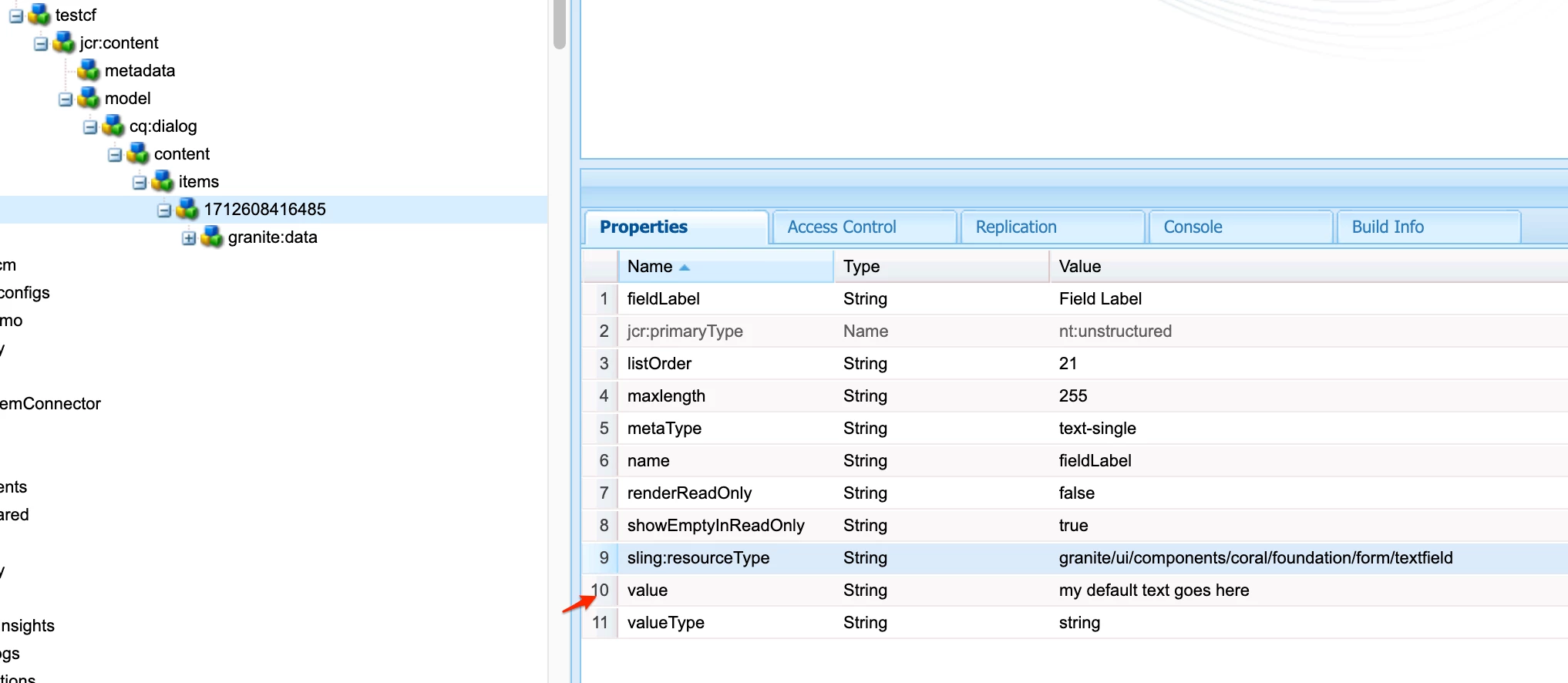
We are currently working on a project where another team handles editing content fragments. They have requested that the content fragment should have a default value when being created but also accept an empty string for the value. However, with the value property assigned there is no way to currently save an empty value.

Is there a possible workaround for this?

Thanks.
This post is no longer active and is closed to new replies. Need help? Start a new post to ask your question.
Best answer by EstebanBustamante

Hi, 

 I just tried one with a textField, and it works fine.

This is how I have defined my field:

Whenever the field is empty, the "default value" will be displayed

If you refresh the page, the value will be populated again because if there is no value. This is the expected behavior and how a "default value" works, if none is set, then the default is set. If you are trying to avoid this behavior, then you are not really looking for a default behavior. I think your best option is to either use a placeholder with the default value as I suggested, or add the suggested value in the field description or tooltip.

Hope this helps


1 reply

EstebanBustamante
Community Advisor and Adobe Champion
April 8, 2024

Hi, 


I'm not sure if I understood correctly. Are you saying that prepopulating the field is not an option? If you're just looking for a way to display a default value without actually setting this value, I believe you could try using the placeholder as a "default value". If you have good name and description fields, this could be an alternative approach.


Hope this helps.

Esteban Bustamante
asdasdsaAuthor
Level 2
April 8, 2024

Hi Esteban,

Thank you for taking the time to reply.

Prepopulating the field is currently what we are doing with the set value property. However, there are specific fields that were requested to accept an empty value as well. 

When we set the value property with a predefined default value, we are unable to save the new empty value as it is replaced with the predefined default value once again. I wanted to see if there was a possibility to somehow have that predefined default value but also allow the option for the field to accept empty values and not fallback to the default value.

EstebanBustamante
Community Advisor and Adobe Champion
EstebanBustamanteCommunity Advisor and Adobe ChampionAccepted solution
Community Advisor and Adobe Champion
April 8, 2024

Hi, 

 I just tried one with a textField, and it works fine.

This is how I have defined my field:

Whenever the field is empty, the "default value" will be displayed

If you refresh the page, the value will be populated again because if there is no value. This is the expected behavior and how a "default value" works, if none is set, then the default is set. If you are trying to avoid this behavior, then you are not really looking for a default behavior. I think your best option is to either use a placeholder with the default value as I suggested, or add the suggested value in the field description or tooltip.

Hope this helps


Esteban Bustamante

