ACS Commons MCP multifield component | Community
Skip to main content
Level 4
December 30, 2024
Solved

ACS Commons MCP multifield component

  • December 30, 2024
  • 1 reply
  • 981 views

Hi,


Anyone knows how to update the multi-field component with the dropdown menu. I need to have the field in MCP to select more than one option from the dropdown. Using SelectComponent.EnumerationSelector.class doesn't allow me to choose more than one value from the dropdown. So do we need to include the dropdown in the multiselect using MultifieldComponent.class. But by default we are getting the text field , how to update the text field with dropdown list.


Anyone knows the solution, please let me know. 


Thanks in advance!


Regards,

Bhavani Bharanidharan

Best answer by EstebanBustamante

Hi @bhavanibharani 


If what you need is a select field that allows multiple selections, then it’s not a multifield, but a simple select with the multiple=true option. You can find more details here: https://developer.adobe.com/experience-manager/reference-materials/6-5/granite-ui/api/jcr_root/libs/granite/ui/components/foundation/form/select/index.html.


However, this is not supported out-of-the-box for MCP fields. What you can do instead is create your own custom version of the widget and explicitly enable the multiple selection option. Something like this should work:


1. Created a new field class with the option for multiple (you can take it from the field config as well)


public abstract class SelectMultipleComponent extends FieldComponent { @ProviderType public static class EnumerationSelector extends SelectMultipleComponent { @Override public Map<String, String> getOptions() { return Stream.of((Enum[]) AccessibleObjectUtil.getType(getAccessibleObject()).getEnumConstants()) .collect(Collectors.toMap(Enum::name, e -> StringUtil.getFriendlyName(e.name()), (k, v)-> { throw new IllegalArgumentException("cannot merge"); }, LinkedHashMap::new)); } } @Override public void init() { setResourceType("granite/ui/components/coral/foundation/form/select"); getComponentMetadata().put("text", getFieldDefinition().name()); //Explicity Add the Multiple here: getComponentMetadata().put("multiple", true); } @Override public Resource buildComponentResource() { AbstractResourceImpl component = (AbstractResourceImpl) super.buildComponentResource(); AbstractResourceImpl options = new AbstractResourceImpl("items", null, null, new ResourceMetadata()); component.addChild(options); String defaultValue = getOption("default").orElse(null); getOptions().forEach((value, name)->{ final ResourceMetadata meta = new ResourceMetadata(); final String nodeName = JcrUtil.escapeIllegalJcrChars(value); if (value.equals(defaultValue)) { meta.put("selected", true); } meta.put("value", value); meta.put("text", name); AbstractResourceImpl option = new AbstractResourceImpl( "option_" + nodeName, null, null, meta); options.addChild(option); }); return component; } public abstract Map<String, String> getOptions(); }


2. Use this new class to create your field by using the "component" attribute: https://adobe-consulting-services.github.io/acs-aem-commons/features/mcp/subpages/form-fields.html (component = SelectMultipleComponent.EnumerationSelector.class)


3. Result: 
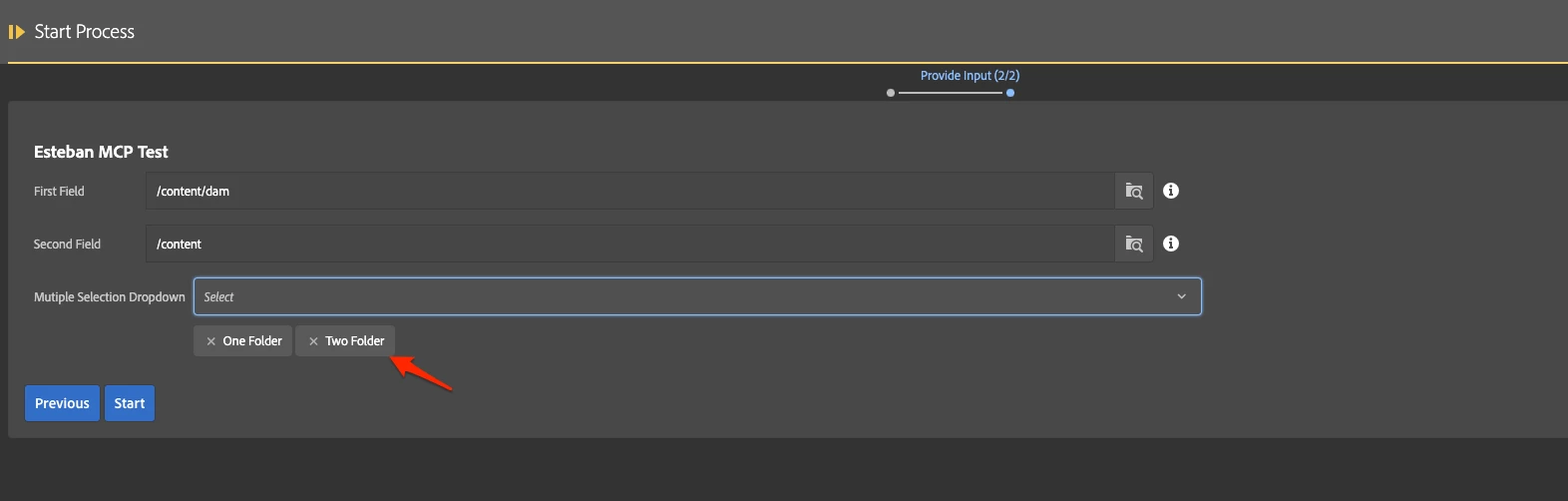
 

You can refer to the acs-commons project for more reference if this code needs to be tweaked: https://github.com/Adobe-Consulting-Services/acs-aem-commons/blob/master/bundle/src/main/java/com/adobe/acs/commons/mcp/form/SelectComponent.java


Hope this helps



1 reply

EstebanBustamante
Community Advisor and Adobe Champion
EstebanBustamanteCommunity Advisor and Adobe ChampionAccepted solution
Community Advisor and Adobe Champion
December 31, 2024

Hi @bhavanibharani 


If what you need is a select field that allows multiple selections, then it’s not a multifield, but a simple select with the multiple=true option. You can find more details here: https://developer.adobe.com/experience-manager/reference-materials/6-5/granite-ui/api/jcr_root/libs/granite/ui/components/foundation/form/select/index.html.


However, this is not supported out-of-the-box for MCP fields. What you can do instead is create your own custom version of the widget and explicitly enable the multiple selection option. Something like this should work:


1. Created a new field class with the option for multiple (you can take it from the field config as well)


public abstract class SelectMultipleComponent extends FieldComponent { @ProviderType public static class EnumerationSelector extends SelectMultipleComponent { @Override public Map<String, String> getOptions() { return Stream.of((Enum[]) AccessibleObjectUtil.getType(getAccessibleObject()).getEnumConstants()) .collect(Collectors.toMap(Enum::name, e -> StringUtil.getFriendlyName(e.name()), (k, v)-> { throw new IllegalArgumentException("cannot merge"); }, LinkedHashMap::new)); } } @Override public void init() { setResourceType("granite/ui/components/coral/foundation/form/select"); getComponentMetadata().put("text", getFieldDefinition().name()); //Explicity Add the Multiple here: getComponentMetadata().put("multiple", true); } @Override public Resource buildComponentResource() { AbstractResourceImpl component = (AbstractResourceImpl) super.buildComponentResource(); AbstractResourceImpl options = new AbstractResourceImpl("items", null, null, new ResourceMetadata()); component.addChild(options); String defaultValue = getOption("default").orElse(null); getOptions().forEach((value, name)->{ final ResourceMetadata meta = new ResourceMetadata(); final String nodeName = JcrUtil.escapeIllegalJcrChars(value); if (value.equals(defaultValue)) { meta.put("selected", true); } meta.put("value", value); meta.put("text", name); AbstractResourceImpl option = new AbstractResourceImpl( "option_" + nodeName, null, null, meta); options.addChild(option); }); return component; } public abstract Map<String, String> getOptions(); }


2. Use this new class to create your field by using the "component" attribute: https://adobe-consulting-services.github.io/acs-aem-commons/features/mcp/subpages/form-fields.html (component = SelectMultipleComponent.EnumerationSelector.class)


3. Result: 


You can refer to the acs-commons project for more reference if this code needs to be tweaked: https://github.com/Adobe-Consulting-Services/acs-aem-commons/blob/master/bundle/src/main/java/com/adobe/acs/commons/mcp/form/SelectComponent.java


Hope this helps


Esteban Bustamante
Level 4
January 3, 2025

Thank you @estebanbustamante. This really unblocked my issue.