opening a form from external Application | Community
Skip to main content
ayecona
Level 5
August 23, 2019
Solved

opening a form from external Application

  • August 23, 2019
  • 3 replies
  • 4169 views

I have the need to open a form that is on my publish site in an Iframe that will open on an external application (Dynamic CRM) for this I want to send a few parameters so that the form opens the correct record from Dynamics CRM.

lets say I want to pass the casenumber and casedate from my external application into the publish instance of AEM. how do I read the parameters being passed? what is the query string look like? is this possible?

thanks

I want to add this below:

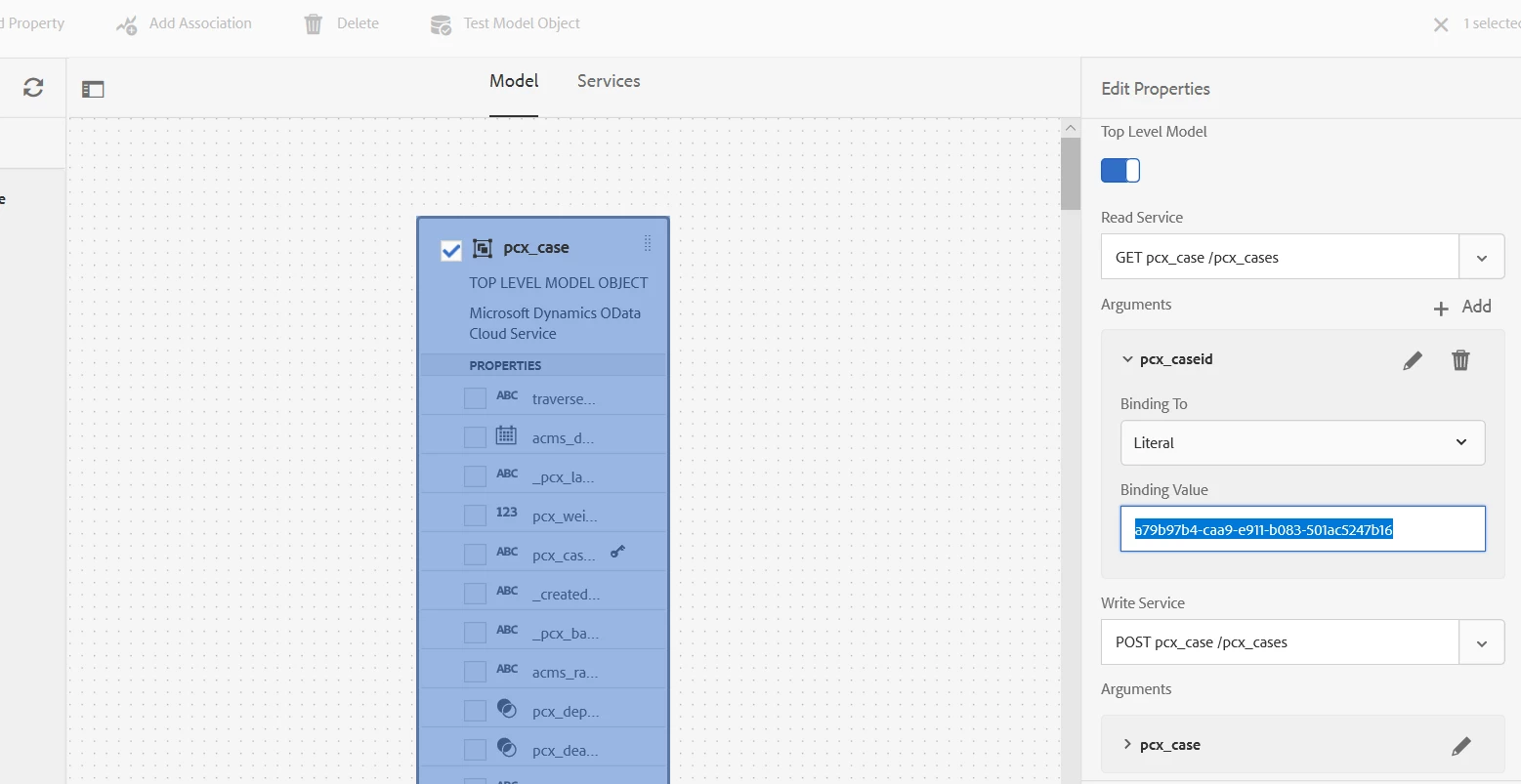
you can see here how the argument of a caseid is being hardcoded, could that be the parameter being passed?

This post is no longer active and is closed to new replies. Need help? Start a new post to ask your question.
Best answer by workflowuser

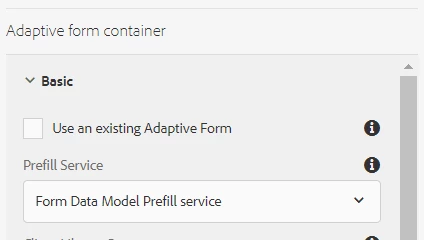
First you need to make sure you have selected the Form Data Model Prefill service for your form as shown below
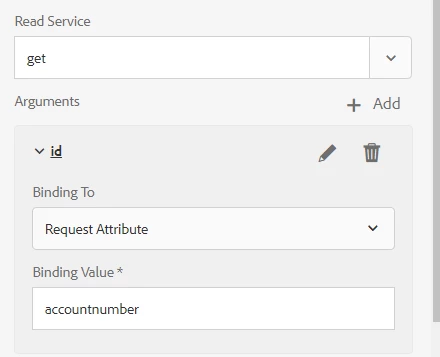
Then you need to change the binding  fo your FDM from literal to Request Attribute. The string in the binding value can be any name. For example I have put accountnumber here. This accountnumber will be used in the code in the jsp page
Next, you need to create a NEW AF Template and Page Component as shown in this video https://helpx.adobe.com/experience-manager/kt/forms/using/saving_and_retrieving_adaptive_form_data.html#CreatenewAdaptiveFormTemplateandPageComponent

Saving And Retrieving Adaptive Form Data . It is recommended that you use the same page component that is provided in the article

Create your AF based on this new template. Associate your Form Data Model with this form

this is the best practice for your use case since we are going to populate the form based on url parameter

Then in the worker.jsp replace the code with the following code

Map<String,Integer>map = new java.util.HashMap<String,Integer>();

if(request.getParameter("accountnumber")!=null)

    {

        System.out.println("There is a accountnumber parameter in the request"+request.getParameter("accountnumber"));

     map.put("accountnumber",Integer.parseInt(request.getParameter("accountnumber")));

        slingRequest.setAttribute("paramMap",map);

    }

When your AF is being loaded this code will get executed. This will check for accountnumber parameter(This needs to be the same as you have specified in the above screenshot) parameter in the URL. We then create a map with the appropriate values and pass the map in the slingRequest. This will populate your for with the results from the FDM get method

for example  when you load an AF with the following URLhttp://localhost:4502/content/dam/formsanddocuments/forumsdemoform/jcr:content?wcmmode=disabled&accountnumber=37

http://localhost:4502/content/dam/formsanddocuments/forumsdemoform/jcr:content?wcmmode=disabled&accountnumber=37

The form will fetch data associated with accountnumber 37 and populate the form

Let us know through this forum if this works or you have any more questions

3 replies

Adobe Employee
August 23, 2019

Saving And Retrieving Adaptive Form Data

take a look at the creating new AF Template and Page Component section. In that you can access the url parameters and populate the form

Adobe Employee
August 23, 2019

let me send you a sample

workflowuserAdobe EmployeeAccepted solution
Adobe Employee
August 23, 2019

First you need to make sure you have selected the Form Data Model Prefill service for your form as shown below

Then you need to change the binding  fo your FDM from literal to Request Attribute. The string in the binding value can be any name. For example I have put accountnumber here. This accountnumber will be used in the code in the jsp page

Next, you need to create a NEW AF Template and Page Component as shown in this video https://helpx.adobe.com/experience-manager/kt/forms/using/saving_and_retrieving_adaptive_form_data.html#CreatenewAdaptiveFormTemplateandPageComponent

Saving And Retrieving Adaptive Form Data . It is recommended that you use the same page component that is provided in the article

Create your AF based on this new template. Associate your Form Data Model with this form

this is the best practice for your use case since we are going to populate the form based on url parameter

Then in the worker.jsp replace the code with the following code

Map<String,Integer>map = new java.util.HashMap<String,Integer>();

if(request.getParameter("accountnumber")!=null)

    {

        System.out.println("There is a accountnumber parameter in the request"+request.getParameter("accountnumber"));

     map.put("accountnumber",Integer.parseInt(request.getParameter("accountnumber")));

        slingRequest.setAttribute("paramMap",map);

    }

When your AF is being loaded this code will get executed. This will check for accountnumber parameter(This needs to be the same as you have specified in the above screenshot) parameter in the URL. We then create a map with the appropriate values and pass the map in the slingRequest. This will populate your for with the results from the FDM get method

for example  when you load an AF with the following URLhttp://localhost:4502/content/dam/formsanddocuments/forumsdemoform/jcr:content?wcmmode=disabled&accountnumber=37

http://localhost:4502/content/dam/formsanddocuments/forumsdemoform/jcr:content?wcmmode=disabled&accountnumber=37

The form will fetch data associated with accountnumber 37 and populate the form

Let us know through this forum if this works or you have any more questions