
ImageRef in GraphQL Query not showing for SVG image | Adobe Higher Education
Skip to main content
ClintLundmark
Level 3
November 15, 2023
Beantwortet

ImageRef in GraphQL Query not showing for SVG image

  • November 15, 2023
  • 1 Antwort
  • 1363 Ansichten

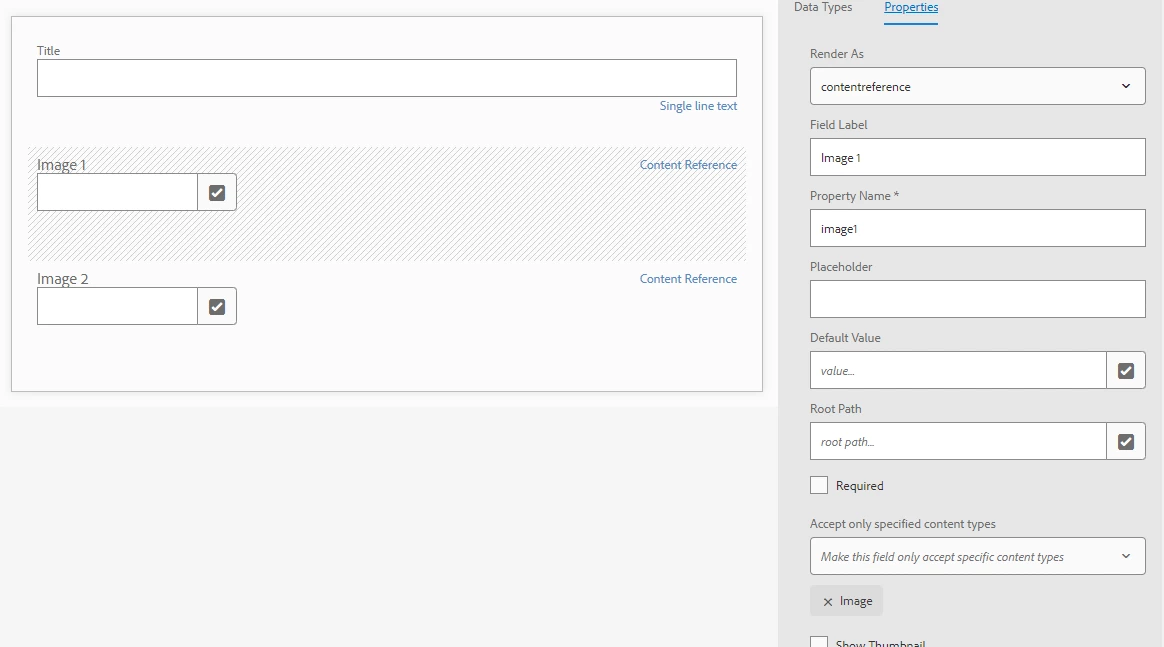
Created a Content Fragment Model and used a Content Reference data type. The "Accept only specified content types" is set to Image. When using the model to create a Content Fragment, it works to select typical image types such as PNG, JPG and SVG. However if a SVG is selected the GraphQL query does not display ImageRef information. It works for other image types, not SVG.


Model:


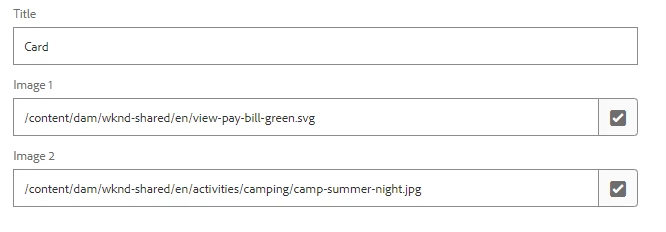
Content Fragment:


Query:


{ imageTestList{ items{ title image1{ ... on ImageRef { _path _publishUrl } } image2{ ... on ImageRef { _path _publishUrl } } } } }


 I have set image1 to be an SVG file and image2 to be a JPG. Here is the output:


Results


{ "data": { "imageTestList": { "items": [ { "title": "Card", "image1": {}, "image2": { "_path": "/content/dam/wknd-shared/en/activities/camping/camp-summer-night.jpg", "_publishUrl": "http://localhost:4503/content/dam/wknd-shared/en/activities/camping/camp-summer-night.jpg" } } ] } } }


The image1 item shows as blank, even though it is set to a SVG file.


Since "accept only content type" is set to Image and, when using the model I can select an SVG file, it seems like it should output ImageRef information for the SVG selected.


As noted in a previous post, if an SVG image is selected for a Content Reference, DocumentRef can be used to output _path, but then it does not work for other image types. In this use case a valid image type for the model is JPG, PNG or SVG.


This was tested in AEM 6.5.17 and 6.5.18.

Dieses Thema wurde für Antworten geschlossen.
Beste Antwort von ClintLundmark

There is a simple work around to this issue. Add a _DocumentRef to the GraphQL query. It feels like a strange approach but it does work!


Query

{ imageTestList{ items{ title image1{ ... on ImageRef { _path _publishUrl } ... on DocumentRef { _path _publishUrl } } image2{ ... on ImageRef { _path _publishUrl } ... on DocumentRef { _path _publishUrl } } } } }

Results

{ "data": { "imageTestList": { "items": [ { "title": "Card", "image1": { "_path": "/content/dam/wknd-shared/en/view-pay-bill-green.svg", "_publishUrl": "http://localhost:4503/content/dam/wknd-shared/en/view-pay-bill-green.svg" }, "image2": { "_path": "/content/dam/wknd-shared/en/activities/camping/camp-summer-night.jpg", "_publishUrl": "http://localhost:4503/content/dam/wknd-shared/en/activities/camping/camp-summer-night.jpg" } } ] } } }


For image1, which is a SVG file, _DocumentRef handles the output. For image2, which is a JPG, _ImageRef handles the output.

1 Antwort

ClintLundmark
ClintLundmarkAutorAntwort
Level 3
November 15, 2023

There is a simple work around to this issue. Add a _DocumentRef to the GraphQL query. It feels like a strange approach but it does work!


Query

{ imageTestList{ items{ title image1{ ... on ImageRef { _path _publishUrl } ... on DocumentRef { _path _publishUrl } } image2{ ... on ImageRef { _path _publishUrl } ... on DocumentRef { _path _publishUrl } } } } }

Results

{ "data": { "imageTestList": { "items": [ { "title": "Card", "image1": { "_path": "/content/dam/wknd-shared/en/view-pay-bill-green.svg", "_publishUrl": "http://localhost:4503/content/dam/wknd-shared/en/view-pay-bill-green.svg" }, "image2": { "_path": "/content/dam/wknd-shared/en/activities/camping/camp-summer-night.jpg", "_publishUrl": "http://localhost:4503/content/dam/wknd-shared/en/activities/camping/camp-summer-night.jpg" } } ] } } }


For image1, which is a SVG file, _DocumentRef handles the output. For image2, which is a JPG, _ImageRef handles the output.

Saravanan_Dharmaraj
Community Advisor
Community Advisor
November 16, 2023

@clintlundmark Thanks for the update with the solution. It will help others.