Decrypting files before ingensting | Community
Skip to main content
June 18, 2017
Solved

Decrypting files before ingensting

  • June 18, 2017
  • 2 replies
  • 5431 views

Since the data files that will be uploaded to Campaign Servers will have PII data, the source system will encrypt (PGP encryption) the data files before uploading them to Adobe Campaign server. As part of the data ingestion process/workflow, we need to first decrypt the files and then ingest the data. Can you please suggest potential solutions for achieving it?

Thanks!
This post is no longer active and is closed to new replies. Need help? Start a new post to ask your question.
Best answer by Amit_Kumar

Hi,

There are two options to solve this

option 1: use the "script" i.e use shell script , activity to decrypt the file in the workflow before importing file into adobe  campaign.

option 2: you can follow the following steps:

Step 1:

download pgp either from https://sourceforge.net/projects/ppgp/ or https://pgp.en.softonic.com/

step 2: install the pgp

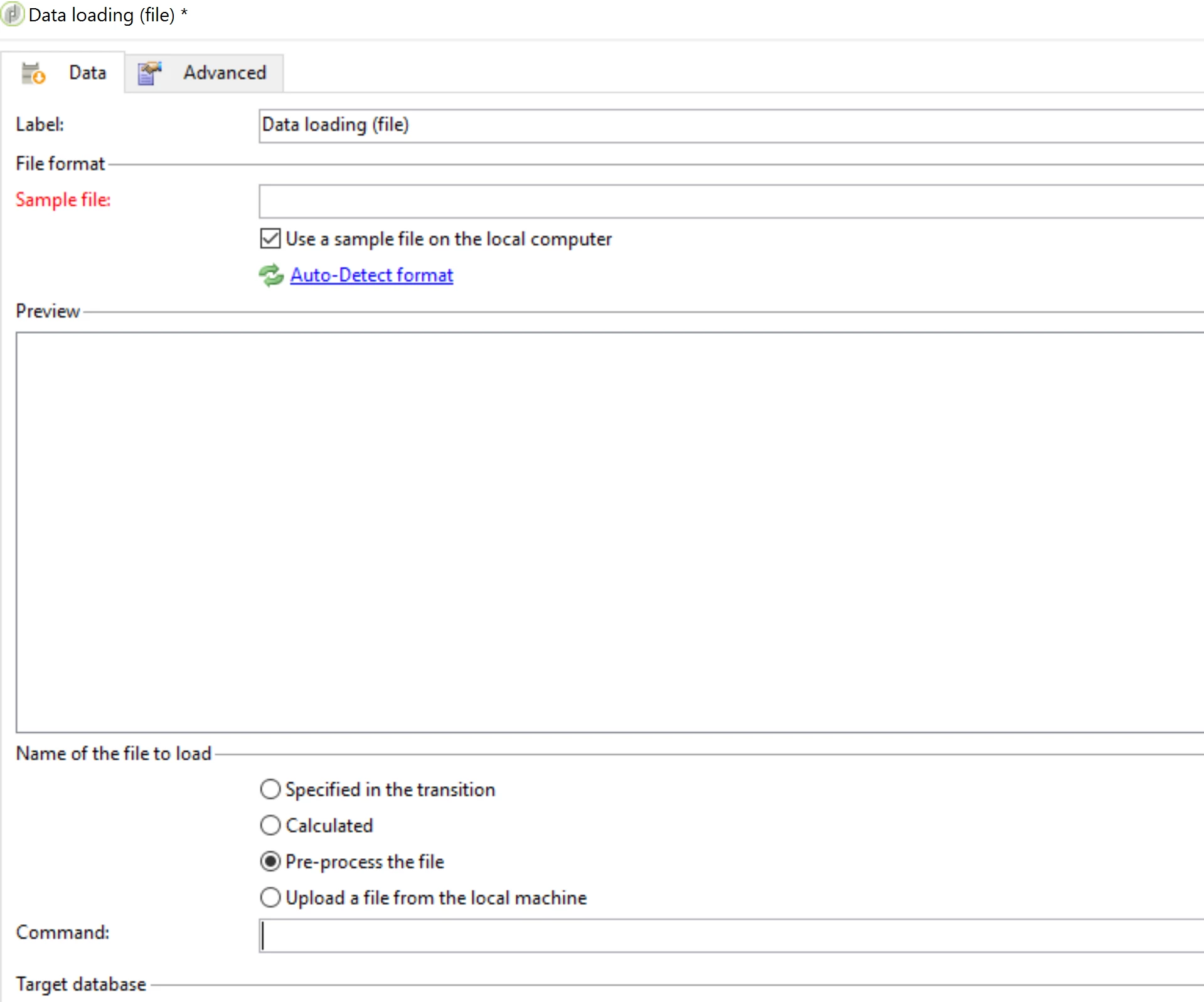
step 3: Use Data loading (file) activity in your adobe campaign workflow:

step 4: choose pre process the file option: refer to screen:

Step 5: Use the following command:

<path-to_pgp_if-not_global_or_server/>pgp.exe --decrypt --input nl6/var/vp/import/filename.pgp --passphrase "your password" --recipient recipient @email.com --verbose --output nl6/var/vp/import/filename

step 6 : save and execute the workflow.

Regards,

Amit

2 replies

Amit_Kumar
Amit_KumarAccepted solution
June 19, 2017

Hi,

There are two options to solve this

option 1: use the "script" i.e use shell script , activity to decrypt the file in the workflow before importing file into adobe  campaign.

option 2: you can follow the following steps:

Step 1:

download pgp either from https://sourceforge.net/projects/ppgp/ or https://pgp.en.softonic.com/

step 2: install the pgp

step 3: Use Data loading (file) activity in your adobe campaign workflow:

step 4: choose pre process the file option: refer to screen:

Step 5: Use the following command:

<path-to_pgp_if-not_global_or_server/>pgp.exe --decrypt --input nl6/var/vp/import/filename.pgp --passphrase "your password" --recipient recipient @email.com --verbose --output nl6/var/vp/import/filename

step 6 : save and execute the workflow.

Regards,

Amit

July 8, 2020
Is it the same procedure for ACS?
June 19, 2017

Thanks a lot Amit for the detailed response. We will try out the solution options that you suggested.