xml input forms | Community
Skip to main content
This post is no longer active and is closed to new replies. Need help? Start a new post to ask your question.
Best answer by _Manoj_Kumar_

Hello @alnavarg 


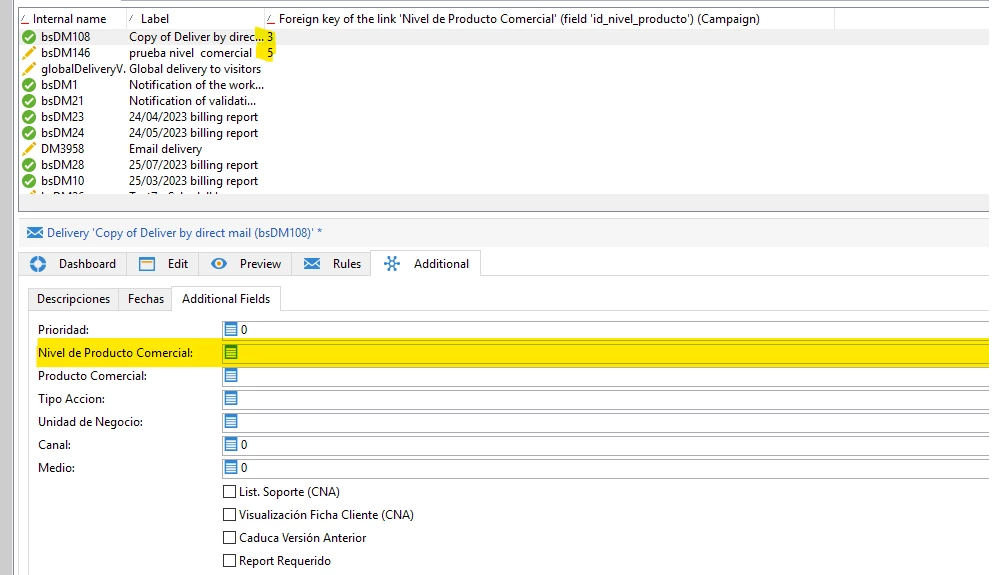
Add a new field to the deliveries schema eg. campaignName


Then edit the nms:delivery input form with these changes.

  • Add operation/@label to the xpathsToLoad (This will be the field from campaign which you are trying to populate)


  • Then add the campaignName attribute in your input form.


  • Then preload the field with value from campaign name


3 replies

AkshayAnand
Community Advisor
Community Advisor
August 21, 2023

Hi @alnavarg 


You can save this value using a workflow, or through adding "Additional Fields" in the target mapping. Once the value is saved, you can use the link to follow the steps for form creation.

If the value is readily available then you can directly create the form using the attached link.


Regards

Akshay

alnavarg
alnavargAuthor
August 21, 2023

@akshayanand i cant use a workflow.

I want the value in like this <set expr=" " xpath=" ">

alnavarg
alnavargAuthor
August 24, 2023

I need help please 


@_manoj_kumar_ 

_Manoj_Kumar_
Community Advisor
_Manoj_Kumar_Community AdvisorAccepted solution
Community Advisor
August 29, 2023

Hello @alnavarg 


Add a new field to the deliveries schema eg. campaignName


Then edit the nms:delivery input form with these changes.

  • Add operation/@label to the xpathsToLoad (This will be the field from campaign which you are trying to populate)


  • Then add the campaignName attribute in your input form.


  • Then preload the field with value from campaign name


     Manoj     Find me on LinkedIn