Storing data in mData / Memo XML | Community
Skip to main content
david--garcia
Level 10
December 17, 2021
Solved

Storing data in mData / Memo XML

  • December 17, 2021
  • 2 replies
  • 1675 views
Currently,  am using the sqlExec function to access the mData field of the recipient schema to store tmp data such as below, while this works, I do not want to rely on this method.


/** store tmp changes in xml field **/ xmlData = '<?xml version="1.0"?>' +'<recipient>' +'<comment>This is a test</comment>' +'<changes firstName="David" lastName="Garcia" email="myemail@email.com"></changes>' +'</recipient>' sqlExec("UPDATE NmsRecipient SET mData = '"+xmlData+"' WHERE iRecipientId='"+parseInt(ctx.recipient.@id)+"' ");


The first test was the JSON method (recipient.comment actually stores the string in the mData field)


var recipient = NLWS.nmsRecipient.create( {recipient:{ email : 'dummy@dummy.com', lastName : 'onetwo', firstName : 'three', origin : 'Preference Centre'}}) recipient.comment = "This is my comment"; recipient.save()


Method (session write) - the changes node did not work at first, so I've extended the recipient schema and added a new xml type field which allows me to access the mdata node easily.

 
<element label="changes" localizable="true" name="changes" type="memo" xml="true"/>


xtk.session.Write( <recipient _operation="insert" email="dummy@dummy.com" firstName="Garcia" xtkschema="nms:recipient"> <comment>This is a test</comment> <changes>Changes test</changes> </recipient>);


Method (e4x)


var recipient = NLWS.nmsRecipient.create(<recipient email = "dummy@support.com" lastName = "Neolane" firstName = "Suspportq"> <comment>This is a test</comment> <changes>This is my changes</changes> </recipient>) recipient.save();



My question is: how can I add attributes to the comment or the changes nodes so that I don't have to keep extending the schema? so that I can use the script such as


var recipient = NLWS.nmsRecipient.create(<recipient email = "dummy@support.com" lastName = "Neolane" firstName = "Suspportq"> <comment>This is a test</comment> <changes firstName="David lastName="Garcia"> </recipient>) recipient.save();


@Darren_Bowers @LaurentLam @Marcel_Szimonisz @Adhiyan @Jonathon_wodnicki @CedricRey @Milan_Vucetic @Manoj_Kumar_ @Florian_Courgey @Jean-Serge_Biro

 
This post is no longer active and is closed to new replies. Need help? Start a new post to ask your question.
Best answer by david--garcia

I was able to get it done by extending the recipient schema and adding more attributes to the new changes element


    <!--tmp recipient changes 18122021 David Garcia-->
    <element label="changes" name="changes" type="memo" xml="true">
      <attribute label="tmp firstName" name="firstName" type="string" xml="true"/>
      <attribute label="tmp LastName" name="lastName" type="string" xml="true"/>
      <attribute label="tmp email" name="email" type="string" xml="true"/>
      <attribute label="tmp emailPreferredName" name="emailPreferredName" type="string"
                 xml="true"/>
      <attribute label="tmp JOB_TITLE" name="JOB_TITLE" type="string" xml="true"/>
      <attribute label="tmp company" name="company" type="string" xml="true"/>
      <attribute label="tmp blackListEmail" name="blackListEmail" type="string" xml="true"/>
      <attribute label="tmp lawfulBasis" name="lawfulBasis" type="string" xml="true"/>
    </element>
    <!--tmp recipient changes -->

In this way, I can use the following script to access the mData field and store data in an xml format.


var recipient = NLWS.nmsRecipient.create(<recipient
  email = "dummy@support.com"
  lastName = "David"
  firstName = "Garcia">
  <comment>This is a test</comment>
  <changes firstName="myTmpName"></changes>
</recipient>)
recipient.save();

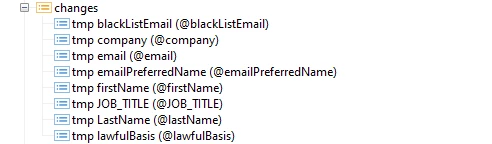
Available fields

xpath to xml fields [changes/@firstName]


However, I cannot get it to work with my JSON variant?

var recipient = NLWS.nmsRecipient.create(
                   {recipient:{
                    email              : 'dummy@dummy.com', 
                    lastName           : 'GGarcia', 
                    firstName          : 'DGarciaTWOTWO',
                    origin             : 'Preference Centre',
                   [changes/@firstName]: 'ChangesTest'}})               
                    
                    recipient.comment = "MyComment";                 
                    recipient.save();   

also tried recipient.changes.@firstName and the workflow just goes in a loop


UPDATE

After I removed the type="memo" from the recipient schema the following script worked fine.


<element label="changes" localizable="true" name="changes" type="memo" xml="true"/>

to

<element label="changes" name="changes" xml="true"/>


Any idea what impact does the memo type has?


var recipient = NLWS.nmsRecipient.create( {recipient:{ email : 'dummy@dummy.com', lastName : 'D', firstName : 'G', origin : 'Preference Centre'}}) recipient.changes.firstName = 'tmpName' recipient.comment = "CommentsHere"; recipient.save();


This version also works

var recipient = NLWS.nmsRecipient.create( {recipient:{ email : 'dummy@dummy.com', lastName : 'D', firstName : 'G', origin : 'Preference Centre', changes: { firstName : 'tmpFirstName' } }}) recipient.comment = "CommentsHere"; recipient.save();


2 replies

david--garcia
david--garciaAuthorAccepted solution
Level 10
December 18, 2021

I was able to get it done by extending the recipient schema and adding more attributes to the new changes element


    <!--tmp recipient changes 18122021 David Garcia-->
    <element label="changes" name="changes" type="memo" xml="true">
      <attribute label="tmp firstName" name="firstName" type="string" xml="true"/>
      <attribute label="tmp LastName" name="lastName" type="string" xml="true"/>
      <attribute label="tmp email" name="email" type="string" xml="true"/>
      <attribute label="tmp emailPreferredName" name="emailPreferredName" type="string"
                 xml="true"/>
      <attribute label="tmp JOB_TITLE" name="JOB_TITLE" type="string" xml="true"/>
      <attribute label="tmp company" name="company" type="string" xml="true"/>
      <attribute label="tmp blackListEmail" name="blackListEmail" type="string" xml="true"/>
      <attribute label="tmp lawfulBasis" name="lawfulBasis" type="string" xml="true"/>
    </element>
    <!--tmp recipient changes -->

In this way, I can use the following script to access the mData field and store data in an xml format.


var recipient = NLWS.nmsRecipient.create(<recipient
  email = "dummy@support.com"
  lastName = "David"
  firstName = "Garcia">
  <comment>This is a test</comment>
  <changes firstName="myTmpName"></changes>
</recipient>)
recipient.save();

Available fields

xpath to xml fields [changes/@firstName]


However, I cannot get it to work with my JSON variant?

var recipient = NLWS.nmsRecipient.create(
                   {recipient:{
                    email              : 'dummy@dummy.com', 
                    lastName           : 'GGarcia', 
                    firstName          : 'DGarciaTWOTWO',
                    origin             : 'Preference Centre',
                   [changes/@firstName]: 'ChangesTest'}})               
                    
                    recipient.comment = "MyComment";                 
                    recipient.save();   

also tried recipient.changes.@firstName and the workflow just goes in a loop


UPDATE

After I removed the type="memo" from the recipient schema the following script worked fine.


<element label="changes" localizable="true" name="changes" type="memo" xml="true"/>

to

<element label="changes" name="changes" xml="true"/>


Any idea what impact does the memo type has?


var recipient = NLWS.nmsRecipient.create( {recipient:{ email : 'dummy@dummy.com', lastName : 'D', firstName : 'G', origin : 'Preference Centre'}}) recipient.changes.firstName = 'tmpName' recipient.comment = "CommentsHere"; recipient.save();


This version also works

var recipient = NLWS.nmsRecipient.create( {recipient:{ email : 'dummy@dummy.com', lastName : 'D', firstName : 'G', origin : 'Preference Centre', changes: { firstName : 'tmpFirstName' } }}) recipient.comment = "CommentsHere"; recipient.save();


https://www.linkedin.com/in/david-garcia-uk/ | https://martech.network
David_Loyd
Adobe Employee
Adobe Employee
December 20, 2021

acx:pipelineEvent is also another good schema to take notes from on using the Memo field. It uses a combination of XML and JSON. I've also used a Memo field to solely store JSON and pull it into workflows.