
Publish resource file via JSCode | Adobe Higher Education
Skip to main content
jorgeferreira
Level 3
October 9, 2023
Resuelto

Publish resource file via JSCode

  • October 9, 2023
  • 2 respuestas
  • 1537 visualizaciones

Hello, 


I'm trying to create and publish resource files dynamically by JS code but I'm not being able to publish them after creating. 


My code is as follows:

var file = new File("F:\\Attachments\\current\\attach1.pdf"); if(!file.exists) logError ("File '" + file.fullName + "' does not exist."); var extension = /[^.]+$/.exec(file.name); var md5 = digestStrMd5(file.name); if (!file.copyTo("E:\\Adobe\\Campaign\\var\\campaign_tst\\upload\\" + md5 + "." + extension)) logError ("File '" + file.fullName + "' was not copied"); var xmlString = '<fileRes alt="" codepage="0" height="0" name="'+md5+'" nature="" publish="1" storageType="5" useMd5AsFilename="1" userContentType="0" version="" width="0" xtkschema="xtk:fileRes"/>' var fileRes = xtk.fileRes.create( new XML(xmlString)); fileRes.contentType="application/pdf"; fileRes.label = "Attachment 1" fileRes.md5 = md5; fileRes.fileName = md5; fileRes.originalName = md5+".pdf"; fileRes.save(); fileRes.PublishIfNeeded();


After this code, the files are always with the state publishing is needed:
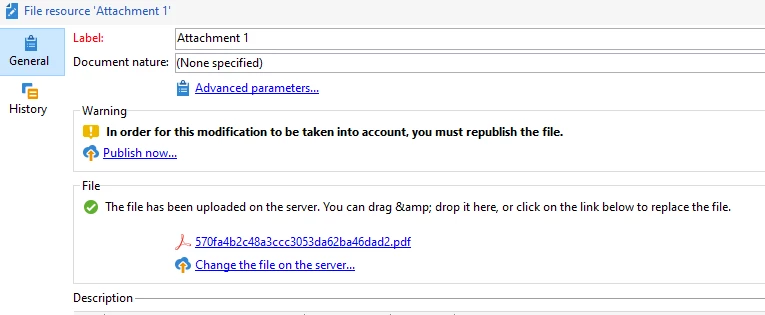
 

Are there any suggestions on how can I publish this attachments via code?
Even if I have to load them in a separate JS. 


Thanks in advance

Este tema ha sido cerrado para respuestas.
Mejor respuesta de Marcel_Szimonisz

Hello @jorgeferreira,

I remembered i was having similar issue but did not finish the thing

https://experienceleaguecommunities.adobe.com/t5/adobe-campaign-classic-questions/i-want-to-upload-images-to-public-resources-every-morning-is-it/td-p/234118

And they recommend use publishIfNeededFromId for one file resource
https://experienceleague.adobe.com/developer/campaign-api/api/sm-fileRes-PublishIfNeededFromId.html


In your case I gues you need to create some sort of file list  but i could not find the structure. Maybe it can follow session write collection logic:


<fileRes-collection xtkschema="xtk:fileRes"> <fileRes name="" md5=""/> <fileRes name="" md5=""/> <fileRes name="" md5=""/> </fileRes-collection>


Marcel Szimonisz

MarTech Consultant
for more tips visit my blog
https://www.martechnotes.com/

2 respuestas

LakshmiPravallika
Community Advisor
Community Advisor
October 9, 2023
jorgeferreira
Level 3
October 9, 2023

Hi, 


I also came accross that unanswered question. 
It's not clear for me how can I call that method. 


LakshmiPravallika
Community Advisor
Community Advisor
October 9, 2023

Hi @jorgeferreira 


Could you Please try fileRes.FilePublishing(fileRes); at the end of the code and let me know if it works.


Regards,

Pravallika.

Marcel_Szimonisz
Community Advisor
Community Advisor
October 9, 2023

Hello @jorgeferreira,

I remembered i was having similar issue but did not finish the thing

https://experienceleaguecommunities.adobe.com/t5/adobe-campaign-classic-questions/i-want-to-upload-images-to-public-resources-every-morning-is-it/td-p/234118

And they recommend use publishIfNeededFromId for one file resource
https://experienceleague.adobe.com/developer/campaign-api/api/sm-fileRes-PublishIfNeededFromId.html


In your case I gues you need to create some sort of file list  but i could not find the structure. Maybe it can follow session write collection logic:


<fileRes-collection xtkschema="xtk:fileRes"> <fileRes name="" md5=""/> <fileRes name="" md5=""/> <fileRes name="" md5=""/> </fileRes-collection>


Marcel Szimonisz

MarTech Consultant
for more tips visit my blog
https://www.martechnotes.com/

jorgeferreira
Level 3
October 9, 2023

Hi Marcel, 


In the first link you have provided I could find the answer to this specific issue.

I just needed to add 

xtk.fileRes.PublishIfNeededFromId(fileRes.id);

After the .save()


Thanks!