Import Workflow not inserting records | Community
Skip to main content
Adobe Employee
July 5, 2023
Solved

Import Workflow not inserting records

  • July 5, 2023
  • 1 reply
  • 1603 views

I am trying to import data from a csv file. Pretty much same use case as this article:
https://experienceleaguecommunities.adobe.com/t5/adobe-campaign-classic-questions/clarification-on-insert-or-update-in-adobe-campaign-classic/m-p/442478 .

I have followed the approved solution and I am not getting any errors in my journal, which looks like this:
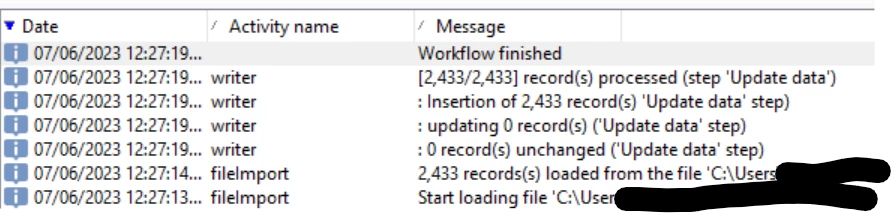
But no records have been added to my recipient table. I've checked both in the recipients folder in the Campaign client and in nmsrecipient in the postgreSQL database. Doesn't the journal say they have been inserted? Why are the records not being inserted?

This post is no longer active and is closed to new replies. Need help? Start a new post to ask your question.
Best answer by aggabhi

Hi Abhishek,

Now the records have been inserted in postgreSQL table. Not sure why it was delayed, but it wasn't displaying then. Sorry for the confusion and thanks for the response.


Regards,

Hari


Thanks, just find the link if it won’t work in future 


https://experienceleaguecommunities.adobe.com/t5/adobe-campaign-classic-questions/recipient-profile-not-visible-under-recipient-folder/m-p/356163  

@hariharanb 

1 reply

Level 5
July 5, 2023

Hi @hariharanb ,


Seems you have not configured the update data activity correctly here, records which you have loaded by data loading is not getting updated in update data activity.


can you attach screenshot of update data activity configuration??


Regards

Abhishek

Adobe Employee
July 5, 2023

Hi Abhishek,

Here is my update data activity:

capillaryId is the name of the primary key in the extended recipient schema. User_id is the name of the corresponding PK field in the csv.


Regards,

Hari

Adobe Employee
July 5, 2023

Hi Abhishek,

Now the records have been inserted in postgreSQL table. Not sure why it was delayed, but it wasn't displaying then. Sorry for the confusion and thanks for the response.


Regards,

Hari