
how to create coupons in the coupons folder in the coupon management. | Community
Skip to main content
Sathyam_Chandan
Level 2
November 20, 2023
Solved

how to create coupons in the coupons folder in the coupon management.

  • November 20, 2023
  • 1 reply
  • 1356 views

Dear Community friends,


Exp: I have 1000 unique coupons (in the .CSV file) and 1000 recipients, I want to map these coupons through coupon management at the advanced section in the email delivery. I tried, but I am unable to get the solution. can you please help me.
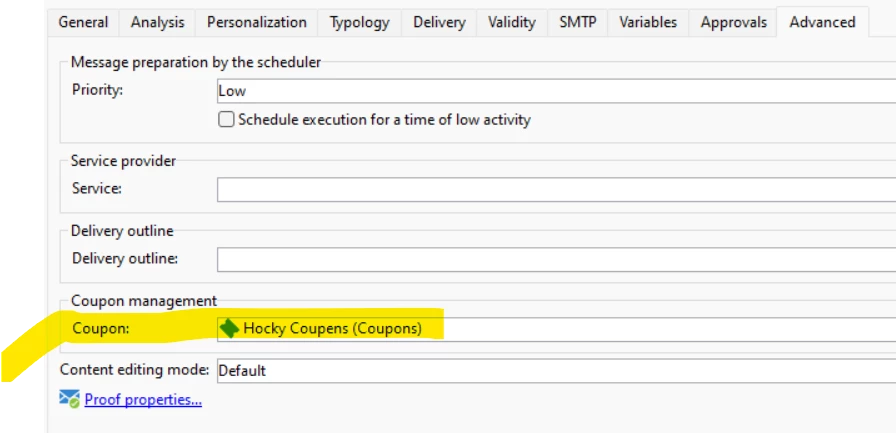


Thank you

Sathyam.


This post is no longer active and is closed to new replies. Need help? Start a new post to ask your question.
Best answer by ParthaSarathy

@sathyam_chandan , the solution have been provided in this thread

By Configure the same setup with coupon-id as mentioned in the thread, you can able to import in bulk.

You can also create an import workflow by having basic configuration like data loading > dedup > update data, you can import in bulk.

1 reply

ParthaSarathy
Community Advisor
Community Advisor
November 20, 2023

Hi @sathyam_chandan ,

Make Sure, the coupon type is Individual and in Coupon tab check you have adequate coupon codes in it.

And to configure Individual coupons, in email body > include > coupon value and select coupon code 

It will print as,

<%= couponValue.couponCode %>
~  ParthaSarathy S~  Click here to join ADOBE CAMPAIGN USER GROUP for Quarterly In-person | Hybrid | Virtual Meetups
Sathyam_Chandan
Level 2
November 20, 2023

Thank you @parthasarathy  for quick reply


but I want to do bulk import coupon codes instead of enter manually each coupon. How to import 1000 coupons into coupon values.


Regards

Satyam

ParthaSarathy
Community Advisor
ParthaSarathyCommunity AdvisorAccepted solution
Community Advisor
November 20, 2023

@sathyam_chandan , the solution have been provided in this thread

By Configure the same setup with coupon-id as mentioned in the thread, you can able to import in bulk.

You can also create an import workflow by having basic configuration like data loading > dedup > update data, you can import in bulk.

~  ParthaSarathy S~  Click here to join ADOBE CAMPAIGN USER GROUP for Quarterly In-person | Hybrid | Virtual Meetups