How do i write a query in workflow such that i get number of click that user has performed on the email sent via adobe campaign? | Community
Skip to main content
Level 2
April 18, 2023
Solved

How do i write a query in workflow such that i get number of click that user has performed on the email sent via adobe campaign?
  • April 18, 2023
  • 3 replies
  • 1010 views

How do i write a query in workflow such that i get number of click that user has performed on the email sent via adobe campaign?
This post is no longer active and is closed to new replies. Need help? Start a new post to ask your question.
Best answer by ParthaSarathy

Hi @ajit_tr ,

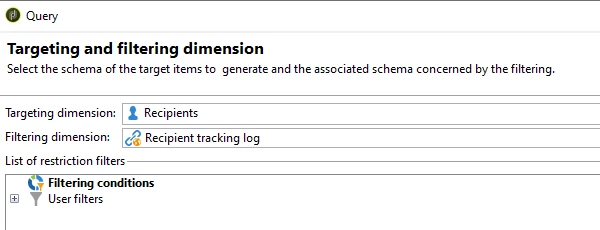
In query select targeting dimension as 'recipient' and filtering dimension as 'recipient Tracking log'

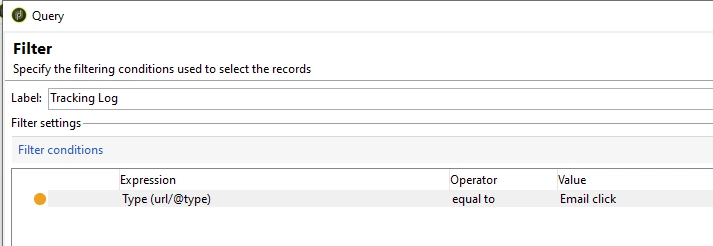
Query Condition: [url/@type] equals to Email Click

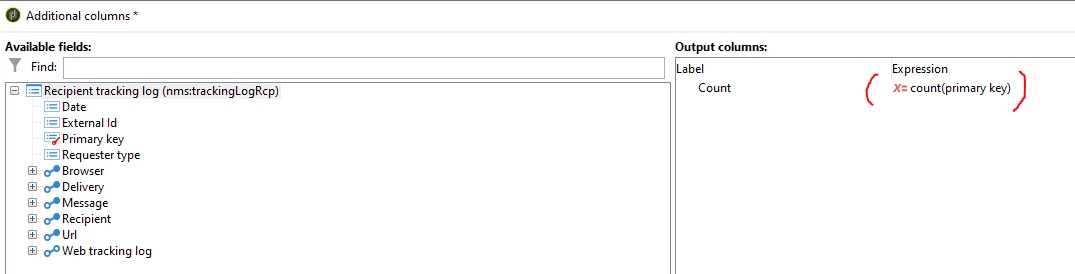
Complementary information > add data > Data linked to the filtering dimension > Data of the filtering dimension > add a new expression: count(@id)

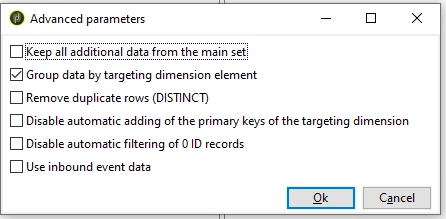
Below click on Advanced parameter > Disable all checkbox and enable 'Group data by targeting dimension element'


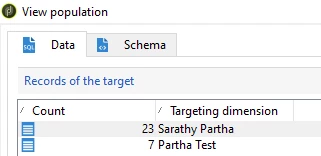
Result:


3 replies

ParthaSarathy
Community Advisor
ParthaSarathyCommunity AdvisorAccepted solution
Community Advisor
April 19, 2023

Hi @ajit_tr ,

In query select targeting dimension as 'recipient' and filtering dimension as 'recipient Tracking log'

Query Condition: [url/@type] equals to Email Click

Complementary information > add data > Data linked to the filtering dimension > Data of the filtering dimension > add a new expression: count(@id)

Below click on Advanced parameter > Disable all checkbox and enable 'Group data by targeting dimension element'


Result:


~  ParthaSarathy S~  Click here to join ADOBE CAMPAIGN USER GROUP for Quarterly In-person | Hybrid | Virtual Meetups
ParthaSarathy
Community Advisor
Community Advisor
April 19, 2023

The above query condition will provide Email click counts of all deliveries/campaign in the instance.

To filter email counts on any specific campaign or delivery, then you can add additional conditions like 'deliveryCode of delivery equals to' or 'internal name of delivery equals to' or 'internalName of Campaign equals to' depends on the requirement.


~  ParthaSarathy S~  Click here to join ADOBE CAMPAIGN USER GROUP for Quarterly In-person | Hybrid | Virtual Meetups
akshaaga
Adobe Employee
Adobe Employee
April 21, 2023

@ajit_tr ,
To retrieve the number of clicks that a user has performed on an email sent via Adobe Campaign, you can use the nms:trackingLogRcp schema in a workflow query activity, like -

select count(*) as Clicks
from nms:trackingLogRcp
where deliveryId = '<deliveryID>'
and linkLabel is not null
and targetMode = 'M'
and isProcessed = 1
and recipientId = '<recipientID>'

You will need to replace the <deliveryID> and <recipientID> placeholders with the appropriate values.

The query filters the tracking log records based on the following criteria:

  • deliveryId: The ID of the delivery you want to retrieve the clicks for. Replace <deliveryID> with the actual delivery ID.
  • linkLabel is not null: Filters only the tracking logs that have a non-null linkLabel, which means a link was clicked.
  • targetMode = 'M': Filters only the tracking logs with a target mode of 'M', which means the click was performed on a link in an email.
  • isProcessed = 1: Filters only the tracking logs that have been processed.
  • recipientId: The ID of the recipient you want to retrieve the clicks for. Replace <recipientID> with the actual recipient ID.

Note that the tracking log records are only available for a limited time after the delivery is sent, so it is important to run this query soon after the delivery has been sent to ensure the tracking data is still available.

Sukrity_Wadhwa
Community Manager
Community Manager
May 4, 2023

Hi @ajit_tr,

Were you able to resolve this query with the help of the given solutions or do you still need more help here? Do let us know. In case the given solutions were helpful, then kindly choose the one that helped you the most as the 'Correct Reply'.
Thanks!

Sukrity Wadhwa