


Web SDK Part 4: Avoiding Banana Peels (and other things that can trip you up!)
Going back to what I said in my first post of this series, I'm a big fan of Web SDK but 'the elephant in the room' is that Web SDK was not primarily designed for Adobe Analytics. This means there are a few unexpected things that can cause you to slip up. I'm here to help you avoid those banana peels!
This article is going to cover six potential issues relating to:
- Automated Click Data Collection
- using Adobe Target with Adobe Analytics
- Market Channels on Single Page Application (SPA) Websites

Automated Click Data Collection
As an Adobe Analytics expert you are probably used to your Adobe Analytics implementation automatically tracking Exit Links and Download Links. Within the Web SDK Extension you can enable 'Click Data Collection' and on first glance this appears to be the same capability. It is true that 'Click Data Collection' provides automatic Exit Link and Download Link tracking. However, there are some big differences that you need to be aware of!
Banana Peel #1: Click Data Collection fires all the time?!
Yes, you heard me correctly; it doesn't just track Exit Links and Download Links, it actually tracks every single time any link is clicked. So, unless you want to receive a large invoice from Adobe for all those additional server calls, you are going to need to do something about this!
Solution
Fortunately, it is easy to supress these additional calls. Within the configuration of the Web SDK Extension, Adobe provides a callback function that only executes when the automated Click Data Collection fires (If you are doing this in code see onBeforeLinkClickSend).
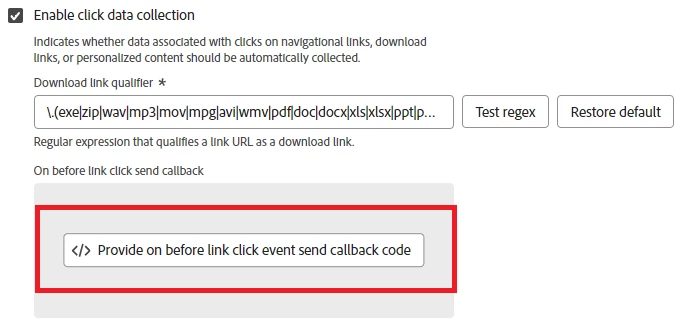
Returning false in this callback function stops the Web SDK sending the data.
Therefore, to supress the additional calls, we can include a small snippet of code in the callback function, that detects if it is an 'other' link tracking call (rather than the other possible values 'exit' or 'download') and if so, blocks the call by returning false. For example:
if (content.xdm.web.webInteraction.type === "other") {
  return false;
}
NOTE: The callback function only executes when the automated link tracking happens. Therefore, this will not stop any custom link tracking that you're doing (which is a good thing!).
Banana Peel #2: Exit and Download tracking doesn't capture the link URL
By default, Click Data Collection actually captures the text of the link, rather than the link URL. This means if you do nothing, your Download Links and Exit Links will start collecting different values to what you are used to. You may be happy to accept this change, but if you are not, there is a simple fix to revert the value back to the URL.
Solution
Adobe's recommended approach is to remove the value of the options.xdm.web.webInteraction.name property (which is where the text of the link is captured). If this property is undefined, Adobe falls back to using the link URL. Again, we can put code within the same callback function to achieve this. For example:
if (content.xdm.web.webInteraction.type === "download"||content.xdm.web.webInteraction.type === "exit") {
  content.xdm.web.webInteraction.name = undefined;
}
Banana Peel #3: Exit Links fires when moving between subdomains of your website
If the link domain does not have the exact same top-level domain and subdomain, Exit Link tracking fires. This means by default you might be tracking a lot of navigations that you consider internal to your site (e.g. shop.mysite.com to checkout.mysite.com).
Solution
Unfortunately, there is no 'out of the box' whitelist/blacklist for exit link tracking domains. However, again it is easy to use the same callback function to supress the unwanted Exit Link tracking. For example:
if (content.xdm.web.webInteraction.type === "exit"){
  if (content.xdm.web.webInteraction.URL.includes("mysite.com")){
    return false;
}
This approach could also be extended to cover any other domains that you want to supress Exit Link tracking for.
Adobe Target (in combination with Web SDK and Adobe Analytics)
Using Adobe Target in combination with Web SDK and Adobe Analytics has many benefits. However, if you are using both Analytics and Target there are a couple things you need to be aware of...
Banana Peel #4: Migrating Adobe Analytics but not Adobe Target
To reduce the complexity of migrating to Web SDK, you may be tempted to phase your migration by moving Adobe Analytics over first and then moving Adobe Target over at a later date. If possible, you should avoid this because it will break the A4T (Analytics for Target) integration between the two capabilities.
Solution
If you want the A4T integration to continue working, you have to migrate both Adobe Analytics and Adobe Target to Web SDK at the same time.
Banana Peel #5: 'Send Events' just for Adobe Target
With your non-Web SDK implementation, you will be used to making calls to Adobe Target separately from Adobe Analytics. With Web SDK this is no longer possible; every time you call the Send Event, the hit will be forwarded by the Edge Network to Target and Analytics whether you like it or not! Therefore, problems occur if you only populate the XDM Object with Adobe Target in mind.
If you do this, Adobe Analytics will still receive the hit and may revert to some default behaviours which may not be desirable! The main two default behaviours you need to look out for are:
- if you don't tell Adobe Analytics otherwise, it treats incoming hits as Page Views
- if you don't give Adobe Analytics a pageName it records the URL of the page in the page name variable
For example, you might forget to fully populate the XDM Object when using Send Event to tell Target that:
- a proposition has been displayed
- a button has been clicked
In both these scenarios you would get the previously mentioned default behaviours in Adobe Analytics, inflating your Page Views and causing URLs to appear in the page name variable.
Solution
The issues described are easily avoided by making sure the XDM Object is always populated in a way that is valid for Adobe Analytics. For the above example, I would suggest populating the relevant properties in the web.webInteraction part of the XDM Object so that Adobe Analytics treats the hit as link tracking (see part 2 of this series for how to do this).
Banana Peel #6: Marketing Channels breaks on SPA websites
A Single Page Application (SPA) website is designed to improve load performance by not fully refreshing the browser when a user navigates between screens.
There is a key difference between how the old Adobe Analytics JavaScript and the new Web SDK JavaScript handles these SPA page loads (i.e. where the browser does not fully refresh).
This difference potentially will break your Marketing Channel Rules and can affect any rule that use Hit Attributes derived from the following variables:
- URL
- Query String Parameters
- Referring URL
The old Analytics code only included these variables in the payload of the first page view made after a full reload. This meant that additional page views made as a result of SPA navigations (i.e. without a full refresh) did not have these variables included in the hit. Conversely, the Web SDK transmits these variables on every page view.
This could have big implications for any Marketing Channel Rules that reference any of these variables (or attributes derived from them). We found that our Marketing Channels were being corrupted as they were being overwritten when rules were being triggered when we hadn't expected.
Solution
This is a difficult one as I'm not sure I have a 'recommended' approach. Therefore, I will share with you what we have done, but caveat it by saying you need to work out what is best for your situation.
We couldn't find a satisfactory way of changing our Marketing Channel Rules to work with the new Web SDK behaviour. This led us to go down the route of manipulating the values in the XDM Object to replicate what was happening with the old Adobe Analytics JavaScript. To achieve this, we had to detect whether or not we were on the first page view following a full browser refresh, and then alter the XDM object appropriately. As a result, we were able to leave the Marketing Channel Rules as they were and get the same outcome.
Final Thoughts
A lot of the knowledge in this article was hard won (i.e. we made mistakes and had to learn from them!). Hopefully, I have saved you some of the pain and head-scratching that we had to go through.
And in that spirit, I think it would be fantastic if you've come across your own 'banana peels' while implementing Web SDK, if you share them in the comments!
As always, thanks for reading, and if you would like updates on when these posts go live please consider following me on LinkedIn.