Report Grouping by Status in their chronological order (not alphabetical) | Community
Skip to main content
Level 4
February 7, 2025
Solved

Report Grouping by Status in their chronological order (not alphabetical)

  • February 7, 2025
  • 3 replies
  • 612 views

I have created a report based on projects & statuses. The report is grouped by "Status" field but by default sorts the order by Alphabetical order (Current, On Hold, Stage 1 etc.). But I want this to be displayed in a custom sequence based on the project lifecycle status steps (starting with Request, then Registration, pending approval, Stage 1, etc.). How do I change the sort order in a report?
Best answer by KellieGardner

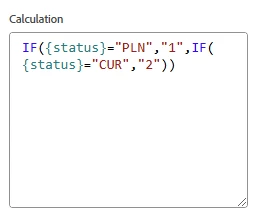
I worked around this by creating a custom calculated field on my projects. It provided me with a status sorting number that I could use to sort my report and then I could hide the column.


example: IF({status}="PLN","1",IF({status}="CUR","2"))


3 replies

Madalyn_Destafney
Community Advisor
Community Advisor
February 7, 2025

This is unfortunately not possible to sort groupings, and is something I've wanted forever. Please upvote this Idea of mine about this very thing.

If this helped you, please mark correct to help others : )
Lawson02
Level 6
February 10, 2025

No idea if this would work but you could try and create a custom column with an SWITCH() statement that holds your custom order and sort based on that

Status Order:

SWITCH( status,

Request = 1,

Registration = 2,

Pending Approval = 3,

Stage 1 = 4,

ect...

)

KellieGardner
Community Advisor
KellieGardnerCommunity AdvisorAccepted solution
Community Advisor
February 12, 2025

I worked around this by creating a custom calculated field on my projects. It provided me with a status sorting number that I could use to sort my report and then I could hide the column.


example: IF({status}="PLN","1",IF({status}="CUR","2"))


Lawson02
Level 6
February 12, 2025

You could do either but sometimes the fields are 1 time usage so I prefer them as a report field instead of a custom object field. This also assumes that they have a form that is attached to every project.