
Make Hours tab of Project Show Total Logged, not # of Entries | Community
Skip to main content
Madalyn_Destafney
Community Advisor
Community Advisor
February 21, 2023
New

Make Hours tab of Project Show Total Logged, not # of Entries

  • February 21, 2023
  • 4 replies
  • 951 views

In the bottom right of the Hours tab of a project, it shows what I THOUGHT was the total hours of any project/task time logged in the project. Example below. It used to add the hours so you could see total hours easily without having to add up each entry (I understand you can get the totals in reports, but should be possible from the project too). Somewhere along the way this changed to show the number of hour ENTRIES logged in the project. This is no help. WF, please consider changing this to have the total hours OR please change this verbiage to say 'Showing 32 hour entries' to make this clear. Thank you!
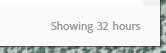
I confirmed with WF that this is apparently not a bug and they said this has been like this for several months, meaning it didn't always used to be like this. Very misleading.

4 replies

Heather_Kulbacki
Community Advisor
Community Advisor
February 22, 2023

It is confusing. If you Group your hours page by project (even though that project is only going to pull in hours from that project anyway), it will total the hours at the top of the group.


I actually have a few layout templates where I've set the Lists > Hours to default to the Project grouping. If they need a different grouping, say in a report instead of in a project the report can be built that way or the user can change the grouping. But this helps with those who typically need to see the total hours by project.

Madalyn_Destafney
Community Advisor
Community Advisor
February 22, 2023

Yup, aware I can see totals in an hour report grouping, but I won't always have projects in an hour report and want to at any time to be able to click an Hours tab of a project and get an accurate total hours logged. So my Idea here is to either add this since WF doesn't total the hours for you on that tab, or change that verbiage to not be so misleading bc it's not hours, it's hour entries (which I don't think is helpful to anyone). Ya know?

If this helped you, please mark correct to help others : )
Level 4
February 27, 2023

I posted something similar myself. It is confusing and seems like it should be an easy fix. Workfront may not consider this a bug, but I disagree. Has anyone else noticed that the total hours on th... - Adobe Experience League Community - 572215

MoniqueEvans
Community Advisor
Community Advisor
June 25, 2024

I agree with changing the verbiage to say "Showing 32 hour entries"


In my layout template, I have grouping by User as the default so whenever I look at a project the hours tab always shows the total for each person. This helps avoid the confusion since most people will see the large number on the list before the smaller number in the bottom corner