
Why Workload Balancer Not Correct for a User? | Community
Skip to main content
Kundanism
Level 10
April 28, 2022
Solved

Why Workload Balancer Not Correct for a User?

  • April 28, 2022
  • 1 reply
  • 624 views

Hi

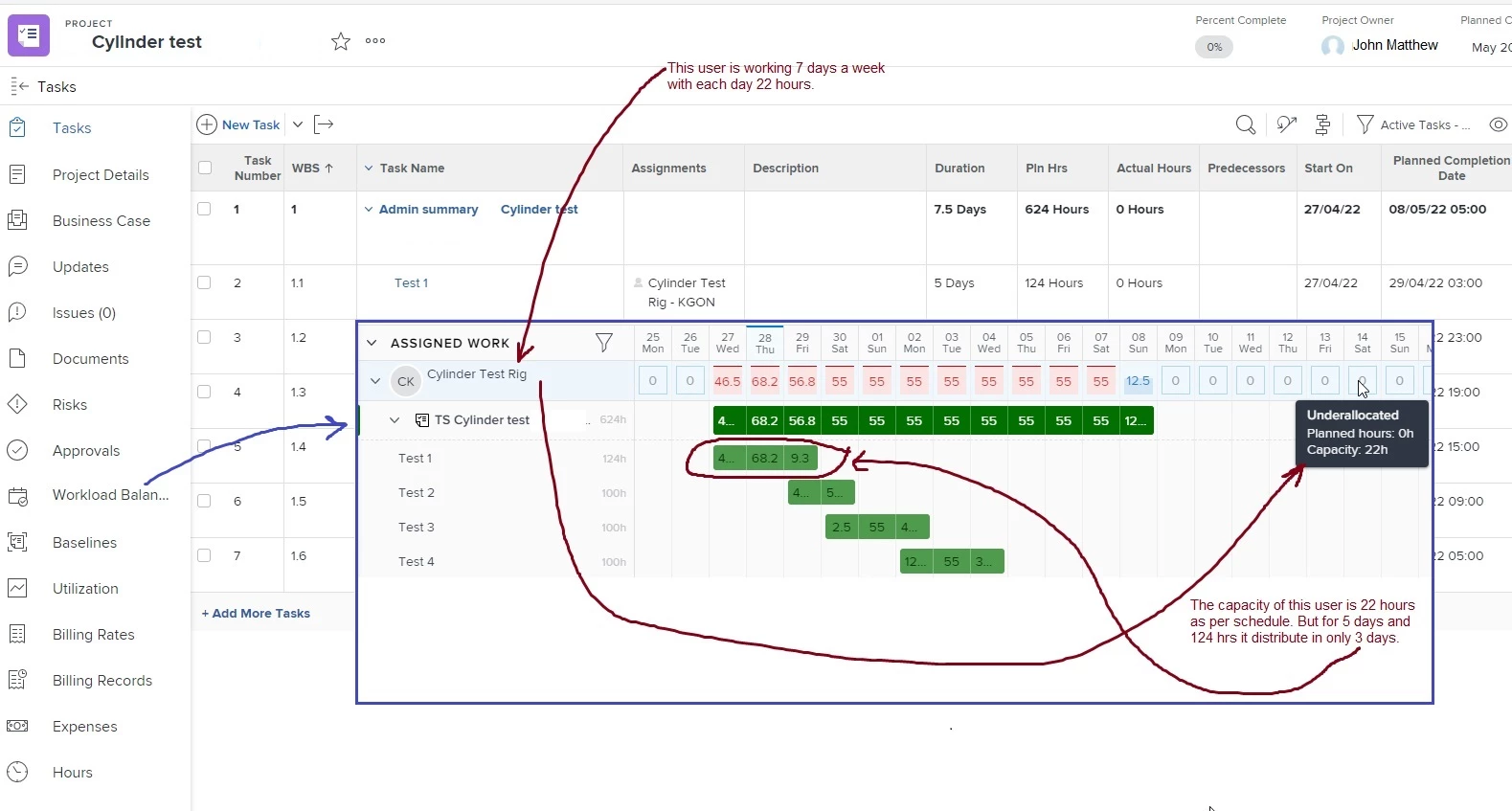
An user is scheduled for 22 hrs each day for 7 days in a week. The capacity is: 22 hrs per day. But when user is assigned to a teask Test 1 for days duration with 124 hrs planned hrs.

The workload balancer shows that the task is going to finish in 3 days with very hign number of assigned hours which is not feasible.

I have attached an view for your kind reference. Any recommendation, why this is appearing.
Mvh

Kundan.

This post is no longer active and is closed to new replies. Need help? Start a new post to ask your question.
Best answer by imgrund

Hi - I've had this happen to a few clients when implementing. The issue is that your Hours Per Work Day do not match the user's schedule.

While your user has a capacity of 22 hours a day, your hours per work day is less than 22. (Don't know the start time of the task so can't let you know for sure what it is set to.

Example though... if your schedule is Midnight to 10pm and let's say that your hours per workday is 8 hours... if you had a task that was 2 days duration, the task would start at Midnight but would end at 4pm the same day. The duration is calculating 8 hours per day so calculated 16 hours. (Hope that makes sense)

Sadly, Hours Per Work Day is one of a few settings that is Global and cannot be changed for a single group :(

One thing that did work for a client of mine was just to do Fixed Dates task constraint for the tasks the users is on and set the beginning and end Date & Time.

I hope that is helpful for you.

1 reply

imgrund
Adobe Employee
imgrundAdobe EmployeeAccepted solution
Adobe Employee
May 19, 2022

Hi - I've had this happen to a few clients when implementing. The issue is that your Hours Per Work Day do not match the user's schedule.

While your user has a capacity of 22 hours a day, your hours per work day is less than 22. (Don't know the start time of the task so can't let you know for sure what it is set to.

Example though... if your schedule is Midnight to 10pm and let's say that your hours per workday is 8 hours... if you had a task that was 2 days duration, the task would start at Midnight but would end at 4pm the same day. The duration is calculating 8 hours per day so calculated 16 hours. (Hope that makes sense)

Sadly, Hours Per Work Day is one of a few settings that is Global and cannot be changed for a single group :(

One thing that did work for a client of mine was just to do Fixed Dates task constraint for the tasks the users is on and set the beginning and end Date & Time.

I hope that is helpful for you.

Kundanism
KundanismAuthor
Level 10
May 19, 2022

Thanks a lot @Anthony Imgrund‚ for your recommendation in this regard.

Mvh

Kundan.