What is a good report to identify all the Request Queues? | Community
Skip to main content
Tvasilovic
Level 3
October 13, 2022
Solved

What is a good report to identify all the Request Queues?

  • October 13, 2022
  • 2 replies
  • 1527 views

Hello,

I have just taken over as Admin for this company's WF. Previously request queues were made but were not identified as such by the custom status. I am trying to make a report to see all projects acting as request queues but all the filters I have tried bring back nothing or too many. Anyone have a good solution?

This post is no longer active and is closed to new replies. Need help? Start a new post to ask your question.
Best answer by William

There are two kinds of projects that can be considered "Request Queues" 
1. A project that is published as a queue and its name appears in the dropdown menu under "Request Type" after the user clicks the blue "Submit Request" button on the Requests landing page.
2. Sometimes, a project from #1 above will route requests to a different intake project that has limited access. Users ofter refer to these projects as queues also.

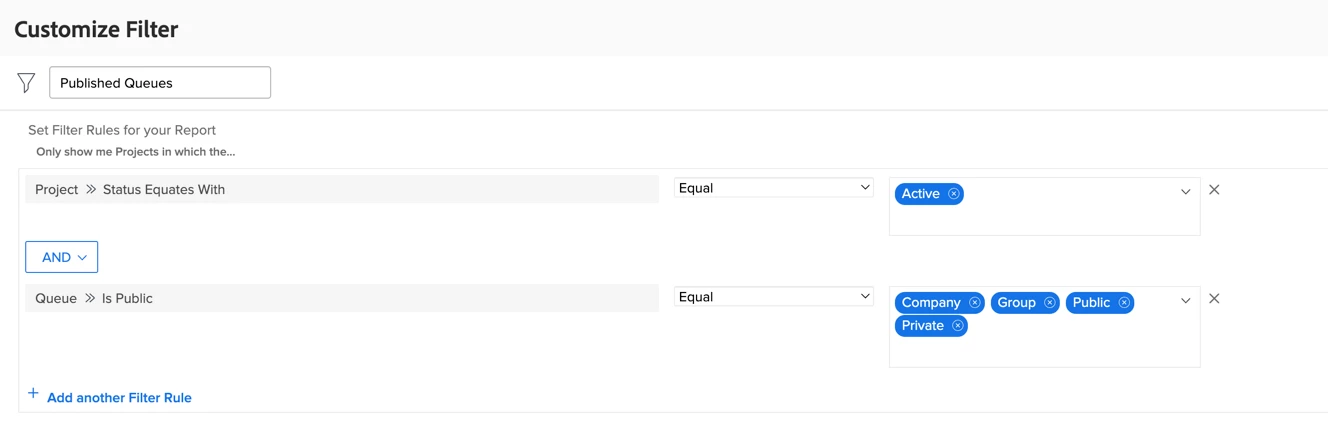
To pinpoint projects that fall into category 1 above (my personal nomenclature for these is "routing project"), you can use the "Published Queues" filter shown in the below screen capture. 


To identify projects that fall into category 2 above (my personal nomenclature for these is "landing project"), you can use the below text mode:

EXISTS:a:$$EXISTSMOD=EXISTS
EXISTS:a:$$OBJCODE=RRUL
EXISTS:a:defaultProjectID=FIELD:ID
statusEquatesWith=CUR	PLN
statusEquatesWith_Mod=in

2 replies

DeniseMoore
Level 4
October 13, 2022

I put all of our projects that are set as request queues into a portfolio titled "Request Queues." Maybe that would help you as well.

Tvasilovic
Level 3
October 13, 2022

That would be helpful, but first I am trying to find them all! Most appear to be located within the departmental portfolios, but I want to make sure I am not overlooking any.  Once I do find them all I will put a Project status of "Request Queue" on them.

William
Community Advisor
WilliamCommunity AdvisorAccepted solution
Community Advisor
October 13, 2022

There are two kinds of projects that can be considered "Request Queues" 
1. A project that is published as a queue and its name appears in the dropdown menu under "Request Type" after the user clicks the blue "Submit Request" button on the Requests landing page.
2. Sometimes, a project from #1 above will route requests to a different intake project that has limited access. Users ofter refer to these projects as queues also.

To pinpoint projects that fall into category 1 above (my personal nomenclature for these is "routing project"), you can use the "Published Queues" filter shown in the below screen capture. 


To identify projects that fall into category 2 above (my personal nomenclature for these is "landing project"), you can use the below text mode:

EXISTS:a:$$EXISTSMOD=EXISTS
EXISTS:a:$$OBJCODE=RRUL
EXISTS:a:defaultProjectID=FIELD:ID
statusEquatesWith=CUR	PLN
statusEquatesWith_Mod=in
If you like my content, please take a moment to view and vote on my Idea Requests: https://tinyurl.com/4rbpr7hf
Tvasilovic
Level 3
October 14, 2022

Thank you for these tips! I ended up finding very similar reports to both in the System Admin blueprint package of reports. One question, that customized filter for Published Queues-  You did that AFTER the report creation, correct? When you view the report you chose to filter and "create new filter"?  I don't see a Published Queues option in the filter abilities. Is this due to the type of report, whether it is a Project report or Queue report? I think I have what I need but its good to have all possible tools available!

William
Community Advisor
Community Advisor
October 14, 2022

Ah. The example I shared is meant to be used with a Project report. (I often forget that Queue reports exist and go straight to Project reports.)

"Published Queues" is just the name I gave to a project filter. You can create the same filter directly on a Project report, but one best practice is to build your filters/views/groupings when looking at a list of projects, issues, users, etc. and then when making your report, just apply the f/v/g that you previously made. This makes it easier to apply those attributes to other reports in the future; or quickly apply changes to multiple reports that may share the same f/v/g.

If you like my content, please take a moment to view and vote on my Idea Requests: https://tinyurl.com/4rbpr7hf