WF Custom Form Fields - edit/delete issue | Community
Skip to main content
April 28, 2023
Solved

WF Custom Form Fields - edit/delete issue

  • April 28, 2023
  • 6 replies
  • 1551 views

Hi All,

Good day!

I have created custom form and form fields are used for different purpose in Project/Task/Issue.

Problem is, someone from team are knowingly/unknowingly updating/deleting the Form fields and it is impacting the business. 


Do we have an option to, 

1. Lock the created Custom Form so that no one can updated?

2. Can we enable the approval process for Custom Form before using in Project/Task/Issue ? so that it will avoid my issue

3. Can we get track of updated field's user information similar to 'Updates' ?


Thanks in advance
This post is no longer active and is closed to new replies. Need help? Start a new post to ask your question.
Best answer by Madalyn_Destafney

Hi, you need to go in the Custom Form in setup and go to Form Sharing and ensure that only those you want to be able to manage the form itself has manage access. You may have users on there with manage access that shouldn't have access to revising the Qs in the form itself in setup. If they are View only access, users can still fill it in on projects/tasks/etc. but not modify the actual form.


For tracking history of fields filled in in the Updates feed of the respective object, you can add/remove actions in your Updates Feed area in Setup (i.e. if you want to show X person filled in Y field in the project in Updates, that's something you need to select to include in Updates at a system level). 

Let me know if this helps!

6 replies

April 28, 2023

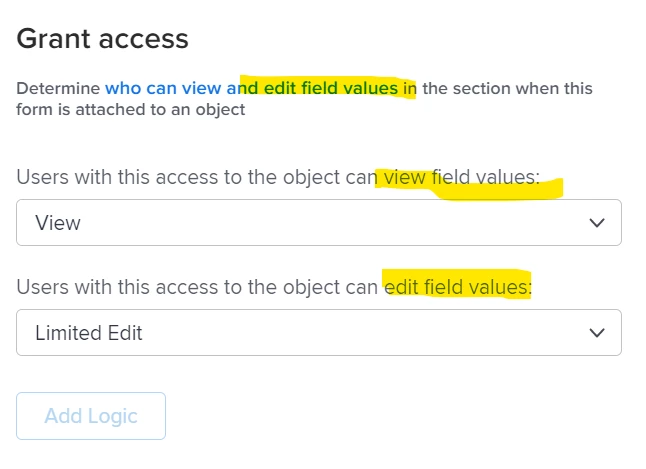
I know you can create a section break before the field, and make that 'admin only', or a permission that correlates with your organization's needs... such as admin to change and viewable to others. I'm not sure about the tracking, but if I find out I'll come back and re-post

prcreddy9Author
April 28, 2023

Thank you @hachidori for quick reply. seems to be the grant access is limited to field values in Project/Task/Request level Forms . however will check with admin-only option with different users login. 


April 28, 2023

The only other thing I can think is the Form Sharing option, but I didn't see where you could change it to View Only versus edit. Let me know if you find out differently though. 

April 28, 2023

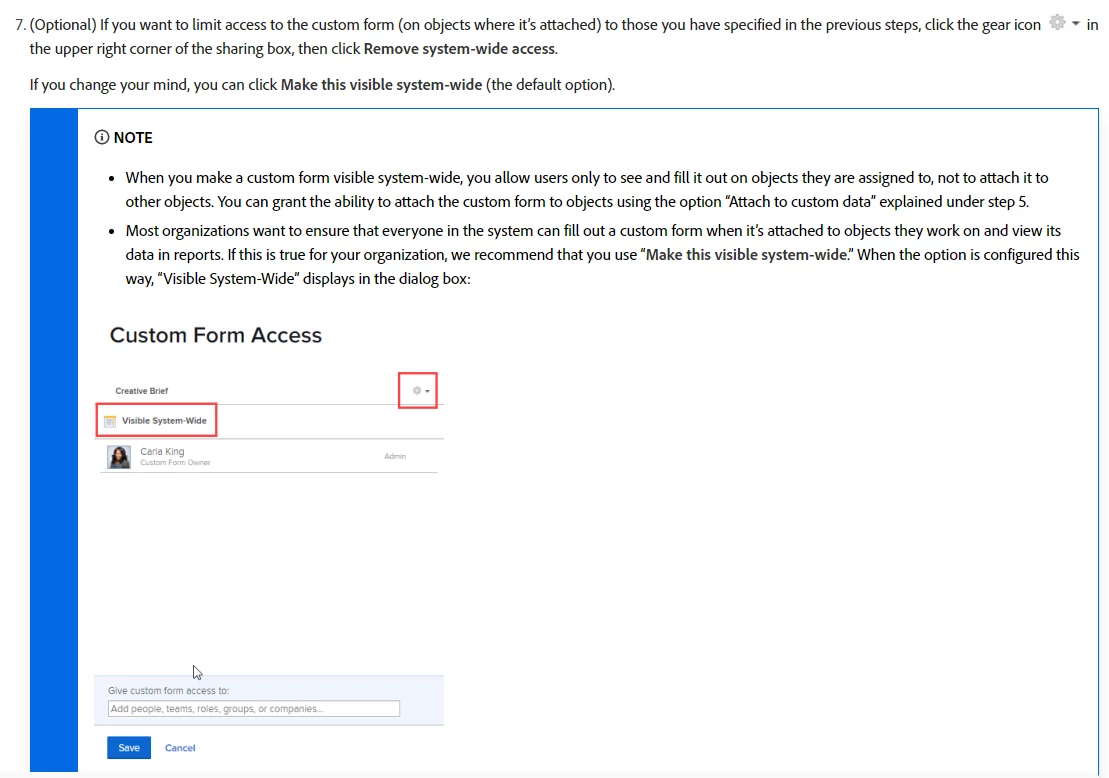
This wouldn't help with tracking, but I did see this about the Custom form itself. I suppose it would all depend on your unique needs, but I found it interesting: https://experienceleague.adobe.com/docs/workfront/using/administration-and-setup/customize/custom-forms/manage-custom-forms/share-access-to-a-custom-form.html?lang=en


Madalyn_Destafney
Community Advisor
Madalyn_DestafneyCommunity AdvisorAccepted solution
Community Advisor
April 28, 2023

Hi, you need to go in the Custom Form in setup and go to Form Sharing and ensure that only those you want to be able to manage the form itself has manage access. You may have users on there with manage access that shouldn't have access to revising the Qs in the form itself in setup. If they are View only access, users can still fill it in on projects/tasks/etc. but not modify the actual form.


For tracking history of fields filled in in the Updates feed of the respective object, you can add/remove actions in your Updates Feed area in Setup (i.e. if you want to show X person filled in Y field in the project in Updates, that's something you need to select to include in Updates at a system level). 

Let me know if this helps!

If this helped you, please mark correct to help others : )
skyehansen
Community Advisor
Community Advisor
April 28, 2023

the only thing we found to work is employ a heavier governance.


* remove permissions to edit custom forms from as many users as possible.

* remove form sharing from as many users as possible. (remember, sharing the form allows them to either add it to an object or edit it. By using more templates and request queues, you can remove the need for them to see and add a form as it will be pre-added)

* require users that are allowed to edit custom forms to be as trained as possible.

* employ naming conventions which make custom form fields workflow-specific and make the global custom form fields clear as to their globalness. This way individual workflows would be able to edit "their" fields without impacting everyone else using the field.