Viewing Actual Hours on a Project | Community
Skip to main content
September 6, 2023
Solved

Viewing Actual Hours on a Project

  • September 6, 2023
  • 1 reply
  • 692 views

Hi all,

I have a user who has queried if it's right to only be bale to view all hours logged against a project if you have Manage access to the project. If he has contributor or view access then he's restricted to only his own hours.

I believe this is correct (seems logical), but I can't find a help page that specifically explains this.

Can someone point me in the right direction please?

Thanks

Matt
This post is no longer active and is closed to new replies. Need help? Start a new post to ask your question.
Best answer by Madalyn_Destafney

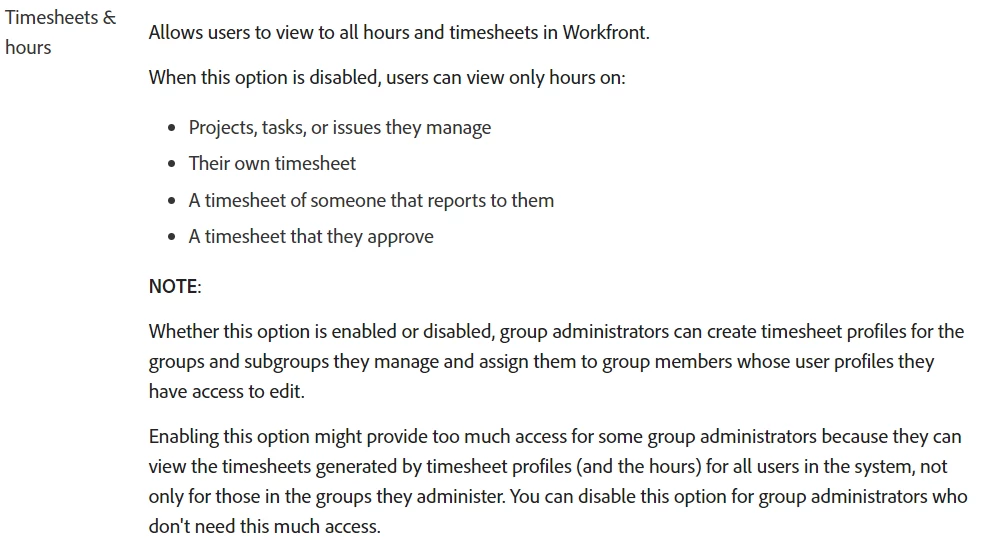
Hi there, I believe it’s tied to a user's access level, not project sharing perms (view/contribute/manage). Users with a Plan license that are given admin rights on timesheets/hours are who can see more hours than their own. Snippet here from this article.


If you found this helpful, please mark correct to help others 🙂


1 reply

Madalyn_Destafney
Community Advisor
Madalyn_DestafneyCommunity AdvisorAccepted solution
Community Advisor
September 6, 2023

Hi there, I believe it’s tied to a user's access level, not project sharing perms (view/contribute/manage). Users with a Plan license that are given admin rights on timesheets/hours are who can see more hours than their own. Snippet here from this article.


If you found this helpful, please mark correct to help others 🙂


If this helped you, please mark correct to help others : )
September 6, 2023

Hi Madalyn,

In this case, his access level doesn't allow him to have Admin access to the project, but you have pointed me in the right direction. He was given Manage permission on the project which allows him access to all the timesheet hours entered against that specific project. There's a little info box (that I've previously missed) that mentions this.

As always, thanks for coming back to me.

Matt