Users cannot edit information on a custom form. | Community
Skip to main content
March 7, 2023
Solved

Users cannot edit information on a custom form.

  • March 7, 2023
  • 1 reply
  • 2725 views

We have a custom form that is attached to a project (in the Project Details section) after the project is created. Access/permission is set to the maximum levels possible for all objects and users -- the form, the template, the project, etc. However, work license users are unable to enter information on the custom form (plan users can enter information in the form). I'm fairly confident that we've been able to do this before. And according to this article https://experienceleague.adobe.com/docs/workfront/using/basics/work-with-custom-forms/edit-custom-forms.html?lang=en these users should be able to enter/edit the information in the form. I have tried searching the help section for information and can't find anything for this specific issue. Any ideas? I'm probably missing something obvious.

This post is no longer active and is closed to new replies. Need help? Start a new post to ask your question.
Best answer by DarcySm1

Is it a calculated field?  If so they won't be able to edit the data.  When you said it says "N/A" that to me sounds calculated.  Otherwise it would be blank.


Thanks for the ideas. Turns out because the form was set to be able to attach to a program (in addition to a project or issue), it affected the access settings on the form headers. 

1 reply

Community Advisor
March 7, 2023

Hi Darcy,


A couple of things to check:


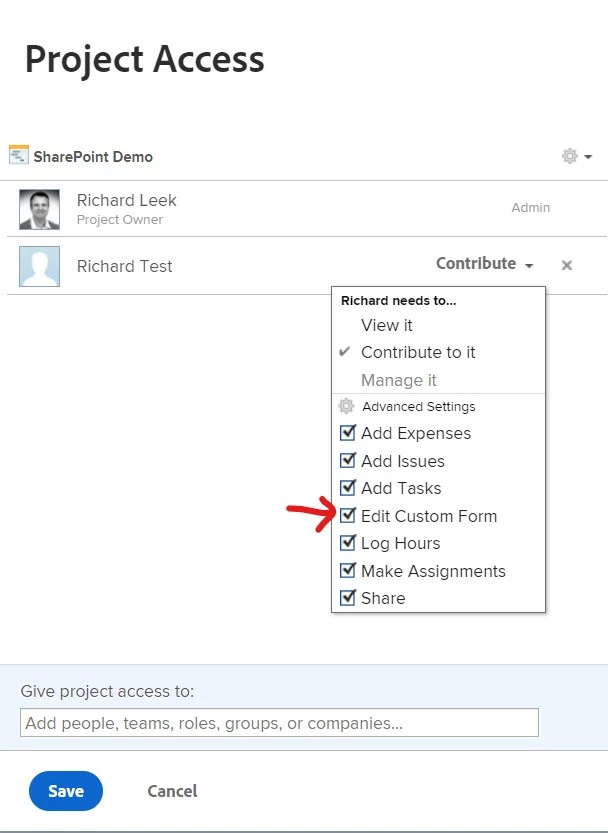
1) Have you given the workers contribute access to the project? And if so, can you double-check that "Edit Custom Forms" access is enabled:


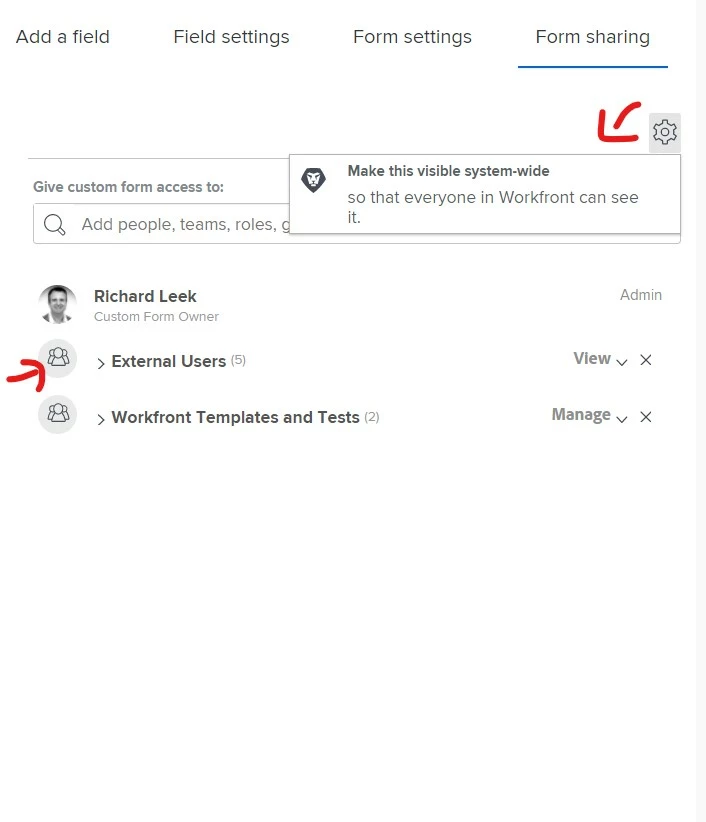
2) Check the Form sharing permissions in the custom form editor. It either needs to be set to "Visible System Wide", or if you don't want everyone to be able to see the form, you need to specify which groups or users should have access to the form. 


Let me know if this resolves the problem.


Best Regards,

RIch. 


DarcySm1Author
March 7, 2023

I have already checked for both of those things. And, yes, they have those settings. 

DarcySm1Author
March 1, 2024

I'm now having this same issue, how did you resolve it? 


See my comment above from 3/9/23 -- the form was set to be able to attach to a program. Once I removed that, I was able to fix the section headers and users could edit the form data.