
Urgent Need to Remove an Update/Comment Thread | Community
Skip to main content
TamBou
Level 5
May 2, 2023
Solved

Urgent Need to Remove an Update/Comment Thread

  • May 2, 2023
  • 4 replies
  • 1649 views

Someone has posted a significantly inappropriate Update on a job in Workfront. I've tried removing it (am Sys Admin) as myself and as each of the two on the thread per request from their boss. I concur this thread must be removed one way or the other. Does anyone know how I can get this done and as quickly as possible?

This post is no longer active and is closed to new replies. Need help? Start a new post to ask your question.
Best answer by Doug_Den_Hoed__AtAppStore


Hi @tambou,


I concur: when I (as a SysAdmin) enter a comment, then Login As a different SysAdmin, the latter cannot delete the comment via the Workfront User Interface:


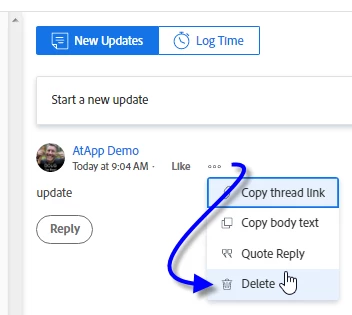
However (fortunately), when exit Workfront, then log in to Workfront as the second SysAdmin, then Setup > Login As the first SysAdmin (as the author of the unwanted comment), I can then delete it, as follows:


Good to know, especially in such Urgent Circumstances.


Regards,

Doug

4 replies

TamBou
TamBouAuthor
Level 5
May 2, 2023

Job = Project 

Doug_Den_Hoed__AtAppStore
Community Advisor
Doug_Den_Hoed__AtAppStoreCommunity AdvisorAccepted solution
Community Advisor
May 2, 2023


Hi @tambou,


I concur: when I (as a SysAdmin) enter a comment, then Login As a different SysAdmin, the latter cannot delete the comment via the Workfront User Interface:


However (fortunately), when exit Workfront, then log in to Workfront as the second SysAdmin, then Setup > Login As the first SysAdmin (as the author of the unwanted comment), I can then delete it, as follows:


Good to know, especially in such Urgent Circumstances.


Regards,

Doug

J_Mas
Level 5
May 2, 2023

I'm able to do this when I'm logged in as one of my users. I'd say make sure you don't have this ability turned off in your Access Level settings. (I got this info based on this older thread).

  1. As an administrator, Go to Setup
  2. From the left-hand menu, select Access Levels
  3. Select the access level of the person who made the update/comment (e.g. Worker)
  4. From the Edit Access Level menu, scroll to the bottom and select "Set additional restrictions..."
  5. Verify that "Never allow users to delete comments" is not selected.
KellieGardner
Community Advisor
Community Advisor
May 2, 2023

If the message has been replied to you can't delete the main message until you delete a reply. If you delete the reply, then you should be able to delete the main comment. Also, make sure the ability to delete comments isn't turned off in your access level.