Updating Custom Fields on a Document Form | Community
Skip to main content
Level 2
February 7, 2024
Question

Updating Custom Fields on a Document Form

  • February 7, 2024
  • 1 reply
  • 547 views

Hi everyone,


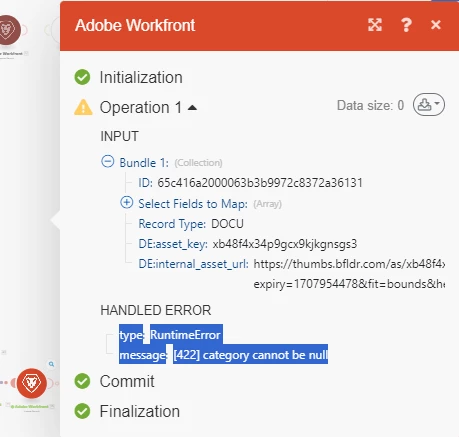
We have a custom form for a Document within a specific portfolio that I am looking to update the Record with. I am able to find the field within Update Record > Document. However I am receiveing a runtime error if [422] category cannot be null. My suspecion is that since the form doesn't default on the document until after you manually select it that Fusion that the Module doesn't see the fields to update on the document. Is there another step I am missing before this?

 

This post is no longer active and is closed to new replies. Need help? Start a new post to ask your question.

1 reply

Sven-iX
Community Advisor
Community Advisor
October 5, 2024

Hi @shanego 


if you're certain that the form is NOT yet there when you set the values, and there is no other form, then set "categoryID" to the form ID.


Note: categoryID is a shortcut to the first custom form attached - which means if there already is a form attached, setting categoryID will effectively replace that existing form. 


If it's possible that other forms may already be there, use the MiscAction module, and choose the action "assignCategories" just prior to setting the custom fields.