Unable to Resolve Comment on Proof | Community
Skip to main content
tbamber
January 29, 2020
Question

Unable to Resolve Comment on Proof

  • January 29, 2020
  • 6 replies
  • 6618 views
I am currently having a problem with one of our designers where she can only see the "Resolve" checkmark if I switch her to owner of proof. We have never had that happen to anyone else and switching her over to an owner on all of her proofs is really tedious. I've looked through her settings, which are identical to all of the other designers, but nothing seems to stand out. Tony Bamber Senior Graphic Designer Whirlpool Corporation
This post is no longer active and is closed to new replies. Need help? Start a new post to ask your question.

6 replies

Level 10
January 30, 2020
it's a long shot but if you're able to (if you have the permissions and the correct type of proof license agreement with workfront) -- have you tried removing and replacing her proof license? It happens once every one or two years to us, but occasionally someone's license goes haywire to the point where the only fix is to re-set it (remove and save the profile, and then re-instate it). This is assuming she has the correct level of access on her proof license (if you're using the manager/supervisor/admin level, I always go for "supervisor" just based on the way my users work). -skye
Level 4
January 30, 2020

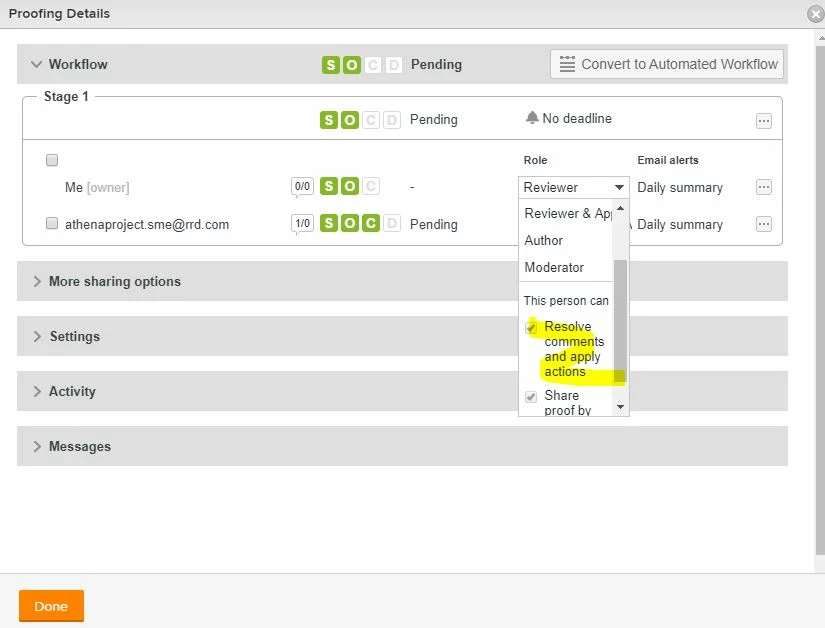
Hi Tony, I had a similar query from one of our teams a couple of days ago, when I looked under Proof Details and the role dropdown (they were a Reviewer) I saw further options under the additional roles which included a check box to 'Resolve comments and apply actions'. I don't use proofing regularly as my role is more system admin & support but I hadn't seen that option before - just wondering if this might be the same for your user? Vikki Gibbs WF System Admin Paragon Customer Communications

February 7, 2022

this setting can be applied at the automated workflow template level too.

For example, our workflow templates have a stage for designers to make edits - in that stage, the pre-set designer in each Workflow template has this option clicked ("this person can: Resolve comments...") so they are able to resolve comments as they make the edits.

tbamber
tbamberAuthor
January 30, 2020
Thanks, Vikki. I did notice that too and she does have both of those checked. Tony Bamber Whirlpool Corporation (Creative Studios)
tbamber
tbamberAuthor
January 30, 2020
Thanks. I'll give that a try! Tony Bamber Whirlpool Corporation (Creative Studios)
Level 2
October 28, 2021

Tony: I know it's been a while, but did this work for you without having to update that setting every time? I have a new staff member who now has this issue. I was able to update the setting to give them resolve permission on that specific group, but I don't see this setting available to set at the user level.

allisonlWF
Adobe Employee
Adobe Employee
November 2, 2021

The "resolve" option on a proof comment is available by default for users who are the proof owner or are assigned the Author or Moderator proof role. It's available on the Review, Review & Approve, and Approve proof roles if the person has a proofing license.

From what I can see, it doesn't look like you can set the "resolve comments and apply actions" option to a user, but you can apply it to the proof role selected on a proofing workflow template (if you're using those).