Unable to edit user profile | Community
Skip to main content
Level 3
January 19, 2023
Solved

Unable to edit user profile

  • January 19, 2023
  • 3 replies
  • 1801 views

Hi, 


Is there an when it comes to editing user profile? A few of our colleagues are not able to configure their user profile mainly Notifications. 


The system will not load anything: 

However some other users can edit this part. I don't think this is an access level issue as I believe anyone with any access level can edit this part. In case you are wondering, this is the part we're trying to achieve: https://experienceleague.adobe.com/docs/workfront/using/basics/use-notifications/activate-or-deactivate-your-own-event-notifications.html?lang=en


Any kind of help is appreciated. Thank you in advance!

 

This post is no longer active and is closed to new replies. Need help? Start a new post to ask your question.
Best answer by Tracy_Parmeter

I spoke with support on this issue and they have a fix that they are hoping to release with this Thursday's update.

3 replies

skyehansen
Community Advisor
January 19, 2023

This may be related to your earlier issue where you were unable to load certain pages.


If it's not related, and if you are the system admin, you can log in as this person, and try to edit their profile while logged in as them. If you can do it, and they can't, then it's a browser/PC issue -- you can try and have them clear cache and cookies in this case.


If you can't edit the profile while logged in as them, I would say it's definitely a profile issue. If other users with the same sort of profile can edit themselves, then I would try /resetUser, and if this doesn't work, call in to the helpdesk. 

Level 3
January 25, 2023

We are still having this issue even after a week and it seems the other users in the community is experiencing this problem as well. I wonder if this is like a technical issue from WF itself? Your assistance is greatly appreciated. Thanks!

Level 5
January 24, 2023

We are having this same issue. I, as the sys admin, can see and update info here for other users. I can also see the Edit Person options if I log in as that person.


I have had the users clear cache, try a fresh session, different browsers, etc. but with no luck.


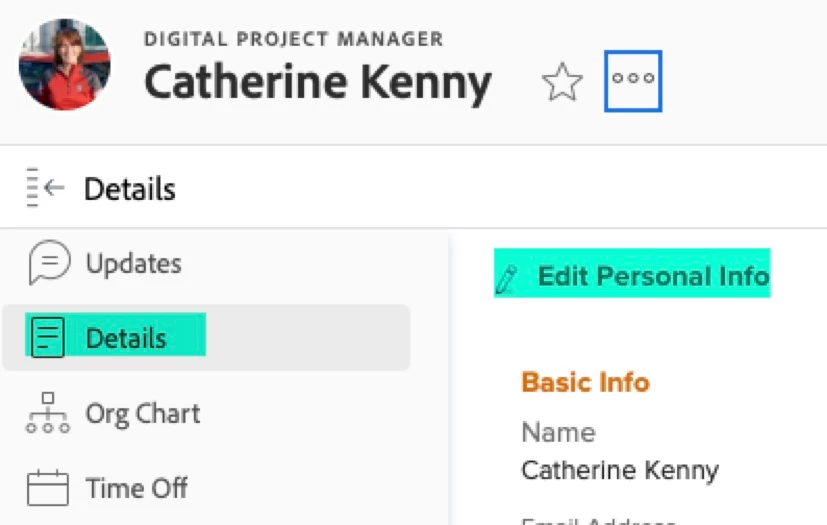
This issue is encountered from the person's own user page (workfront.com/user/), and then clicking on the "More options for user" menu (three dots) to the right of their name.

We found that the user can edit their personal info by selecting Details from the left nav of their user page, then "Edit Personal Info." This route doesn't give them the option to update their Notification settings, though.

We recently switched to SSO. I don't know if this issue is related to that?


SarahWilkersonCA
Level 7
January 24, 2023

We are having the same issue.  Non-system admins get a blank Edit Profile screen.  If I switch a user's planner access that has EDIT rights, they can then edit but it only offers editing for group or ALL...neither of which are acceptable.  I don't want planners to be able to edit others.

SarahWilkersonCA
Level 7
January 24, 2023

Also, we are in the process of switching over to SSO as well.  We are still setting it up but not yet enabled.

Tracy_Parmeter
Tracy_ParmeterAccepted solution
Level 3
January 25, 2023

I spoke with support on this issue and they have a fix that they are hoping to release with this Thursday's update.