
Total up all planned hours / planned revenue at Program or Portfolio level | Community
Skip to main content
Holly_Benjamin
Level 2
July 2, 2024
Question

Total up all planned hours / planned revenue at Program or Portfolio level

  • July 2, 2024
  • 2 replies
  • 477 views

Hello all, 


I am aiming to calculate burn on our programs/portfolios in Workfront, but unsure if it's possible.


I've tried every way I can find online to reference the {actualWorkRequired}/{workRequired} within a calculated field at Program / Portfolio level, and this doesn't seem to work by prefixing each element with {portfolio} or similar. 


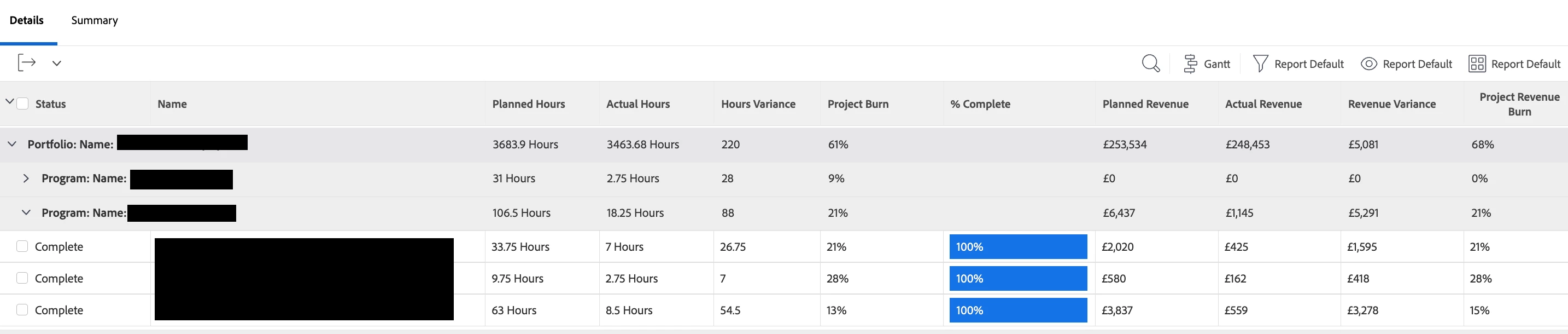
Is this possible? Or is there any other way I can surface the correct burn % in my view below at Portfolio & Program level. Currently it is an average or the Project Burn (Hours worked vs Planned) which isn't representative of the scale of projects underneath it and so is inaccurate when rolled up at the higher levels. A sum of the burn wouldn't be accurate either - the correct % value for the third grey sub total should be 17% when taking into account the actual number of hours.
 

This post is no longer active and is closed to new replies. Need help? Start a new post to ask your question.

2 replies

Doug_Den_Hoed_AtAppStore
Community Advisor
Community Advisor
July 2, 2024


Hi @holly_benjamin,


Getting accurate burn calculations at the Portfolio and Program level is beyond Workfront's native reporting capability, so I invite you to consider our AFA Burn List, Budget vs Actual Quarterly Burn, and/or Budget vs Actual solutions, then email me at doug.denhoed@atappstore.com if you'd like to discuss any of them in more detail.


Regards,

Doug


Level 3
January 13, 2025

Holly,

@holly_benjamin 


What type of report is that? What object are you reporting on as I'm trying to find out the total planned hours within a Program and don't see a way to show that data.