Too many browser windows per Campaign. Is there a better way? | Community
Skip to main content
June 19, 2023
Solved

Too many browser windows per Campaign. Is there a better way?

  • June 19, 2023
  • 2 replies
  • 867 views

In our current Workfront workflow,  we set up Campaigns by creating one Project for each segment of the campaign. So if a campaign includes

  1. an email component
  2. a social component
  3. and a print component,

then I have 4 WF projects. Project 1 is a Master Project and then one project each for each of the components. This drives the Design team nuts because the designer must open 3, if not 4 projects to find requirements and timelines, then upload creative to 3 different places, work through feedback in 3 different places, etc. 


Is there a better way? 
This post is no longer active and is closed to new replies. Need help? Start a new post to ask your question.
Best answer by DeniseMoore

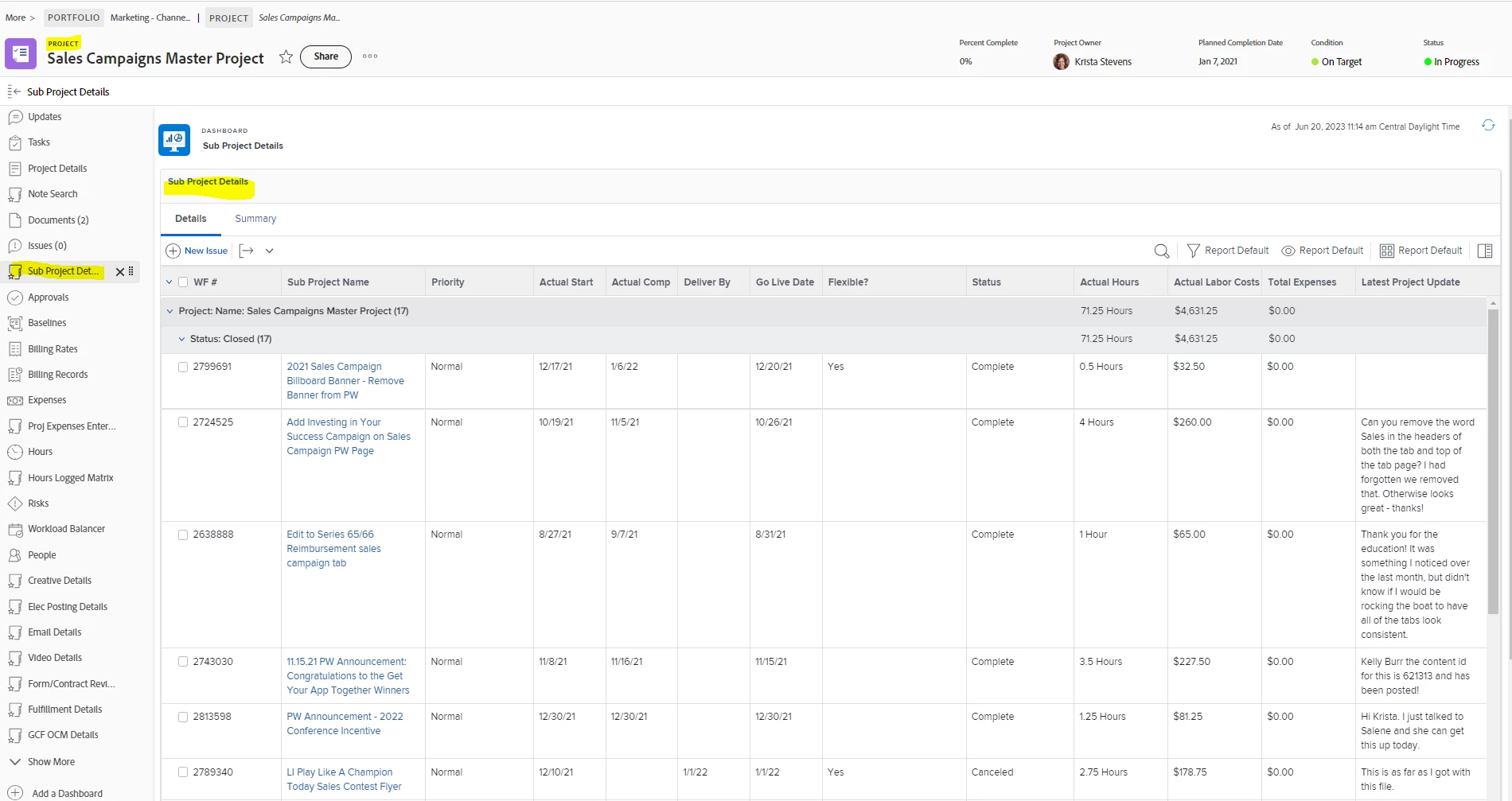
We create a master project, then create an issue (for each component) and resolve that issue with a project. That is how we "link" our sub projects to one master project. I built the master project template such that the issue dropdown matches our project types, forms, etc., so when the issue is resolved by the project nothing more has to be filled out in regards to the custom data. I built a report that goes onto a dashboard titled "sub projects" and added it to the layout as a tab on the left of each project. That dashboard/report displays fields from each of the resolving objects (aka sub projects). So, we are able to, with one click, see all the "components" (sub projects) of a master. The requirements/details, tasks, documents, updates, etc., for each component is then only within its specific sub project. But one can go to the master project and quickly see everything and/or deep dive into any of the sub projects via its hyperlink.
Hope this helps. Kind of hard to explain writing it out. Happy to share and/or walk you through how I've made it work for us.


2 replies

RandyRoberts
Community Advisor
Community Advisor
June 20, 2023

The way I've always done it is if there are shared components in any of the "Deliverables" projects, like a style guide, logos, shared design elements, etc., they all go in the main project. In the main project, I have a task for each of the child projects to see what percentage of completion they are in. This way a designer only has to open the project that has their part of the "deliverable" and the main project.

DeniseMoore
DeniseMooreAccepted solution
Level 4
June 20, 2023

We create a master project, then create an issue (for each component) and resolve that issue with a project. That is how we "link" our sub projects to one master project. I built the master project template such that the issue dropdown matches our project types, forms, etc., so when the issue is resolved by the project nothing more has to be filled out in regards to the custom data. I built a report that goes onto a dashboard titled "sub projects" and added it to the layout as a tab on the left of each project. That dashboard/report displays fields from each of the resolving objects (aka sub projects). So, we are able to, with one click, see all the "components" (sub projects) of a master. The requirements/details, tasks, documents, updates, etc., for each component is then only within its specific sub project. But one can go to the master project and quickly see everything and/or deep dive into any of the sub projects via its hyperlink.
Hope this helps. Kind of hard to explain writing it out. Happy to share and/or walk you through how I've made it work for us.


RandyRoberts
Community Advisor
Community Advisor
June 20, 2023

That is an excellent use of linked issues! And the side dashboard really polishes it up beautifully. Kudos!