The link generated in the "Share Link" button in the Request Queue Page no longer works | Community
Skip to main content
Adobe Employee
April 18, 2024
Solved

The link generated in the "Share Link" button in the Request Queue Page no longer works

  • April 18, 2024
  • 1 reply
  • 859 views

Hi,

I am hoping somebody can provide some light.

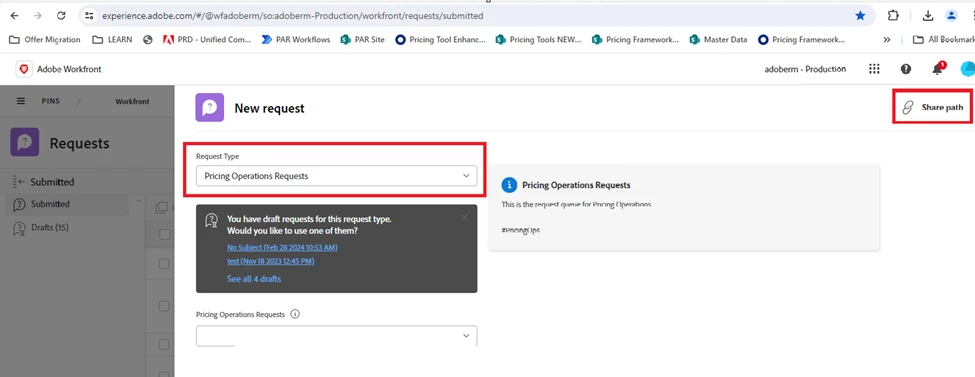
1.Before, from this “New Request” form shown below, with “Pricing Operations Requests” already selected, we can get the link by clicking the “Share Path” button on the top right of the form and be able to share that link to others and the link will get them to this exact form, shown below where “Pricing Operations Request” already selected.  See Figure 1


Sample Link is : https://experience.adobe.com/#/@3E692814636C53B60A495EC3@AdobeOrg/so:adoberm-Production/workfront/requests/new?activeTab=tab-new-helpRequest&projectID=63570d04003960e538eb9d16dfb8df7d&path=


The link above just effectively gets us to: https://experience.adobe.com/#/@wfadoberm/so:adoberm-Production/workfront/requests/submitted


Figure 1


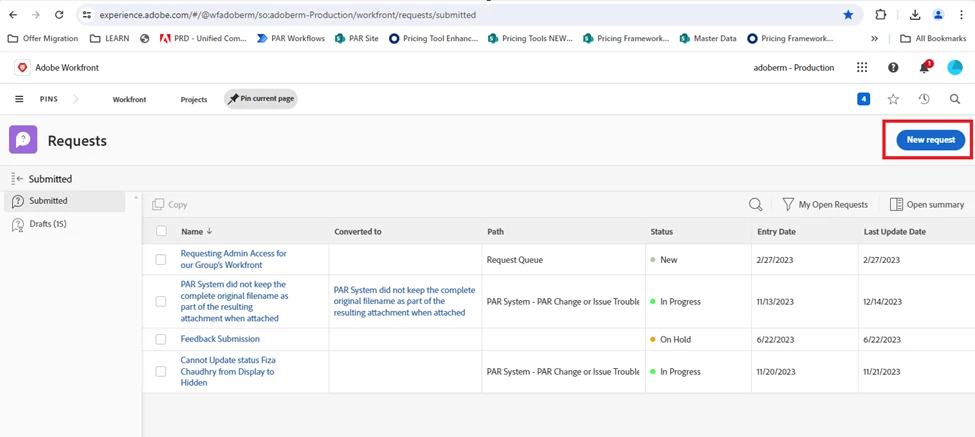
2.Now the link just gets us to the Requests Reports, then we still have to click the “New Request” button (See Figure 2) and then select “Pricing Operations Requests” in the ensuing page to get to the desired page.   We are trying to save on unnecessary clicks for velocity.
 

Question:  Has this changed in Workfront recently or is this a recent bug?


This post is no longer active and is closed to new replies. Need help? Start a new post to ask your question.
Best answer by skyehansen

it's a recent bug, go ahead and submit a case to Support.

1 reply

skyehansen
Community Advisor
skyehansenCommunity AdvisorAccepted solution
April 18, 2024

it's a recent bug, go ahead and submit a case to Support.

Heather_Kulbacki
Community Advisor
Community Advisor
April 19, 2024

Any idea if this has been fixed already? Or possibly only certain clusters (we're CL08)?
I tested this morning and it seems to work.

cjoaquinAdobe EmployeeAuthor
Adobe Employee
April 19, 2024

You are right.  It has been fixed now.  Thank you!