Text mode to display all child tasks | Community
Skip to main content
Level 3
October 21, 2025
Solved

Text mode to display all child tasks

  • October 21, 2025
  • 2 replies
  • 276 views

Hello,

I am having trouble creating a column in my task report that displays all the child tasks along with their statuses.

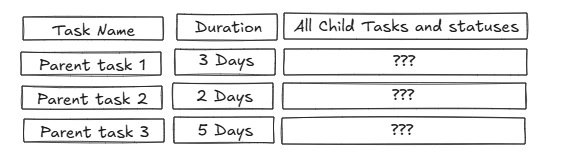
At the moment the report shows a bunch of parent tasks (number of child tasks != 0). I'd like it to have a column that shows a list of all associated child tasks and the current status of each one (see the mockup below). I have tried several text mode codes but none have worked so far.
 

Any help would be highly appreciated. 


Thank you!

Best answer by AliPen

Here's what I did to get the children task names and status keys to show up. You can adjust the value expression to meet your needs but there are limitations. If you need to sort or do any conditional formatting, I would recommend going with Madalyn's suggestion.


displayname=Child Tasks and Statuses
listdelimiter=<br>
listmethod=nested(children).lists
type=iterate
valueexpression=CONCAT({name}," - ",{status})
valueformat=HTML

 Screenshot of report:


2 replies

Madalyn_Destafney
Community Advisor
Community Advisor
October 21, 2025

I think you are better off creating a task report filtered to all the tasks/projects you need, have a column for task status, and GROUP them by project and then parent task.

If this helped you, please mark correct to help others : )
AliPen
AliPenAccepted solution
Level 2
October 21, 2025

Here's what I did to get the children task names and status keys to show up. You can adjust the value expression to meet your needs but there are limitations. If you need to sort or do any conditional formatting, I would recommend going with Madalyn's suggestion.


displayname=Child Tasks and Statuses
listdelimiter=<br>
listmethod=nested(children).lists
type=iterate
valueexpression=CONCAT({name}," - ",{status})
valueformat=HTML

 Screenshot of report:


ab_cdefAuthor
Level 3
October 22, 2025

This is great! Turns out the issue was that I used childrenTasks instead of children - thanks for sharing @alipen !

I’ve also updated the code to show the status label instead of the code.


The only thing is, the child tasks are showing up in random order, so I can’t s

ort them by taskNumber. If anyone knows how to do that, please share it here - thanks in advance!


displayname=Child Tasks listdelimiter=<br> listmethod=nested(children).lists type=iterate valueexpression=CONCAT({taskNumber},": ",{name}," - ",IF({status}="CPL","Completed",IF({status}="AWF","Await Feedback",IF({status}="NEW","New",{status},IF({status}="INP","In Progress",{status},IF({status}="XXX","XXXXX",{status})))))) valueformat=HTML