I think I have done all that the instructions asked. I added the line in red and this is the code I needed up with, but no formatting is being applied. Can you see any reason why?
linkedname=defaultBaselineTask
namekey=view.relatedcolumn
namekeyargkey.0=defaultBaselineTask
namekeyargkey.1=workrequired
querysort=defaultBaselineTask:workRequired
styledef.case.0.comparison.icon=false
styledef.case.0.comparison.isrowcase=false
styledef.case.0.comparison.leftmethod=defaultBaselineTask:work
styledef.case.0.comparison.lefttext=defaultBaselineTask:work
styledef.case.0.comparison.operator=ne
styledef.case.0.comparison.operatortype=double
styledef.case.0.comparison.rightmethod=workRequired
styledef.case.0.comparison.righttext=workRequired
styledef.case.0.comparison.trueproperty.0.name=textcolor
styledef.case.0.comparison.trueproperty.0.value=FFFFFF
styledef.case.0.comparison.trueproperty.1.name=bgcolor
styledef.case.0.comparison.trueproperty.1.value=FF0000
valuefield=defaultBaselineTask:workRequired
valueformat=compound
viewalias=defaultBaselineTask:workrequired
EricSa7,
styledef.case.0.comparison.leftmethod=defaultBaselineTask:workRequired
styledef.case.0.comparison.lefttext=defaultBaselineTask:workRequired
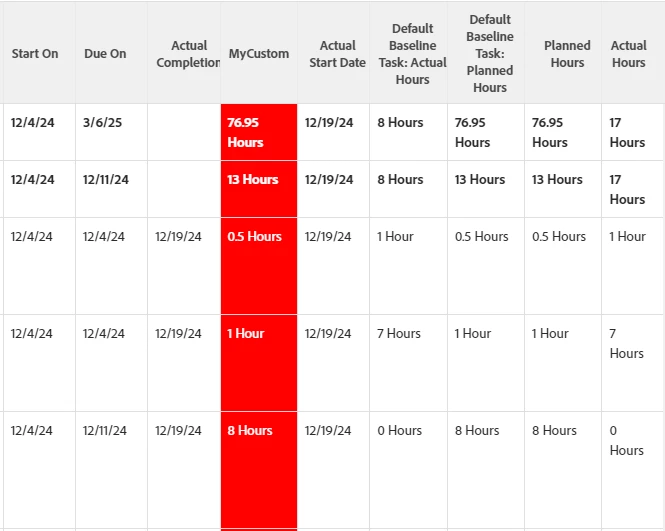
I'm not sure that will make much of a difference. I tried this in my environment and my baseline and planned hours always matched so nothing was changing. I changed workRequired to be actualWorkRequired so that I could log time against a couple of tasks and complete them to see if the formatting is working; in that case it did format the whole column since planned hrs had a number and in many cases New tasks still had 0 actual hours so they weren't equal and it made the cell red. Here's what it looked like, I brought in the planned hrs, actual hrs, and the default baseline fields so I could see what was in them.