
Task Report to only show Hours for a certain Hour Type | Adobe Higher Education
Skip to main content
MorganHatcher
Level 4
March 19, 2025
Resuelto

Task Report to only show Hours for a certain Hour Type

  • March 19, 2025
  • 1 respuesta
  • 381 visualizaciones

Working on a report and I only want it to bring in a certain hour type's actual hours - basically take Actual Work Required and remove any hours of a certain type. I want to have it as a column header, since I want all tasks to show even if they do not have hours for that Hour Type. I have been trying to come up with a solution and just want to make sure this is even possible? I think it should work since Hours and their details are found at the Task level. Or maybe not since it is trying to bring in many to one (many hour entries to one task)? Thanks! 
Mejor respuesta de Sven-iX

Technically doable but it'll be a resource intensive (slow) report if you have good amount of hours logged against tasks. 


Do a task report

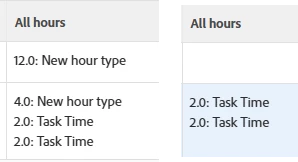
then in one column you can iterate over the task's hours collection

in that iterator, you'll need to use a value expression to suppress by type. 


For example

valueexpression=if({hourType}.{name}!="New hour type",{hours} + ": " + {hourType}.{name}) listdelimiter=<br/> listmethod=nested(hours).lists valueformat=HTML displayname=All hours type=iterate


1 respuesta

Sven-iX
Community Advisor
Sven-iXCommunity AdvisorRespuesta
Community Advisor
March 19, 2025

Technically doable but it'll be a resource intensive (slow) report if you have good amount of hours logged against tasks. 


Do a task report

then in one column you can iterate over the task's hours collection

in that iterator, you'll need to use a value expression to suppress by type. 


For example

valueexpression=if({hourType}.{name}!="New hour type",{hours} + ": " + {hourType}.{name}) listdelimiter=<br/> listmethod=nested(hours).lists valueformat=HTML displayname=All hours type=iterate


MorganHatcher
Level 4
March 19, 2025

Thank you, I appreciate the response! I unfortunately need to have one number/total to then use for a calculation. Might be something I need to look into Fusion to accomplish.